22
SonicWallSonicPointACeGettingStartedGuide
Configuringthenetworkinterface
EachSonicPointorgroupofSonicPointsmustbeconnectedto
aphysicalnetworkinterfacethatisconfiguredinawireless
zone.SonicOSprovidesa standardwirelesszone(WLAN)which
canbeappliedtoanyavailableinterface.
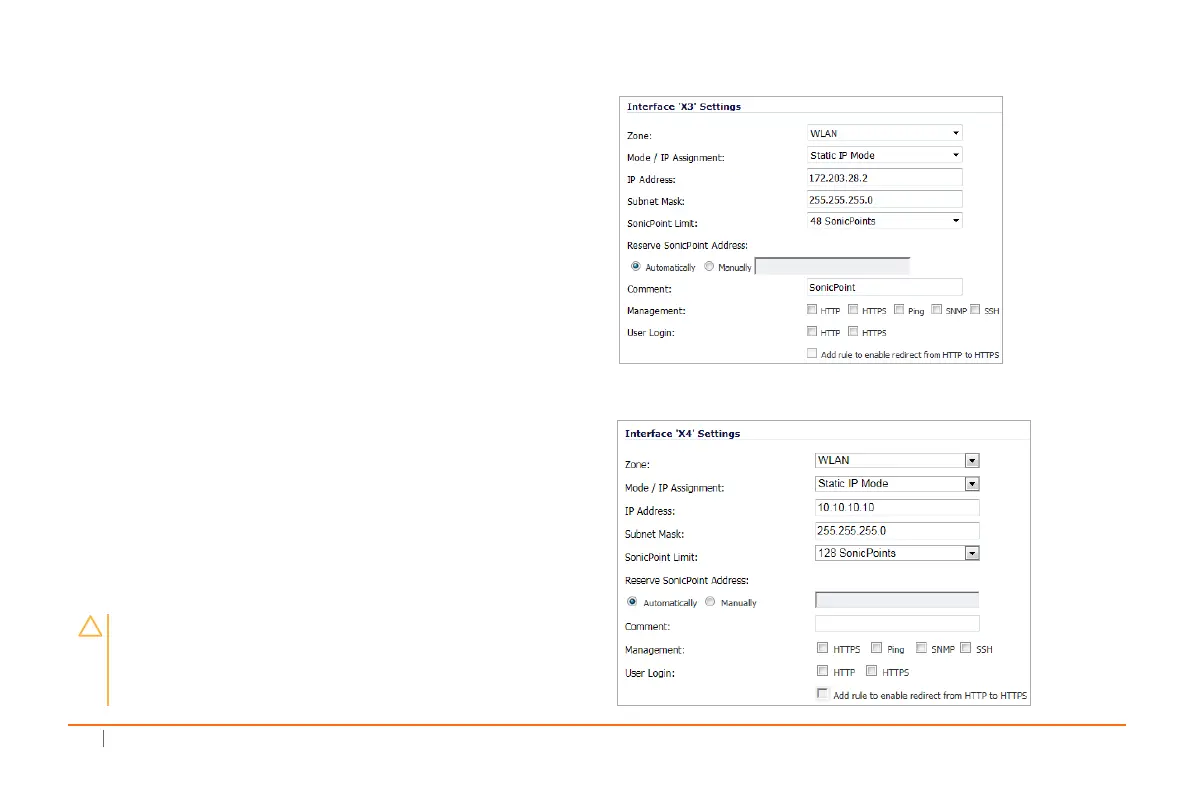
ToconfigurethenetworkinterfaceinSonicOS
1NavigatetotheNetwork>Interfacespageandclick
ConfigurefortheinterfacetowhichyourSonicPointis
connected.
2SelectWLANzonefortheZonetype.
3SelectStaticIPModefortheMode/IPAssignment.
4Inthe IPAddressfield,typeinanyprivateIPaddress
thatdoesnotinterferewiththeIP
addressrangeofany
otherinterfacesontheappliance.
5EnteraSubnetMask.Thedefaultis255.255.255.0.
6Usethedefaultsettingsorselectappropriatesettings
fortheotherfieldsandthenclickOK.
SonicOS5.9interfacesettings
SonicOS6.2interfacesettings
CAUTION:AllowingManagementandUserLogintothe
appliancefromawirelesszonecanposeasecurity
threat,especiallyifyouoryourusershavenotsetstrong
passwords.



 To Next Page