EasyManua.ls Logo

Sonim XP5560 BOLT - Page 28

Sonim XP5560 BOLT
89 pages
Print Icon
To Next Page IconTo Next Page
To Previous Page IconTo Previous Page
Loading...
28
Your Sonim XP5560 BOLT
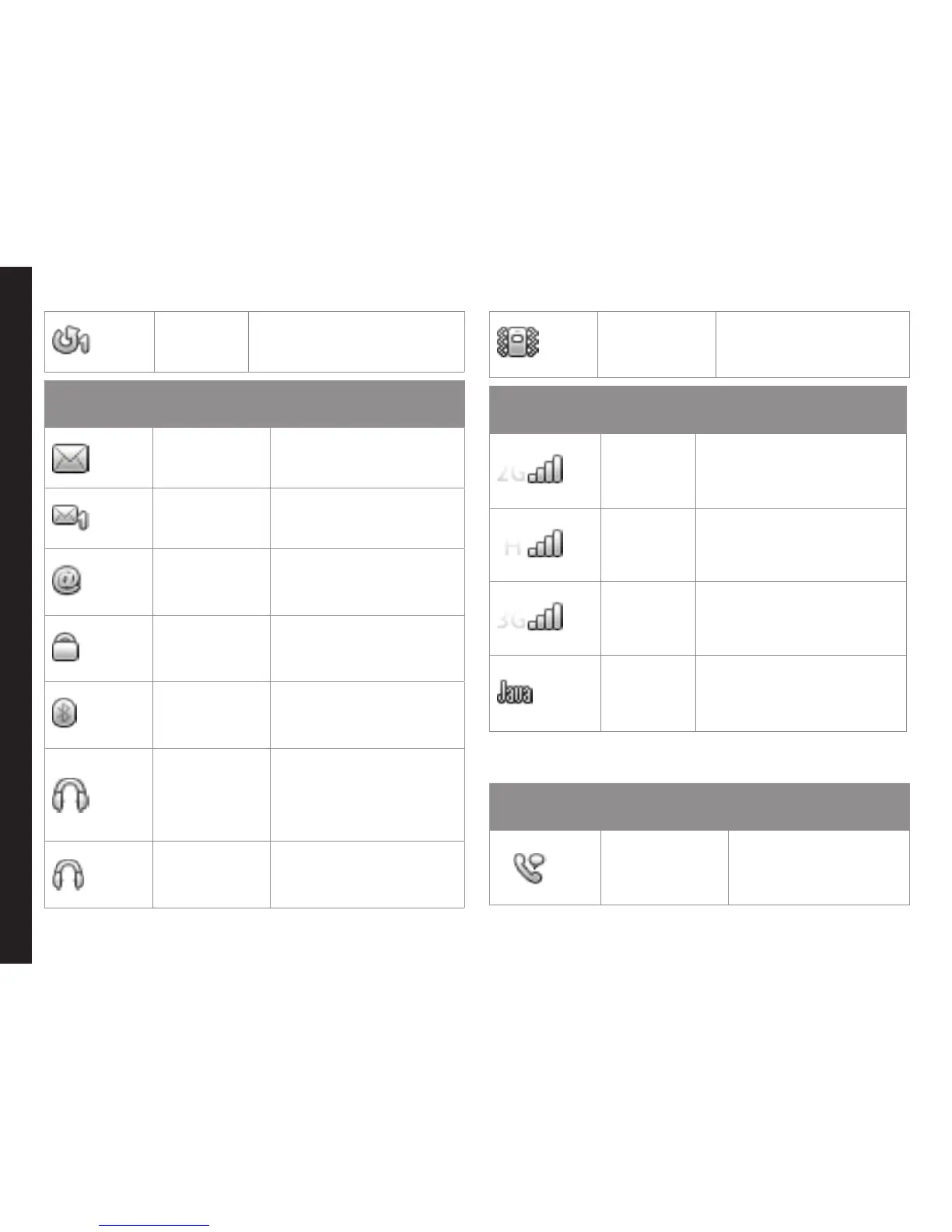
Call
Forward
Indicates that the
call forward function is
enabled.
Display
Indicators
Name Description
Unread
Message
Indicates that there are
unread messages in the
inbox.
Voice
Message
Indicates a new voice
message.
Unread
e-mail
Message
Indicates a new e-mail
message.
Keypad Lock
Indicates that the
keypad is locked.
Bluetooth
Connec-
tivity
Indicates that bluetooth
is active.
Bluetooth
CarKit/
Headset
Connec-
tivity
Indicates that your
device is paired and
connected to a carkit or
headset with bluetooth
connectivity.
Wired
Headset
Indicates that a wired
headset is connected.
Both
Vibration
and Ringing
Indicates that the phone
performs both vibration
and ringing.
Display
Indicators
Name Description
2G
Indicates the signal
strength when registered
to 2G network.
HSPA
Indicates the signal
strength when registered
to HSPA network.
3G
Indicates the signal
strength when registered
to 3G network.
JAVA
Indicates that the Java
application is active
and is available in the
background.
The following table describes the display indicators on
the call screen in the Sonim XP5560 phone:
Display
Indicators
Name Description
Active Call
Indicates an active
call.

Related product manuals