12
USING YOUR SONIM XP5s
USING YOUR SONIM XP5s
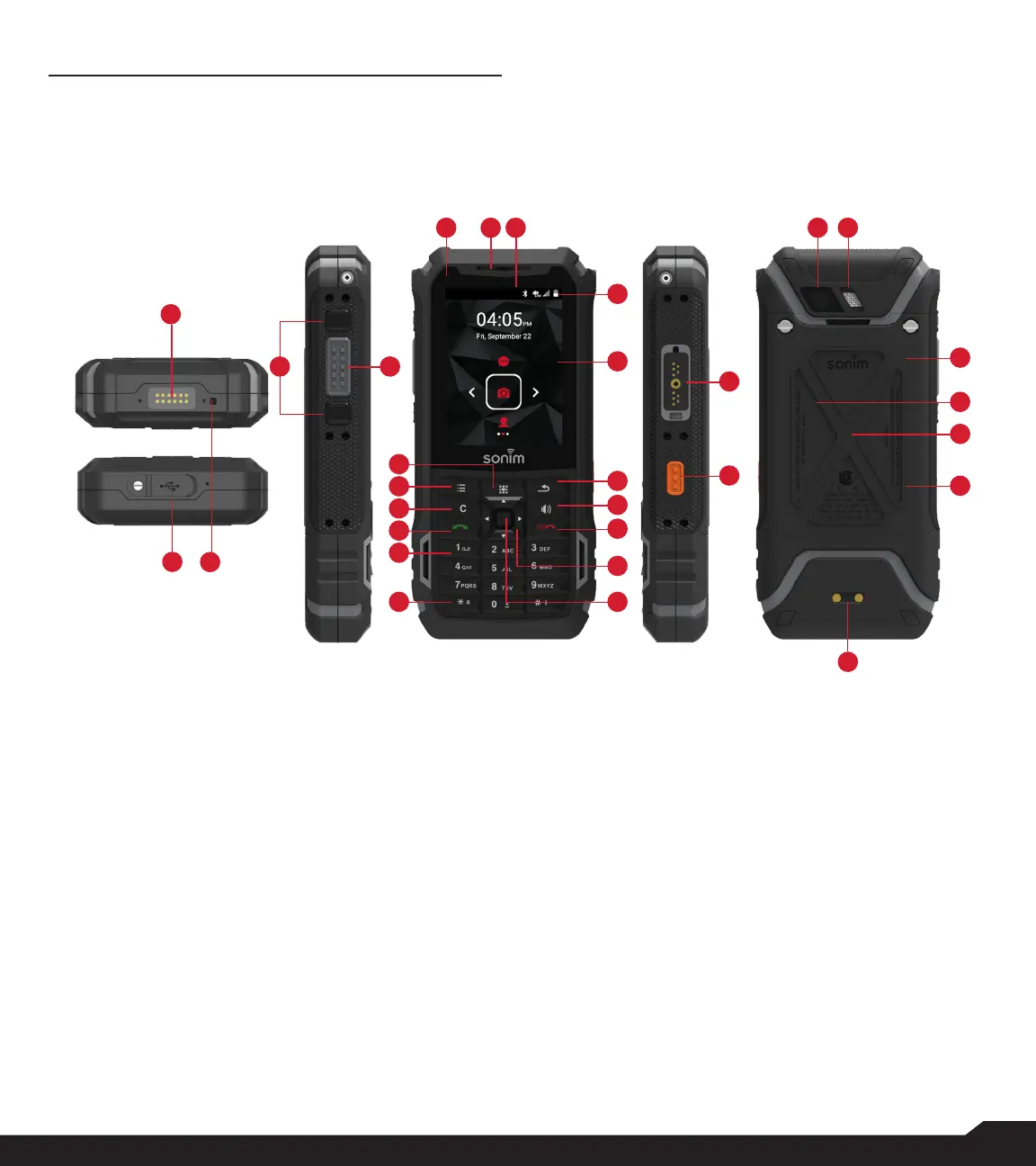
1. Sonim XPand Connector
2. Microphones
3. USB-C
4. Volume Up / Down
5. PTT Button
6. App Tray
7. Options
8. Clear
9. Answer / Accept
10. Voicemail (Press and Hold)
11. Lock Keypad (Press and Hold)
12. Select /Center key
13. Navigation
14. End / Reject / Power On & Off (Press and Hold)
15. Speakerphone
30
20 1921
29
28
25
22
23
54
14
13
12
15
16
17
18
6
10
9
8
7
11
27
26
24
1
2
3
16. Back
17. Display
18. Battery Level Indicator
19. Notication Bar
20. Receiver
21. LED Notication
22. Sonim Secure Audio Connector
23. Emergency Button
24. Charging Pins
25. Battery Under Door
26. SIM Card Slots Under Battery
27. Memory Card Slot Under Battery
28. Battery Door
29. Rear Flash
30. Rear Facing Camera



 To Next Page