Installation—Digital Audio Models
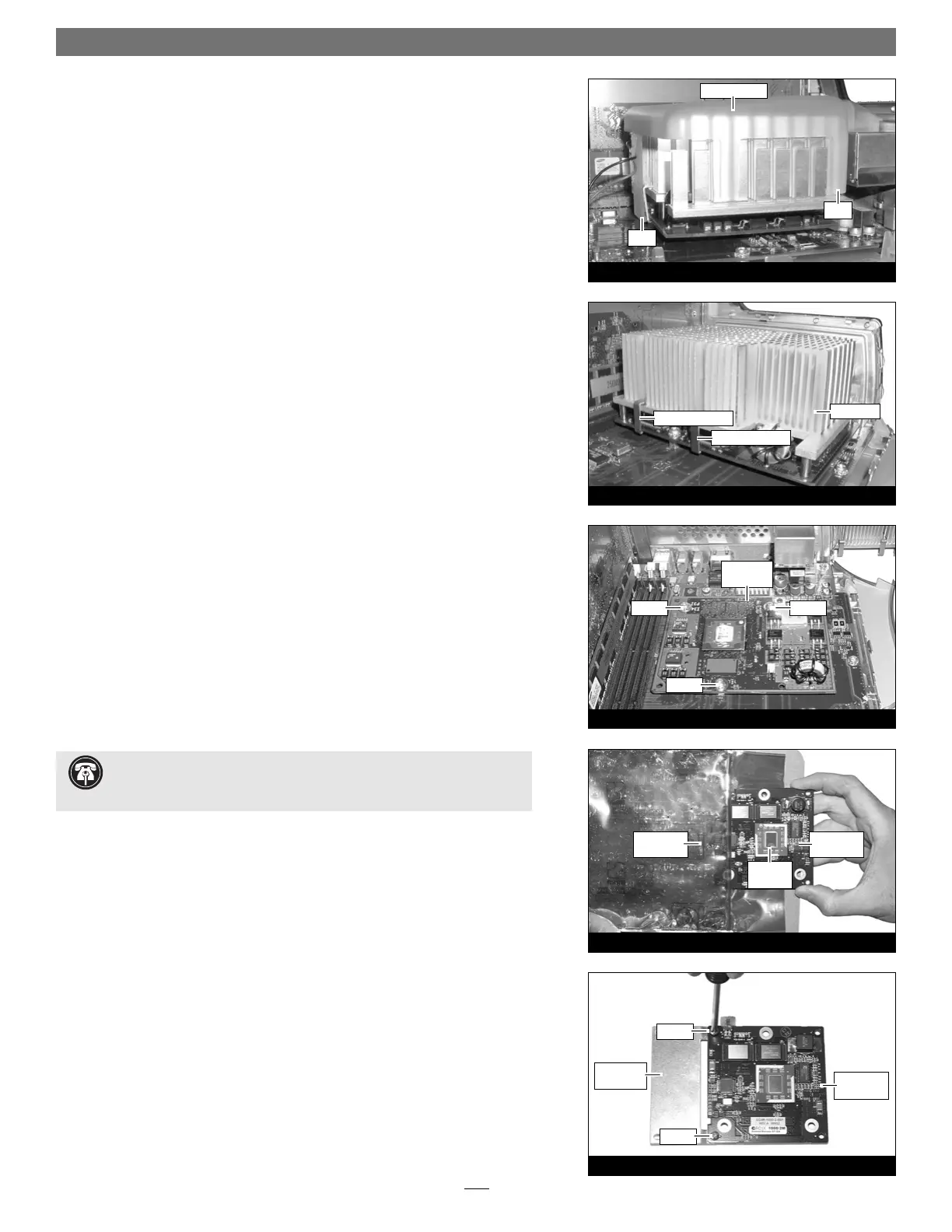
2. Unlatch the fan assembly’s clips from the processor card and the heat sink,
then lift the fan assembly out of the case and set it aside (Figure 24).
Remove Heat Sink
Locate the clips securing the processor heat sink to the processor card (Figure 25);
your heat sink may appear different from what is pictured. Using caution to
avoid touching the processor card, grasp one of the clips securing the heat sink
with needle-nose pliers, between the heat sink and processor card. Pull down and
away to unhook one side of the clip from the processor card (Figure 25). Push
the clip away from you to unhook it from the other side. Repeat these steps with
the other clip. Once the clips have been unhooked, gently lift the heat sink and
clips away from the processor and set them aside, but not on the logic board.
Remove Processor Card
Remove the three screws securing the processor card to the logic board
(Figure 26). Grasping the processor card by its edges, carefully lift it straight up
and away from the logic board.
Install Encore/ST G4 Processor Upgrade Card
1. Remove the Encore/ST processor upgrade card from its anti-static package,
and remove the packing material. Make sure to handle the card by the edges
(Figure 27). Also, do not touch the thermal pad covering the processor.
2. If you removed a single processor CPU card from your system, skip to step 3. If you
removed a dual processor card, remove the extension plate and two screws
from the parts bag included with the Encore/ST, and then remove the screws
from the extension plate. With the Sonnet logo side of the board face up,
place the Encore/ST processor card on top of the extension plate (support
foot face down) as shown (Figure 28). Secure the Encore/ST card to the
extension plate with the two provided screws; do not overtighten the screws.
Please note, when attached properly, the extension plate will be level with the
Encore/ST board.
7
Figure 27
Figure 28
Figure 26
Figure 25
Figure 24
clip
clip
heat sink
fan assembly
processor
card
screw
screw
clip (grasp here)
clip (grasp here)
screw
Encore/ST
card
screw
screw
extension
plate
Support Note: You will find a piece of foam covering a connector on
the edge of the Encore/ST card. Do not remove the foam until instructed
to do so.
anti-static
package
Encore/ST
card
thermal
pad


 To Next Page
 Loading...