Sonnet
MORPHEUS
Connecting
USB input: Use an USB cable to connect the dac to your computer. Only when using a Windows operating system you should install special
drivers. In case of Linux or MAC no drivers are required. The USB input can handle sampling rates up to 384 kHz.
(For installing drivers for PC , Linux or MAC, we refer to the website of the USB manufacturer https://amanero.com/drivers.htm )
RCA outputs: Standard interlinks can be used to connect the dac to your amplifier. The "Morpheus" is designed conform the "Red book
standard" so the maximum output will be 2 Volts RMS . Your (pre)amplifier should handle this output levels.
XLR outputs: Standard XLR line cables should be used to connect the dac to your (pre) amplifier. The "Morpheus" is designed conform the
"Red book standard" so the maximum output for the XLR output will be 4 Volts RMS. Your (pre)amplifier should handle this output levels.
Mains inlet: Use a power cable to a grounded power outlet.
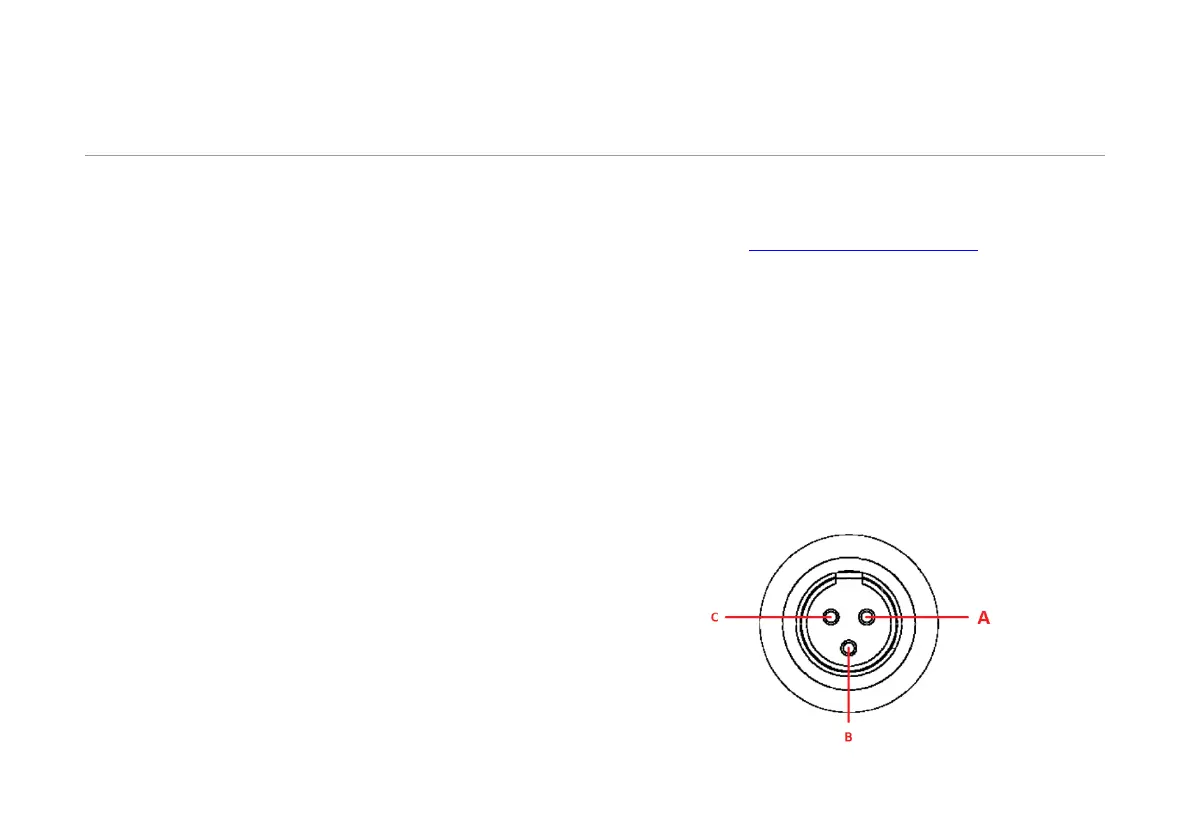
Remote switch: Depending the type of power amplifier it is possible to switch it “On” or “Off” by using one or both of the remote switches. For
connection a 3 pole XLR mini connector can be used and depending the way your power amplifier should be powered, it can be wired
accordingly. The following connections are available:
A) Common
B) Normally closed when Morpheus is switched off.
C) Normally open when Morpheus is switched off.


 To Next Page
 Loading...