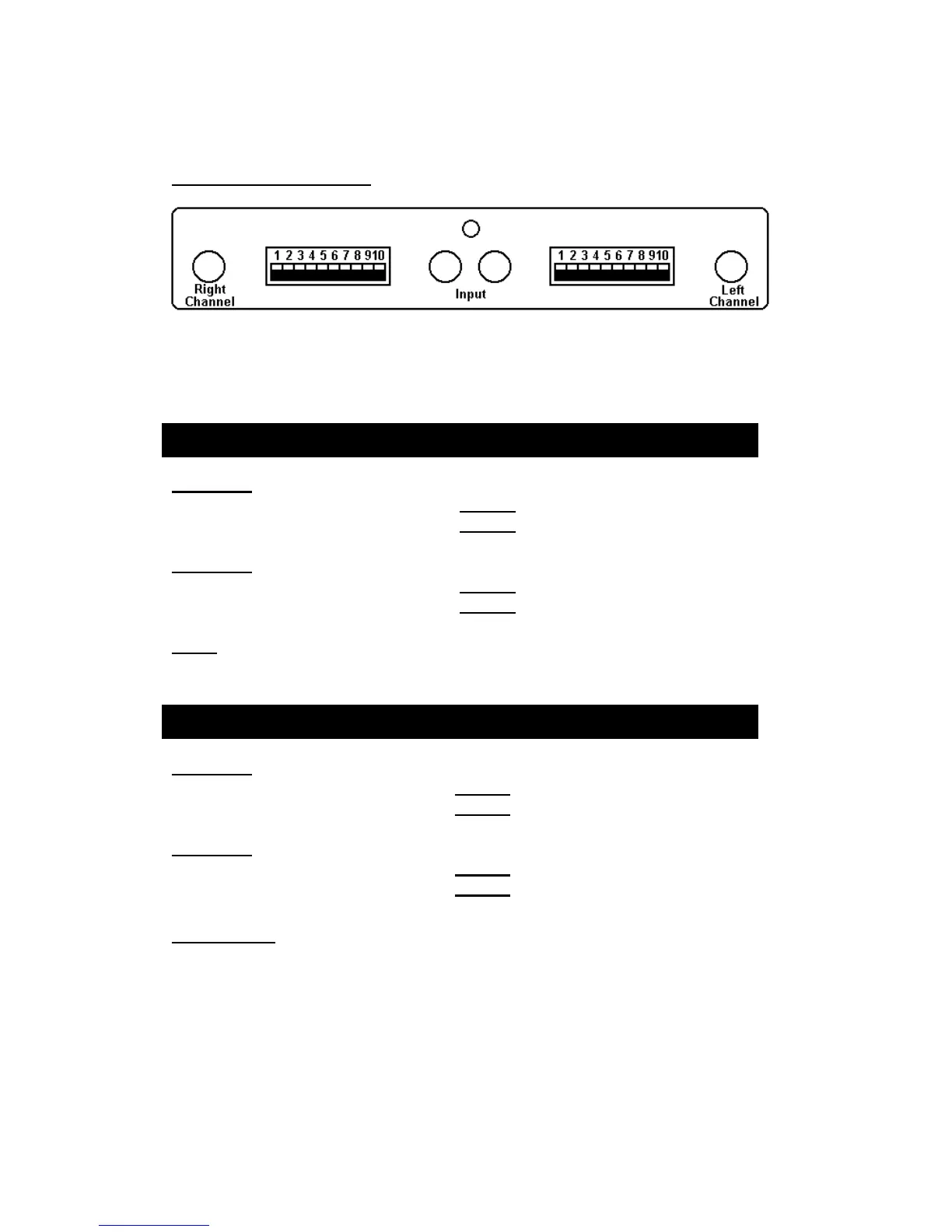
Setup examples
View of back panel from rear
Below we have provided some standard DIP switch default settings for your
reference.
Setting 1:
RIGHT Channel : Switch 1 and 6 DOWN, remaining switches UP.
LEFT Channel : Switch 5 and 10 DOWN, remaining switches UP.
Setting 2:
RIGHT Channel : Switch 1 and 3 DOWN, remaining switches UP.
LEFT Channel : Switch 8 and 10 DOWN, remaining switches UP.
Note: If the sound volume is too high, the please set the GAIN setting to MM
to give a lower output (Right switch 2 and Left switch 9 DOWN).
Setting 1:
RIGHT Channel : Switch 1, 6, 10 DOWN, remaining switches UP.
LEFT Channel : Switch 1, 5, 10 DOWN, remaining switches UP.
Setting 2:
RIGHT Channel : Switch 1, 4, 10 DOWN, remaining switches UP.
LEFT Channel : Switch 1, 7, 10 DOWN, remaining switches UP.
Please note:
These are only some standard examples, we recommend that you try these to
start off with. Please remember the First ON – LAST OFF rule when
switching the phono stage OFF or ON to avoid “pop” noises.
After switching on the phono stage, we recommend that you allow the unit to
have approximately 1 minute to settle down.


 To Next Page