
 Need help?
Do you have a question about the Sonoff DIY BASIC and is the answer not in the manual?
Covers safe power-off procedures, wiring guidance, and installation steps for the smart switch.
Guides users through downloading the eWeLink app and pairing the Wi-Fi smart switch.
Introduces the device, its components, Wi-Fi LED indicator status, and key functionalities.
Explains RF remote pairing, network switching, and factory reset procedures.
Addresses frequent issues like offline status and connectivity errors with troubleshooting steps.
Provides FCC warnings, radiation exposure statements, and compliance information.
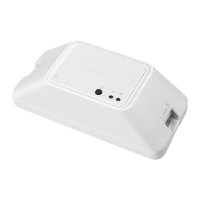
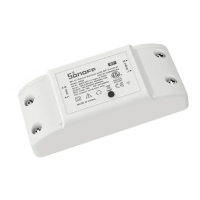
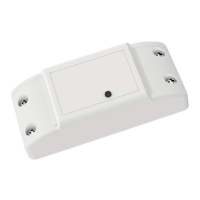
The SONOFF DIY BASIC Wi-Fi Smart Switch is a versatile device designed to transform your traditional home appliances into smart, controllable units. This user-friendly switch allows you to manage your devices remotely, schedule their operation, and integrate them into a smart home ecosystem. It's an ideal solution for those looking to enhance convenience and energy efficiency in their living spaces.
The core function of the SONOFF DIY BASIC Wi-Fi Smart Switch is to enable remote control of connected electrical appliances. Once integrated into your home's electrical system, it acts as an intermediary, allowing you to turn devices on or off from anywhere using the eWeLink app on your smartphone or tablet. This capability extends beyond simple on/off control, offering a range of advanced features that enhance its utility.
One of the primary functions is Remote Control. Whether you're at home, at work, or on vacation, you can check the status of your connected appliances and control them with a tap on your phone. This is particularly useful for managing lights, fans, heaters, or any other device that benefits from remote operation. For instance, you can turn on your air conditioner before arriving home on a hot day or switch off lights you forgot to turn off when leaving.
The device also supports Single/Countdown Timing. This feature allows you to set specific schedules for your appliances to turn on or off automatically. You can create daily routines, such as having your coffee maker start at a certain time each morning or your porch lights turn on at dusk and off at dawn. The countdown timer is perfect for temporary operations, like charging a device for a specific duration or running a fan for an hour before bed.
Voice Control is another significant function, enabling hands-free operation of your connected devices. The SONOFF DIY BASIC Wi-Fi Smart Switch is compatible with popular voice assistants, allowing you to issue commands like "Turn on the living room light" or "Turn off the fan" using your voice. This adds a layer of convenience, especially when your hands are full or you're across the room.
Share Control facilitates multi-user management of the smart switch. You can share control of your devices with family members or housemates through the eWeLink app. This means everyone in the household can manage the connected appliances, eliminating the need for multiple accounts or complicated setups.
Smart Scene functionality allows you to create custom automation rules. By linking the smart switch with other smart devices or environmental triggers, you can set up complex scenarios. For example, you could configure a scene where turning on the smart switch also triggers other smart lights in the room, or where the switch activates when a motion sensor detects movement. This creates a more integrated and responsive smart home experience.
The Sync Status feature provides real-time feedback on the status of your connected appliances within the eWeLink app. You'll always know whether a device is on or off, ensuring peace of mind and accurate control.
For specific models (BASICRFR3), 433MHz Remote Control is supported. This provides an alternative local wireless control method, independent of Wi-Fi. It's useful for scenarios where you prefer a physical remote or in situations where Wi-Fi connectivity might be unreliable. Each channel can be learned independently, offering flexible control options.
Power-on State allows you to define the default state of the connected appliance after a power outage. You can choose whether the device should remain off, turn on, or revert to its last known state, ensuring your preferences are maintained even after unexpected power interruptions.
Finally, LAN Control enables you to control your devices locally within your home network, even if the internet connection is temporarily unavailable. This ensures continued functionality and reliability for essential appliances.
The SONOFF DIY BASIC Wi-Fi Smart Switch is designed for straightforward installation and intuitive use. Its compact form factor allows for easy integration into existing electrical setups.
Wiring Instruction: The manual provides clear instructions for both ceiling lamp wiring and one live wire wiring, ensuring that users can connect the device correctly and safely. It emphasizes the importance of aligning the protective cover properly for a full installation.
Quick Pairing Mode (Touch): Upon initial power-on, the device automatically enters quick pairing mode, indicated by a specific Wi-Fi LED flash pattern (two short, one long flash). This allows for rapid setup with the eWeLink app. If not paired within 3 minutes, the device exits this mode, but it can be re-entered by long-pressing the manual button for about 5 seconds.
Compatible Pairing Mode: For situations where quick pairing might fail, the device offers a compatible pairing mode. This involves a different LED indicator pattern (quick flashes) and a slightly different setup process within the app, providing a robust alternative for successful connection.
Wi-Fi LED Indicator Status: The device features a clear Wi-Fi LED indicator that communicates its current status. Different flash patterns indicate various states, such as quick pairing mode, successful connection, inability to discover the router, failure to connect to Wi-Fi, or an ongoing upgrade. This visual feedback helps users understand the device's operational status at a glance.
Manual Button: In addition to app control, the device includes a manual button. This button serves multiple purposes: it can be used to manually turn the connected appliance on or off, initiate pairing modes, and clear learned remote control codes (for BASICRFR3). This provides a physical override and control option.
RF Remote Controller Pairing (BASICRFR3): For the BASICRFR3 model, the pairing method for the 433.92MHz remote controller is simple. A long press on the pairing button followed by a short press on the desired remote control button establishes the connection. This allows for local, physical control without relying on Wi-Fi.
Switch Network: If you need to change your Wi-Fi network, the device allows you to easily re-enter quick pairing mode by long-pressing the pairing button for 5 seconds. This simplifies the process of migrating the device to a new network without needing to reset it completely.
While the SONOFF DIY BASIC Wi-Fi Smart Switch is built for reliability, certain features and guidelines contribute to its maintenance and troubleshooting.
Safety Precautions: The manual explicitly warns against electric shocks and advises consulting a qualified professional for installation and repair. It also states not to touch the switch during use, emphasizing user safety as a primary concern.
Installation Height Recommendation: The device weight is less than 1 kg, and an installation height of less than 2 meters is recommended. Adhering to these guidelines ensures optimal performance and safety.
Troubleshooting Common Problems: The manual includes a dedicated section for common problems, particularly regarding the device staying "Offline." It provides a systematic approach to diagnose issues based on the blue Wi-Fi indicator status. This includes checking Wi-Fi passwords, router distance, 5G Wi-Fi compatibility (the device only supports 2.4GHz), MAC address filtering, and even using a mobile hotspot as a temporary solution. For issues related to connecting to the server, it advises ensuring a steady network and restarting the switch. This comprehensive troubleshooting guide empowers users to resolve common connectivity issues independently.
Factory Reset: The device can be restored to its factory settings by deleting it from the eWeLink app. This is a crucial feature for troubleshooting persistent issues, reconfiguring the device from scratch, or preparing it for transfer to a new owner.
Clearing RF Remote Controller Codes (BASICRFR3): For the BASICRFR3 model, there's a specific method to clear all learned remote control codes. This involves a long press on the pairing button until the red LED flashes twice, followed by a short press on the corresponding learned button. This feature allows users to reset the remote control pairings if needed, for example, when changing remotes or resolving conflicts.
By combining robust functionality with user-friendly features and clear maintenance guidelines, the SONOFF DIY BASIC Wi-Fi Smart Switch offers a comprehensive solution for smart home automation.
 General
| Model | Sonoff DIY BASIC |
|---|---|
| Category | Switch |
| Input Voltage | 90-250V AC |
| Wi-Fi Standard | 802.11 b/g/n |
| Material | PC V0 |
| Compatibility | Amazon Alexa, Google Assistant, IFTTT |
| Output | 10A |
| Max Load | 2200W |
| Operating Humidity | 5% - 90% RH |


 To Next Page