6INSTALLATION
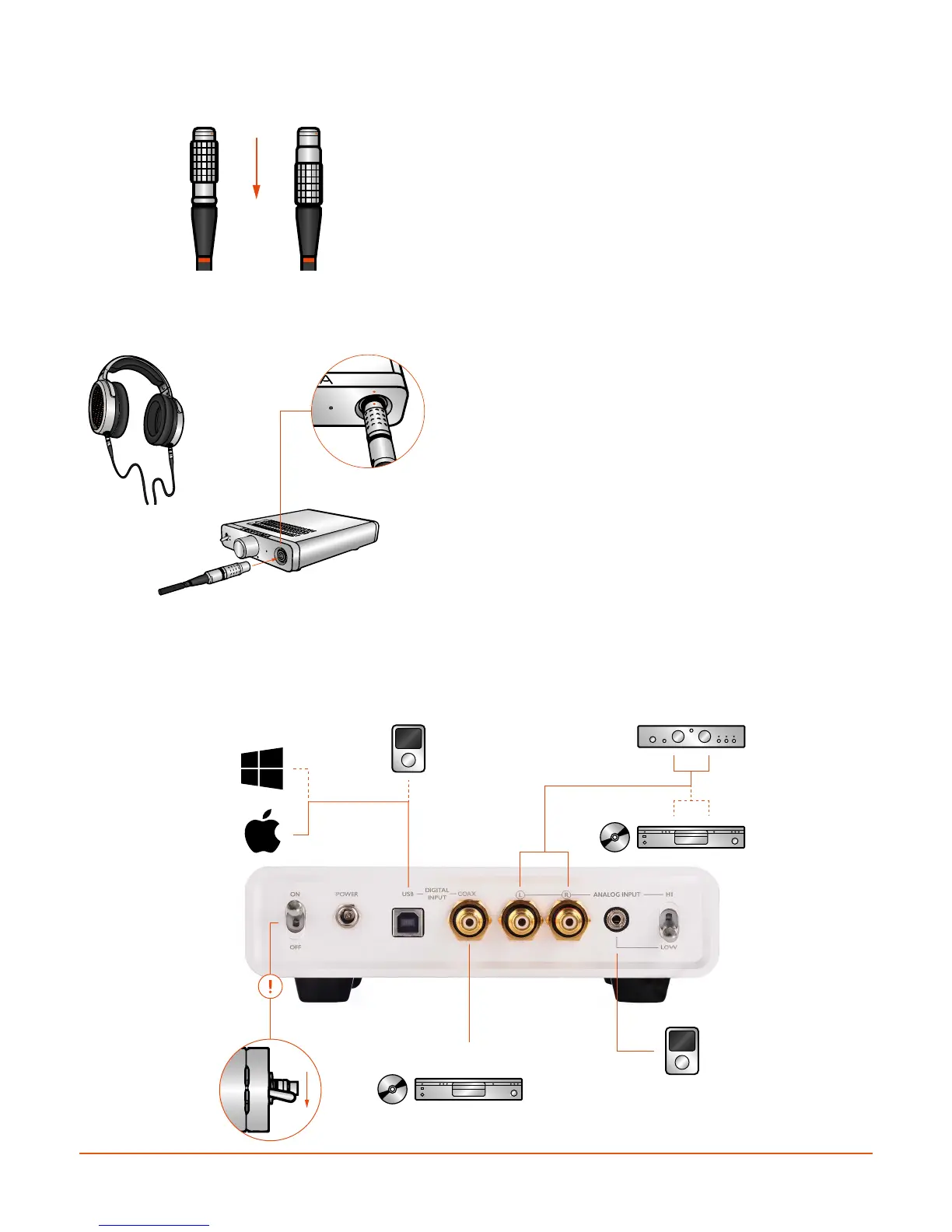
DETACHING THE HEADPHONE CABLE
Should you need to detach the cable for any reason,
grasp the barrel of the cable and carefully pull
backwards until the cable disconnects. You can
then release the barrel and it will return to its usual
position.
CONNECTING THE HEADPHONES TO THE AMPLIFIER
With the cable connected to both ear-cups, connect
the headphone to the amplifier/DAC unit by inserting
the cable into the headphone connector. Be sure to
align the red dots on the connector and chassis. Push
the cable into the connector until it latches.
If you need to detach the cable, grasp the barrel of
the connector and carefully pull backwards until the
cable disconnects, as shown above. Please ensure
that the amplifier is switched OFF before connecting/
disconnecting the headphone cable.
CONNECTING ANALOG AND DIGITAL SOURCES TO THE AMPLIFIER
NOTE: Before beginning this section, please ensure that the power supply unit is NOT attached, and
that the amplifier/DAC unit’s power switch is in the OFF position!
SPDIF
COAX
PRE-OUT
OFF


 To Next Page