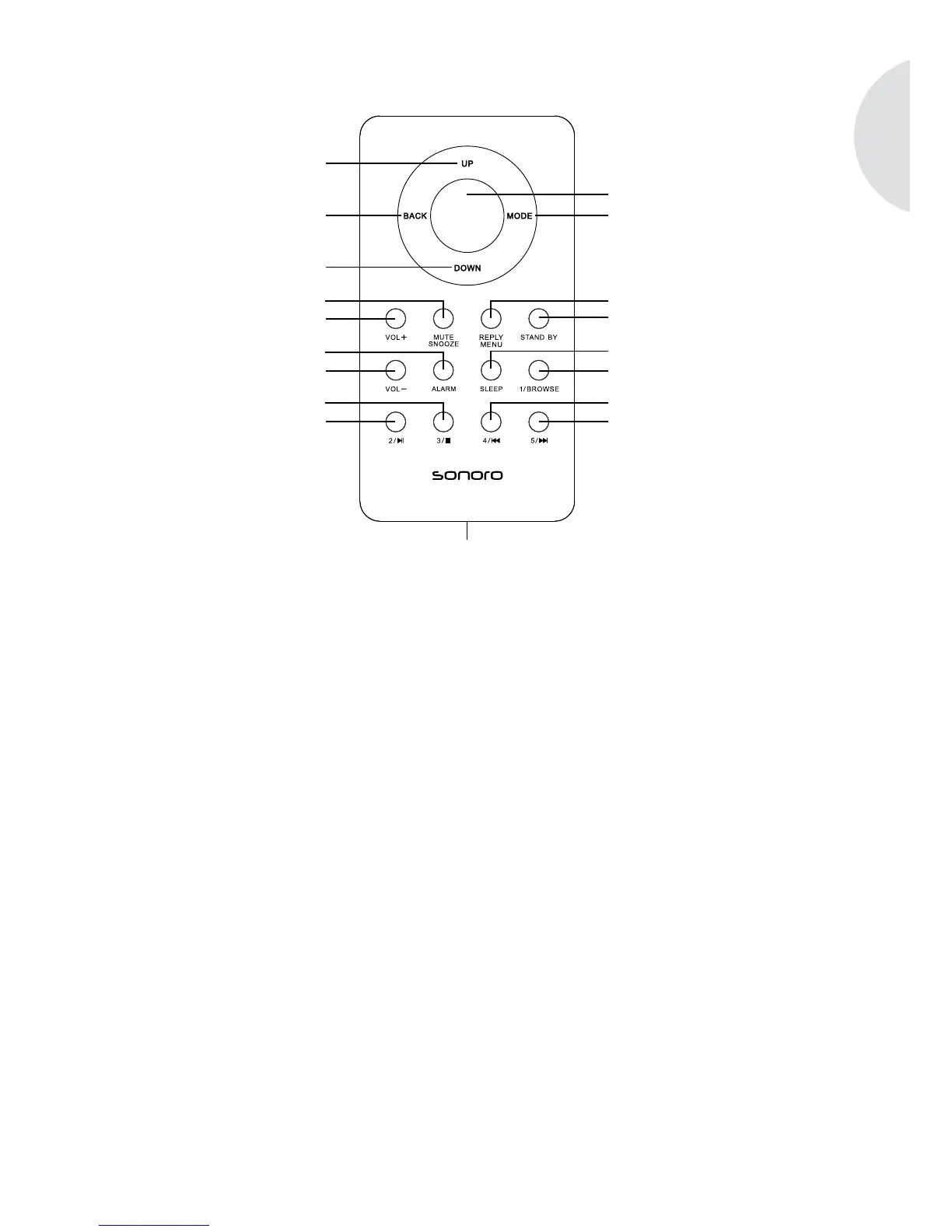
Remote control:
1 UP FM: Station scanning in the next higher frequency range;
iPod: menu navigation to the top.
2 Menu button Press briey: open/conrm the indicated menu entry.
Press for a longer time: open the setup menu; iPod: play-
back button and pause button; iRadio: open the iRadio
menu. iRadio: Access the iRadio menu
3 BACK back button; returns to the previous menu item
4 MODE Switch to the next playback mode.
5 DOWN FM: Station scanning in the next lower frequency range;
iPod: menu navigation to the bottom.
6 MUTE/SNOOZE Press briey (in playback mode): switch the sound playback
(muting) on/off. Press briey (in alarm mode): start the snoo-
ze period. Press for a longer time: open the snooze settings
menu to set the snooze period.
7 VOL+ All playback modes: increase the volume. Menu selection
(setup menu and iPod): switch to the previous menu entry
(to the top).
8 ALARM Press briey: Switch the alarm function on/off. Deactivate the


 To Next Page