Sonos ZoneBridge Setup Guide
14
closer to a ZonePlayer, or wire the ZoneBridge temporarily to see if the problem is
related to wireless interference.
If you encounter this message when installing the first Sonos component, (wired to your
router), you can try the steps below to resolve this issue.
1. Check the firewall
Firewall software installed on the computer may be blocking the ports that Sonos uses
to operate. First, disable all your firewalls and try to connect again. If this resolves the
problem, you should configure your firewall to work with the Sonos Desktop Controller.
Please visit our Web site at http://faq.sonos.com/firewall for additional information. If
this does not resolve the problem, you can try step 2 below.
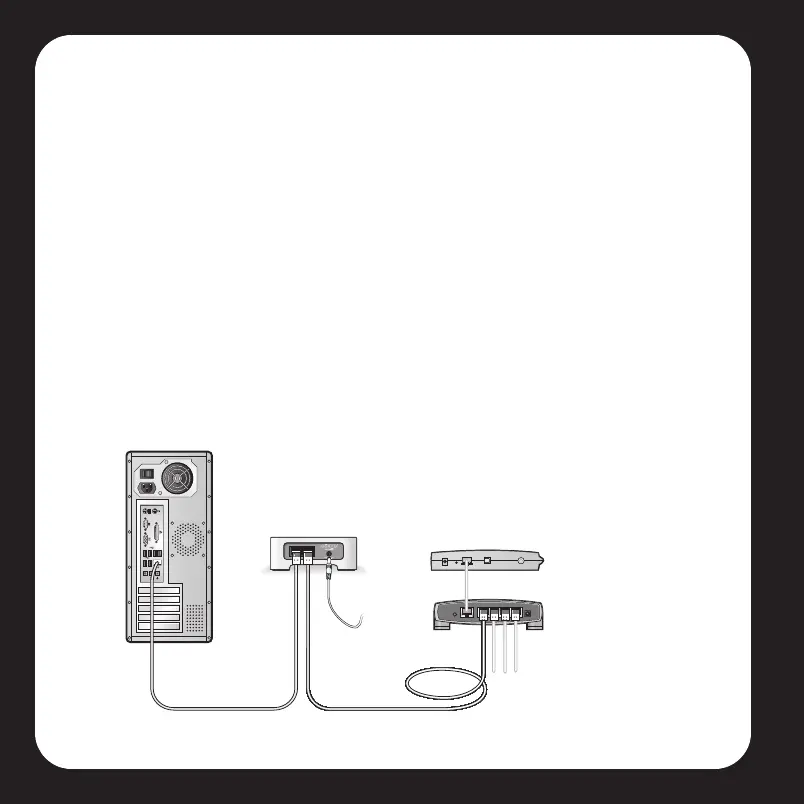
2. Check the router
You can bypass your router’s switch to determine whether there are any router
configuration issues (note that the ZoneBridge and the computer still have Internet
access in this configuration):
Cable/DSL
modem
Router
ZoneBridge
Computer
Viper Book.book Page 14 Friday, June 29, 2007 5:01 PM



 To Next Page