18
Instruction for use | Supercal 739
8.1 Commissioning from the storage mode
8. Commissioning
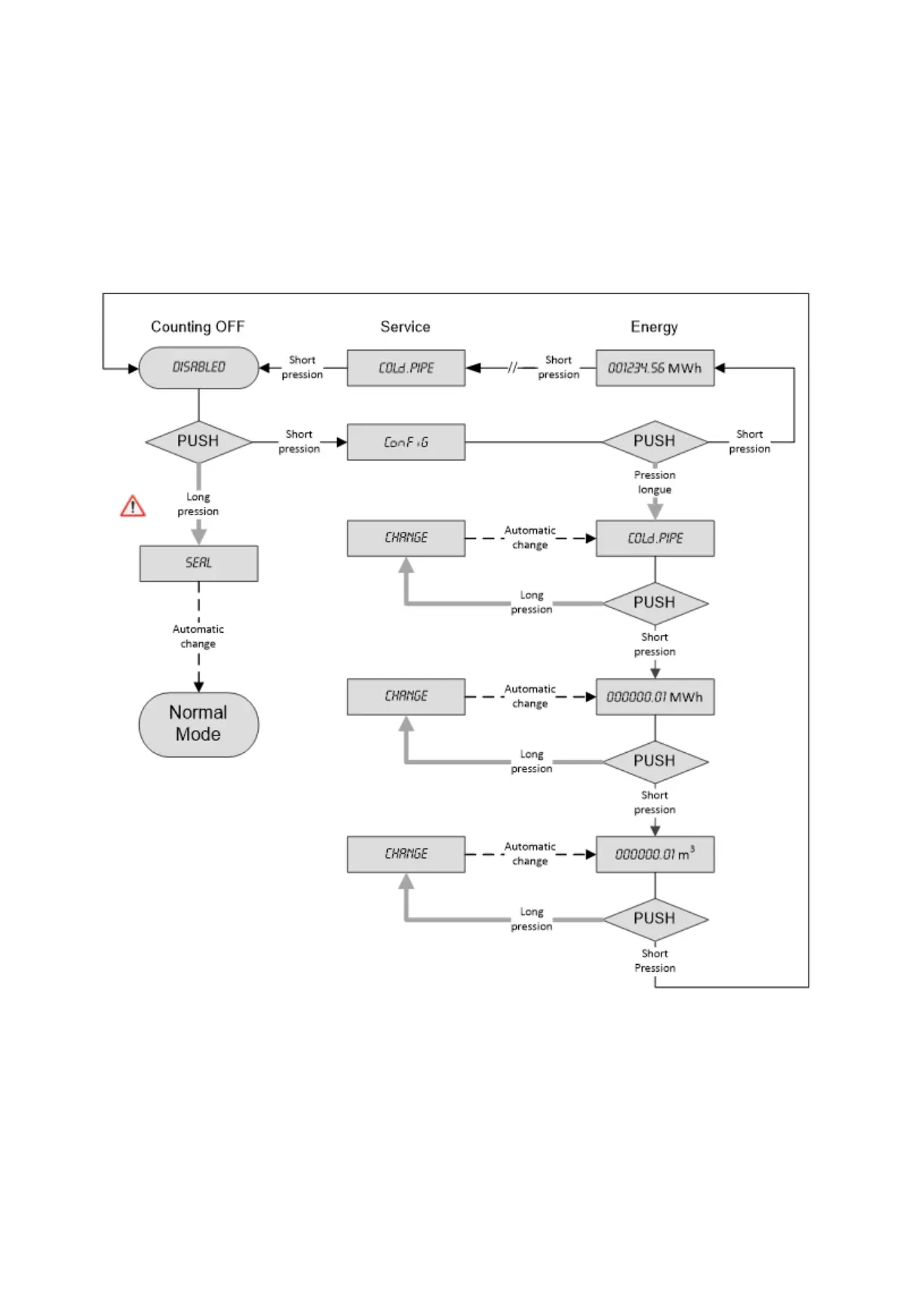
Ex works the ow meter can be in the storage mode, that is to say, it does not count and the
display shows "Disabled".
The storage mode is active as long as the meter is not sealed "Seal".
In the storage mode, the transition to "Cong" menu is made with a short press on the orange
navigation button. Another short press gives access to the whole sequence of the "Normal" mode.
In the "Cong" menu (optionally available), a long press will change the settings below:
Flow meter mounting position in the installation. Hot (HOT PIPE) or cold side (COLD PIPE).
Energy unit (0.1kWh, 1 kWh, 0.001MWh, 0.01MWh, 0.001GJ and 0.01GJ).
Volume unit (0.01 m3 and 0.001m3).
In the "Cong" menu any inaction (i.e. with no pressure on the navigation button) lasting 3 minutes causes the automatic exit
and returns to "Disabled". If changes were made in the "Cong" menu, the data remain stored



 To Next Page