11
Navigation
To navigate the menus
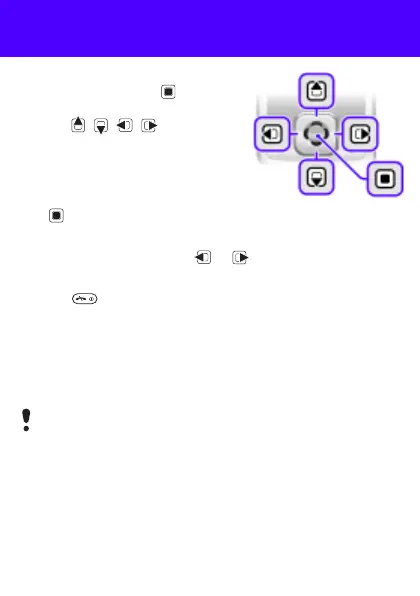
1 From standby press to select
Menu.
2 Press , , , to move
through the menus.
To select items and actions shown
on the screen
• Press either of the selection keys
or .
To select a tab
• Go to the tab by pressing or .
To return to standby
• Press .
To operate the keypad lock
• To lock the keypad, close the slide.
• To unlock the keypad, open the slide.
• To unlock the keypad with closed slide, press any key, then
select Unlock > OK.
Calls to the international emergency number 112 can still
be made, even when the keypad is locked.
This is the Internet version of the User's guide. © Print only for private use.








 To Next Page