4 Getting started
Getting started
Assembly, SIM card, battery, turning
on, help, calls.
Assembly
Before you start using your phone, you
need to insert a new SIM card and the
battery.
SIM card and battery
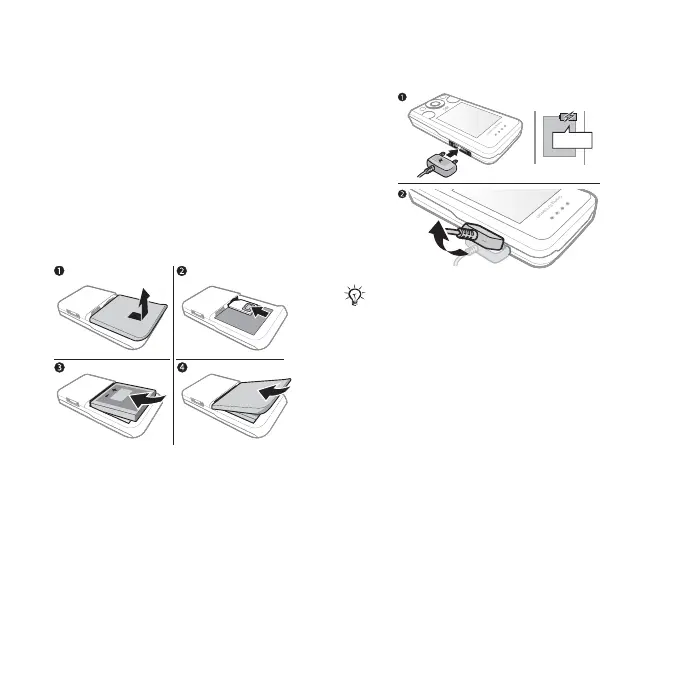
To insert SIM card and battery
1 Turn off the phone. Remove the
battery cover by sliding the battery
release latch down.
2 Slide the SIM card into its holder with
the contacts facing up.
3 Insert the battery with the label side up
and the connectors facing each other.
4 Slide the battery cover into place.
Battery
To charge the battery
1 Connect the charger to the phone.
Wait approximately 2.5 hours or
until the battery icon indicates a full
charge before removing the charger.
2 Remove the charger plug by pulling up
and out.
Some functions use more battery
power than others and may require
more frequent recharging. If talk time
or stand-by time becomes noticeably
shorter, replace the battery. Only
use approved batteries from
Sony Ericsson % 70 Battery.
Do not connect the charger unless the
battery is inserted.
≈ 2.5 h
This is the Internet version of the User's guide. © Print only for private use.














 To Next Page