This is the Internet version of the user's guide. © Print only for private use.
76
More features
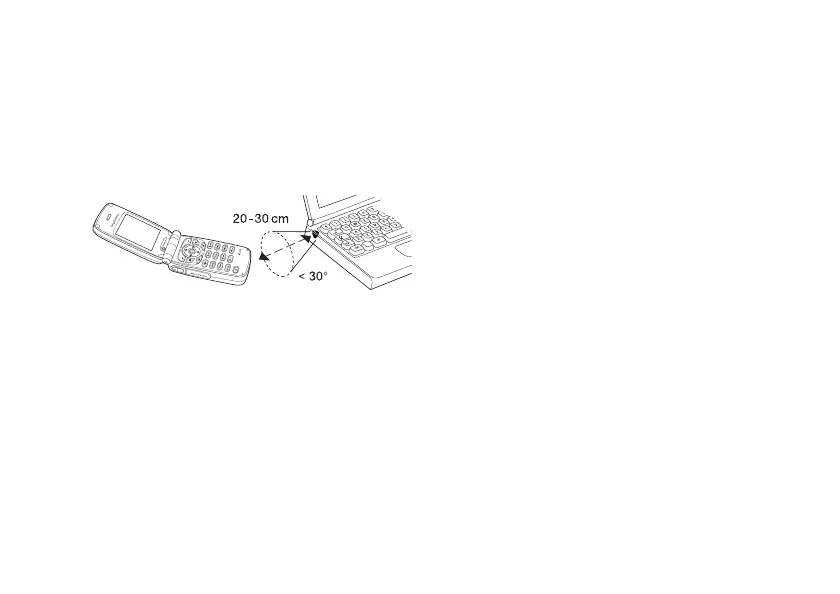
To connect two devices
1 Place your phone as in the picture. The infrared
port on the phone must face the infrared port on
the other device.
2 Your phone now establishes contact with the
other device.
To send an item using the infrared
port (example: a contact)
1 Make sure that the infrared port of the other
device is on. } Phonebook and select a contact,
when contacts is default phonebook, More.
2 } Send contact } Via infrared.
More features
Time and date, alarm clock, calendar,
SIM card lock, etc.
Time and date
The time is always displayed in standby.
• To set the time, } Settings } the General tab
} Time & date } Time. Enter the time, Save.
• To set the time format (12-hour or 24-hour
clock), press Format and select a format.
Date
You can set the date and date format in Settings
} the General tab } Time & date } Date.
Advanced time settings
In Settings } the General tab } Time & date, you
can set time zone and daylight saving time.
If you have activated Auto time zone, you are
asked whether you want to update the time when
your phone changes network, and the time sent out
from the network operator deviates from the time
in your phone. If you press Yes, the time is
updated automatically.








 To Next Page