Help Guide
Interchangeable Lens Digital Camera
ILCE-6700 α6700
Shooting movies (Intelligent Auto)
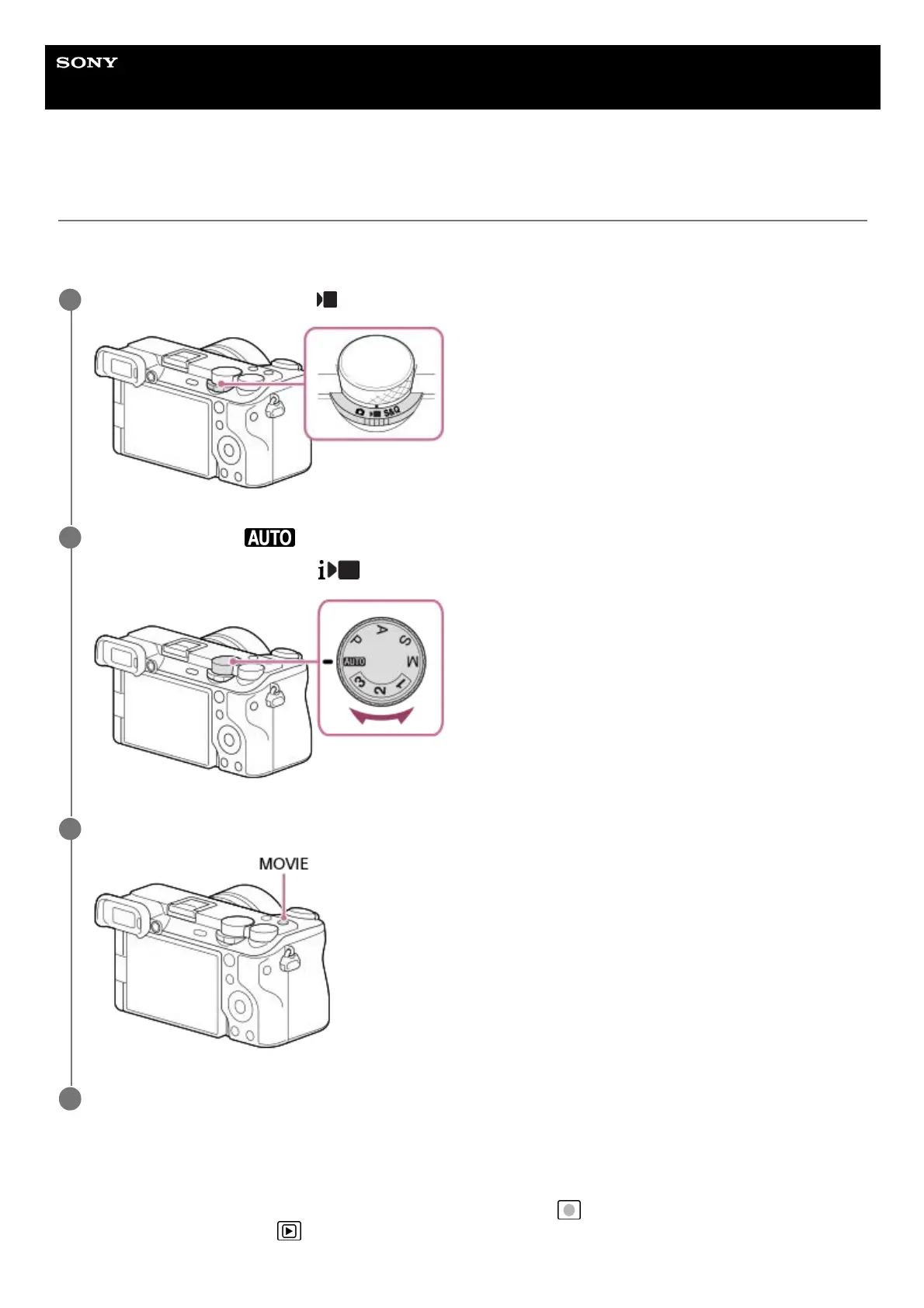
This section describes how to record movies in the [Intelligent Auto] mode. In the [Intelligent Auto] mode, the camera
automatically focuses and automatically determines the exposure based on the recording conditions.
To shoot with the touch function icons
You can also start shooting by touching an icon on the screen instead of pressing the MOVIE (movie) button. Swipe the
monitor left or right to display the touch function icons, and then touch the
(start recording) icon. You can view the
captured image by touching the
(switch to playback screen) icon.
For details on how to display the touch function icons, see “Touch function icons.”
Set the Still/Movie/S&Q dial to
(Movie) to select the movie recording mode.
1
Set the mode dial to
(Auto Mode).
The shooting mode will be set to
(Intelligent Auto).
2
Press the MOVIE (Movie) button to start recording.
3
Press the MOVIE button again to stop recording.
4



 To Next Page