ILCE-7RM3A
5-026-886-11(1)
GB
69
MENU items/List of icons
\\win-473\CAMERA\CX88900(MGA)_CX88800(CQA)_IM\01_Compose\CQA_GB\5026886111\5026886111ILCE7RM3AUC2\01GB-ILCE7RM3AUC2\100MEN.indd
DTP data saved: 2020/11/20 19:20
PDF file created: 2020/11/20 19:27
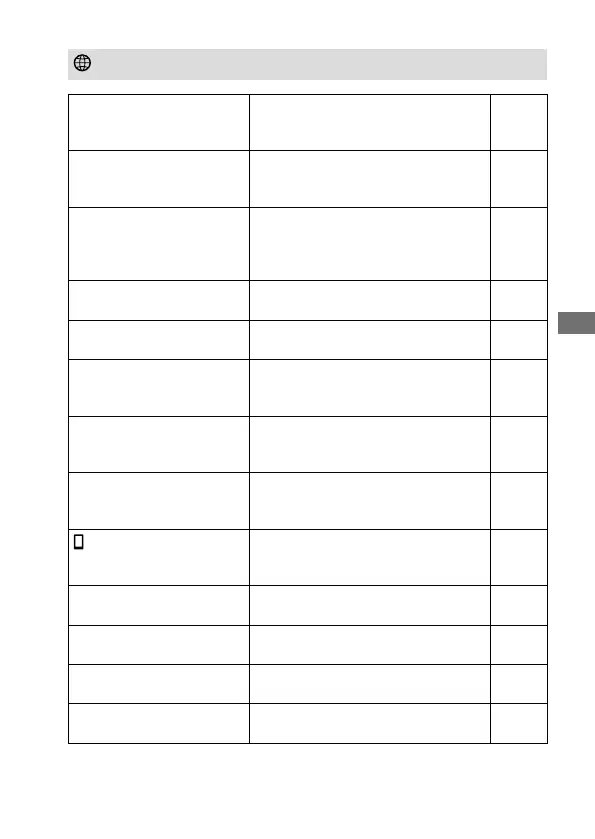
(Network)
Snd to Smrtphn Func
Sets movies to be transferred to a
smartphone, or transfers images to a
smartphone.
Help
Guide
Send to Computer
Backs up images by transferring
them to a computer connected to a
network.
Help
Guide
FTP Transfer Func.
Sets image transfer using FTP and
executes it.
* Basic knowledge of FTP server is
required.
53
View on TV
Allows you to view images on a
network-enabled TV.
Help
Guide
Ctrl w/ Smartphone
Sets the condition for connecting the
camera to a smartphone.
Help
Guide
Airplane Mode
Disables wireless communications
from the device such as Wi-Fi, NFC,
and Bluetooth function.
Help
Guide
Wi-Fi Settings
Allows you to register your access
point and check or change the Wi-Fi
connection information.
Help
Guide
Bluetooth Settings
Controls the settings for connecting
the camera with a smartphone via a
Bluetooth connection.
Help
Guide
Loc. Info. Link Set.
Obtains location information from the
paired smartphone and records it to
captured images.
Help
Guide
Edit Device Name
Changes the device name under Wi-Fi
Direct, etc.
Help
Guide
Imp Root Certificate
Imports a root certificate to the
camera.
Help
Guide
Reset Network Set.
Resets all the network settings. Help
Guide
Bluetooth Rmt Ctrl
Sets whether or not to use a
Bluetooth remote commander.
Help
Guide
Green tab



 To Next Page
 Loading...