Need help?
Do you have a question about the Sony ALPHA 5100 and is the answer not in the manual?
Steps for connecting an Android smartphone via the PlayMemories Mobile app.
Steps for connecting an iPhone or iPad via the PlayMemories Mobile app.
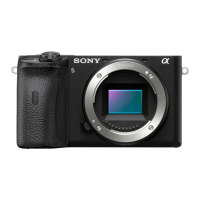
The Sony Alpha a5100 and a6000 are advanced interchangeable lens cameras designed for a wide range of photographic applications, from casual shooting to more professional endeavors. These cameras are particularly well-suited for users who desire high image quality and versatile control in a compact form factor.
At its core, the Sony Alpha a5100 and a6000 function as digital cameras capable of capturing both still images and video. They utilize an APS-C type image sensor, which is larger than those found in typical point-and-shoot cameras, allowing for superior light gathering capabilities and better performance in low-light conditions. This larger sensor contributes to higher resolution images with finer detail and a greater dynamic range.
The cameras are equipped with an E-mount lens system, which means they can accept a wide variety of Sony E-mount lenses, ranging from wide-angle to telephoto, as well as specialized lenses for macro photography or portraiture. This interchangeability of lenses is a key feature, enabling users to adapt the camera to different shooting scenarios and achieve specific creative effects. The included kit lens, often a power zoom (PZ) 16-50mm OSS (Optical SteadyShot) lens, provides a versatile focal range for everyday shooting and includes optical image stabilization to reduce blur from camera shake.
A significant aspect of these cameras' functionality is their advanced autofocus system. They employ a hybrid AF system that combines phase-detection and contrast-detection autofocus, resulting in fast and accurate focusing, even on moving subjects. This is particularly beneficial for capturing action shots or tracking subjects during video recording.
For image processing, the cameras incorporate Sony's BIONZ X image processor, which is responsible for high-speed processing of image data, enabling rapid continuous shooting and excellent noise reduction, especially at higher ISO sensitivities. This processor also contributes to the camera's ability to record high-quality video.
The cameras offer various shooting modes, including intelligent auto modes for beginners, as well as aperture priority, shutter priority, and full manual modes for more experienced photographers who want precise control over exposure settings. Scene selection modes are also available to optimize settings for specific types of scenes, such as portraits, landscapes, or sports.
Video recording capabilities are robust, allowing users to capture high-definition footage. The cameras support various video formats and frame rates, providing flexibility for different video projects. Features like continuous autofocus during video recording ensure that subjects remain sharp throughout the clip.
Connectivity is another important function. Both cameras are equipped with Wi-Fi and NFC (Near Field Communication) capabilities. This allows for seamless connection to smartphones and tablets, enabling features such as remote control of the camera, instant sharing of photos and videos, and easy backup of images. The PlayMemories Mobile app (now Imaging Edge Mobile) is the primary interface for these wireless functions.
The user interface of the Sony Alpha a5100 and a6000 is designed to be intuitive, with a combination of physical buttons and a clear menu system. The a5100 features a touch-sensitive LCD screen, which simplifies navigation and allows for touch-to-focus and touch-to-shoot operations, making it very user-friendly. The a6000, while lacking a touch screen, offers an electronic viewfinder (EVF) in addition to the LCD, providing a more traditional shooting experience and better visibility in bright conditions.
The shutter button is prominently located for comfortable operation. A dedicated ON/OFF (Power) switch ensures easy power management. Custom buttons, like the C1 button, can be assigned to frequently used functions, allowing for quick access to settings without delving into menus.
For focusing, the cameras offer multiple focus modes, including single-shot AF, continuous AF, and manual focus. Manual focus is particularly useful for precise control in situations where autofocus might struggle, such as macro photography or low-light environments. Focus peaking and magnification aids are available to assist with accurate manual focusing.
Exposure control is comprehensive. Users can adjust ISO sensitivity to manage image noise in varying light conditions. Shutter speed and aperture can be controlled independently in manual mode, or prioritized in their respective semi-automatic modes. The cameras also feature exposure compensation to fine-tune brightness.
The built-in flash (on the a6000, and a small pop-up flash on the a5100) provides additional light when needed, and a hot shoe allows for the attachment of external flash units for more powerful and flexible lighting options.
For remote operation, a remote sensor is integrated, allowing the use of an optional infrared remote control. This is useful for self-portraits, long exposures, or any situation where minimizing camera shake is critical.
The cameras support various image formats, including JPEG for immediate use and RAW for maximum post-processing flexibility. RAW files retain more image data, allowing for extensive adjustments to exposure, color, and detail in editing software.
The tilting LCD screen is a practical feature, especially for shooting from high or low angles, or for self-portraits and vlogging. The screen can typically tilt upwards by 180 degrees, making it easy to frame shots when the camera is pointed at the user.
Maintaining the Sony Alpha a5100 and a6000 involves several key practices to ensure longevity and optimal performance.
Lens Care: The lens is a critical component. It's important to keep the front and rear elements clean and free from dust, fingerprints, and smudges. A soft, lint-free microfiber cloth and a specialized lens cleaning solution are recommended. A blower brush can be used to remove loose dust particles before wiping. When changing lenses, it's advisable to do so in a clean environment to prevent dust from entering the camera body and settling on the image sensor. Always use the lens cap when the lens is not in use and the rear lens cap when the lens is detached from the camera.
Image Sensor Cleaning: While the cameras have a dust reduction system that vibrates the sensor to dislodge dust, manual cleaning may occasionally be necessary if dust spots appear on images. This is a delicate procedure and should ideally be performed by a professional service technician. If attempting it yourself, use specialized sensor cleaning kits and follow instructions carefully to avoid damaging the sensor. It's crucial not to touch the image sensor directly with bare hands or inappropriate tools.
Body Cleaning: The camera body can be wiped down with a soft, dry cloth to remove dirt and grime. Avoid using harsh chemicals or abrasive materials, as these can damage the camera's finish or electronic components. Pay attention to crevices and buttons where dust can accumulate.
Battery Care: Use only genuine Sony batteries or reputable third-party alternatives. Store batteries in a cool, dry place and avoid fully discharging them for extended periods. If the camera will not be used for a long time, remove the battery to prevent leakage.
Storage: When not in use, store the camera in a protective bag or case to shield it from dust, moisture, and physical impact. If storing for an extended period, consider using desiccant packets in the camera bag to absorb moisture, especially in humid climates.
Firmware Updates: Sony periodically releases firmware updates for its cameras to improve performance, add new features, or fix bugs. Regularly checking the Sony support website for your specific camera model and installing updates is a good maintenance practice.
Lens Contacts: The lens contacts on both the camera body and the lens itself should be kept clean. These gold-plated contacts facilitate communication between the camera and the lens. If they become dirty, it can lead to communication errors. Gently wipe them with a clean, dry cloth if necessary, but avoid excessive rubbing or using liquids.
Microphone Port: If the camera has a built-in microphone, ensure its port is not covered during movie recording to capture clear audio. Keep this area clean and free from obstructions.
By adhering to these usage and maintenance guidelines, users can maximize the performance and lifespan of their Sony Alpha a5100 or a6000 camera, ensuring it continues to capture high-quality images and videos for years to come.
 General
| Effective Pixels | 24.3MP |
|---|---|
| ISO Sensitivity | ISO 100-25600 |
| LCD Screen Size | 3.0 inches |
| Connectivity | Wi-Fi, NFC |
| Weight | 283 g (with battery and memory card) |
| Image Processor | BIONZ X |
| Continuous Shooting | 6 fps |
| Video Recording | AVCHD, MP4 |
| Battery | NP-FW50 |
| Lens Mount | Sony E-mount |
| Built-in Flash | Yes |
| Dimensions | 109.6 x 62.8 x 35.7 mm |
| Sensor Type | APS-C CMOS |
| Autofocus Points | 179 points |
| LCD Screen Type | Tilting, Touchscreen |
| Video Resolution | Full HD 1920 x 1080 |
| Battery Life | 400 shots (approx.) |
| Sensor Resolution | 24.7MP |


 To Next Page