ILCE-9M2
5-010-473-11 (1)
GB
68
C:\5010473111\5010473111ILCE9M2IN5\01GB-ILCE9M2IN5\030BAS.indd
DTP data saved: 2019/07/26 13:31
PDF file created: 2019/08/06 10:22
Direct manual focus (DMF)
You can make fine adjustments manually after performing auto focusing,
letting you focus on a subject more quickly than when using the manual
focus from the beginning. This is convenient in situations such as macro
shooting.
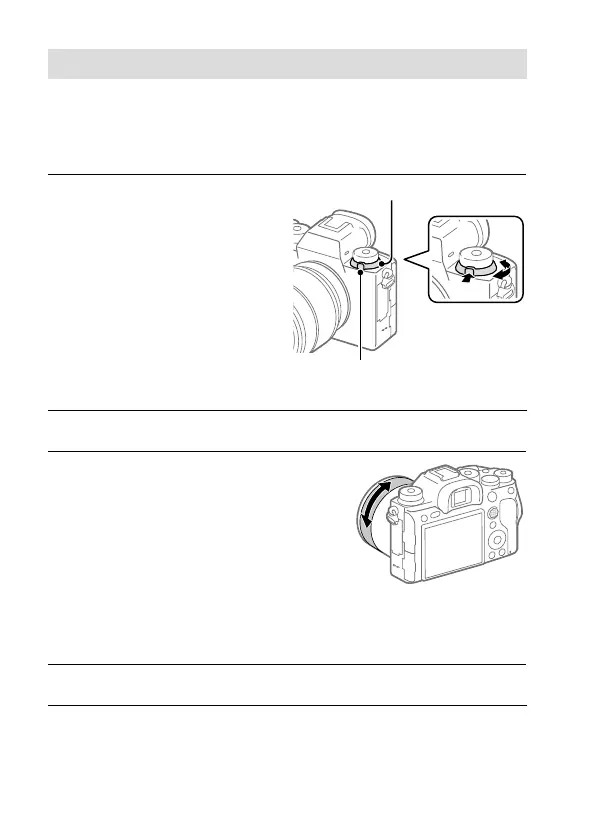
1
Turn the focus mode dial
while pressing the focus mode
dial lock release button and
select DMF.
Focus mode dial lock release
button
Focus mode dial
2
Press the shutter button halfway down to focus automatically.
3
Keep the shutter button
pressed halfway down, and
then rotate the focusing ring
to achieve a sharper focus.
• When you rotate the focusing
ring, the focus distance is
displayed on the screen. The
focus distance is not displayed
when the Mount Adaptor
(sold separately) is attached.
4
Press the shutter button fully down to shoot an image.



 To Next Page