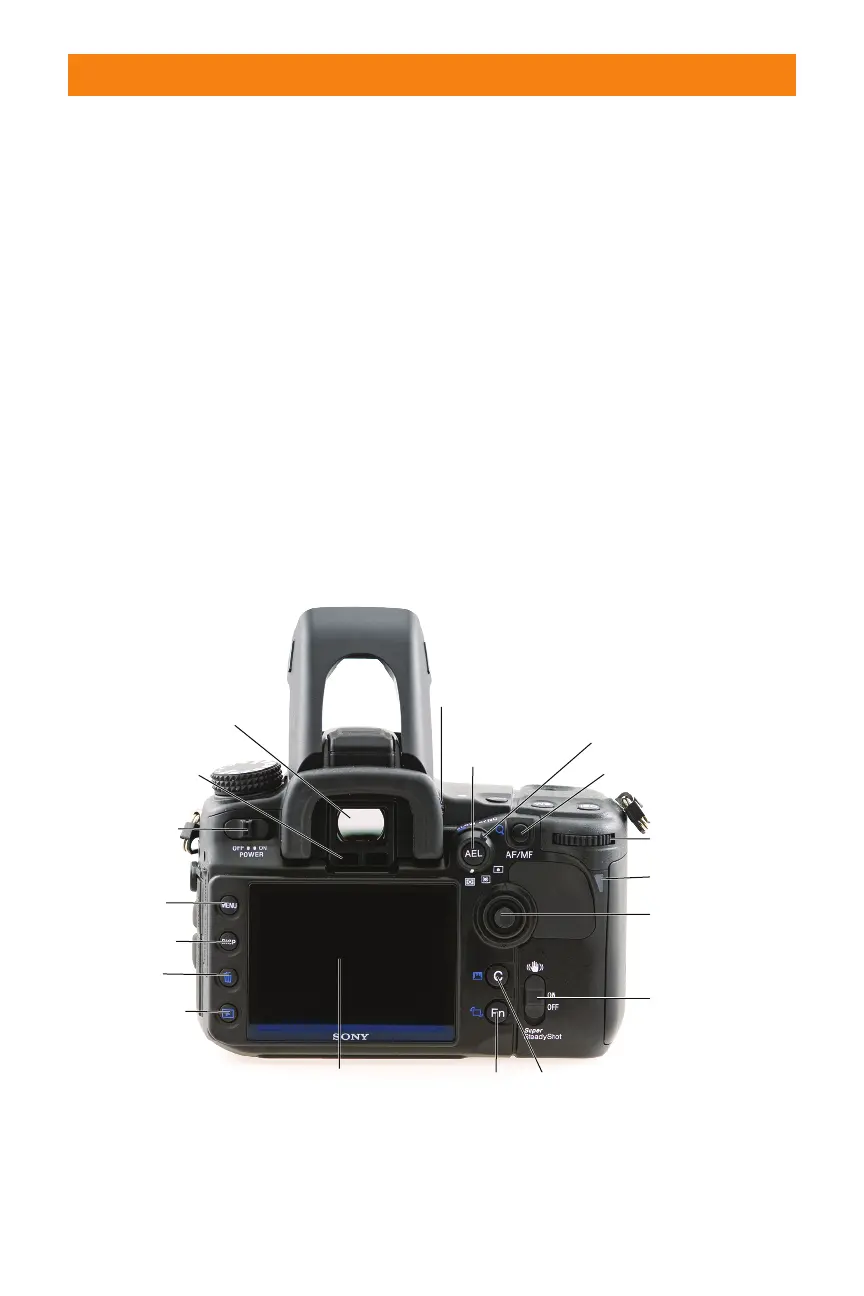
On the back
The back of the camera is dominated by the
large 3-inch LCD, but when you hold the
camera with your right hand, you will notice
that the controls used when shooting —
especially the multi-selector and the Rear
control dial — are all easily accessed with
your right thumb.
✦ Power switch. This is the power
switch. The A700 has a built-in
sensor cleaning mode that vibrates
the sensor every time the power is
turned off. The slight vibration
when turning the camera off is
normal.
✦ Menu button. The Menu button
opens the Main menu on the LCD.
✦ Display button. The Display but-
ton switches between the detailed
display and the enlarged display in
the Recording mode. The bright-
ness of the LCD can be adjusted by
pressing the Display button for a
few seconds.
✦ Trash button. When you are
reviewing images on the LCD,
pressing this button opens the
delete image dialogue. There is a
choice to delete the image or to
cancel, which returns the display to
reviewing images mode. It is also
Chapter 1 ✦ Exploring the Sony Alpha A700 15
Access light
Rear control dial
Multi-selector
Function/
Rotate
button
AF/MF Enlarge button
Viewfinder
Display button
Menu button
LCD monitor
AEL (AE Lock)
Slow Sync
Index button
Power switch
Eyepiece sensor
Trash button
Playback button
Custom/
Histogram
button
Super SteadyShot
Metering mode lever
Diopter
adjustment
dial
1.3 A rear view of the A700
06_270318 ch01.qxp 4/18/08 11:50 AM Page 15



 To Next Page