ÿ" ù ù !
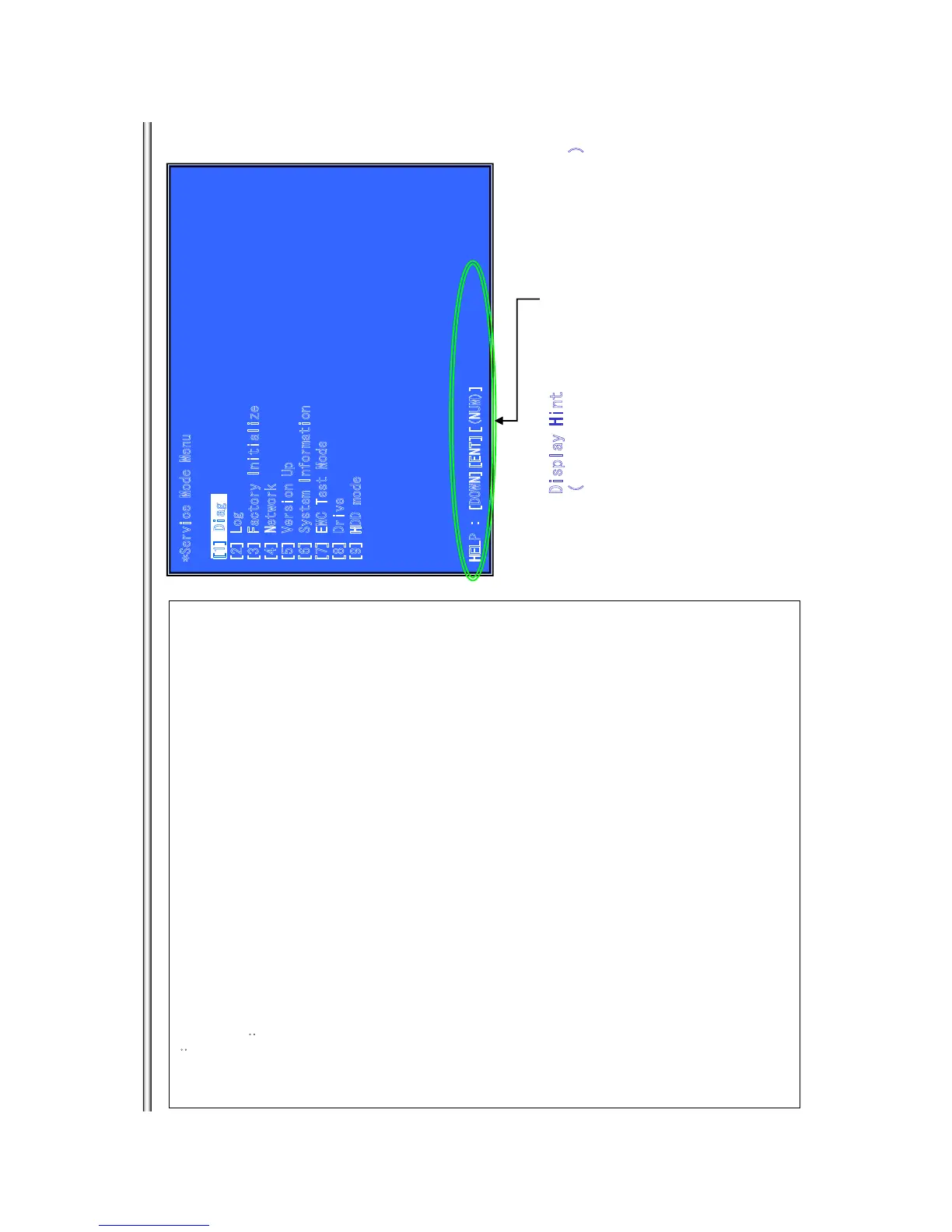
*Service Mod
e
Me
n
u
[1] Diag
[2] Log
[
3
] Facto
r
y
In
it
i
aliz
e
[
4
] Ne
t
wo
rk
[
5
] Ve
r
si
on Up
[6] System Information
[7] EMC Test Mode
[
8
]
Drive
[
9
]
HDD mode
H
E
LP : [
DOWN][
EN
T
]
[
(N
UM)]
Outlineæ
Service Mode Top Menu
It selects to each function from here.
output HDMI/Component 480p forcibly.
Operationæ
[1] Select and Activate Diag Menu.
[2] Select and Activate Log Menu,
[3] Select and Activate Factory Initialize Menu.,
[4] Select and Activate Network Menu
[5] Select and Activate Version Up
Ô
DISC version Up
Õ
Menu,
[6] Select and Activate System Information Menu.
[7] Select and Activate EMC Test Mode Menu.
(not Used)
[8] Select and Activate Drive Menu.
[9] Select and Activate HDD mode.
(not Used)
[UP] Move Up cursor
[DOWN] Move Down cursor
[ENT] Activate
the selected
cursor.
*The cursor is not displayed when initial.
Display Hint
(The key in which the present use is possible)
[
1] Diag
BX18/S185/S186
7-5



 To Next Page