Log Menu
Outline
æ
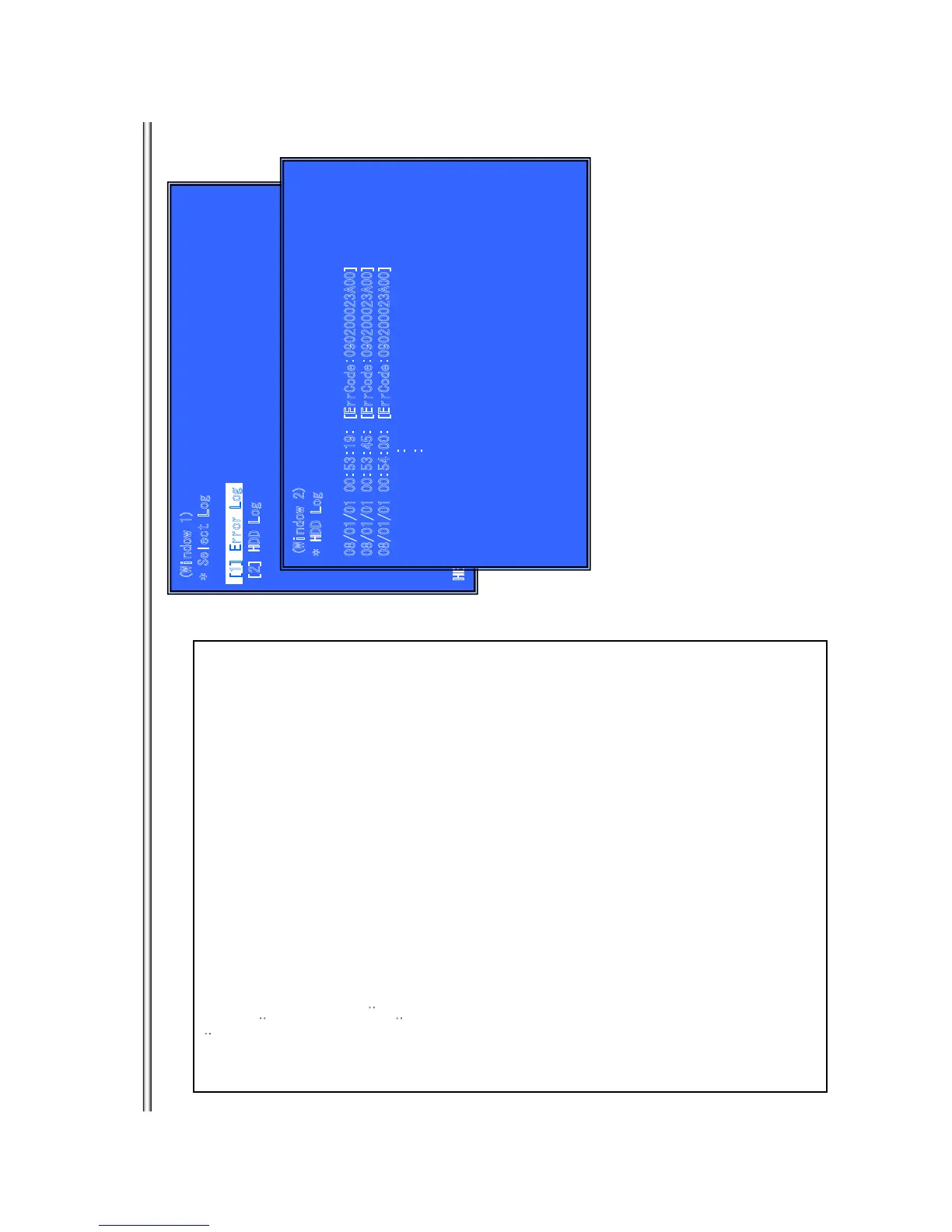
Display each contents of the log,
(Window 1) select log.
Operation
æ
[1] Activate and Display Error log
[2] Activate and Display Command Log
[UP] Move Up cursor
[DOWN] Move Down cursor
[ENT] Activate the selected cursor.
[RET] Return to Service Top Menu.
(Window 2)
æ
Display HDD Log
.
(Not supported)
Operation
æ
[LEFT] Next Page
[RIGHT] Previous Page
[RET] Return to select log (window 1)
[RED] Write the contents of an error log on a USB memory.
>Log contents
See P16.
**Write the contents of a log on a USB memory**
[RED] is pushed where a USB memory is inserted in a set in log display screen.
Error Log:
“HDD_Text” file is outputted in a USB memory.
(
Window 1)
* Select Log
[2
] HDD L
o
g
HE
LP :
[
D
OWN
]
[E
NT][(
NU
M
)
]
(
W
i
ndow 2)
* HDD Log
0
8
/01/01 00:53:19: [ErrC
od
e:090200023A
0
0]
0
8
/01/01 00
:
53:45: [E
r
rC
od
e:0902000
2
3A
0
0]
08/01/01 00:54:00: [ErrCode:090200023A00]
:
:
[
1
] Er
ror
L
o
g
BX18/S185/S186
7-8



 To Next Page