8
BDP-S3700/BDP-S1700
4-579-662-11(1)
master page=left
E:\SONY
DVD\SD150015\4579662111_GB\030STU.fm
Step 1: Connecting the Player
Do not connect the mains lead until you have made all the connections.
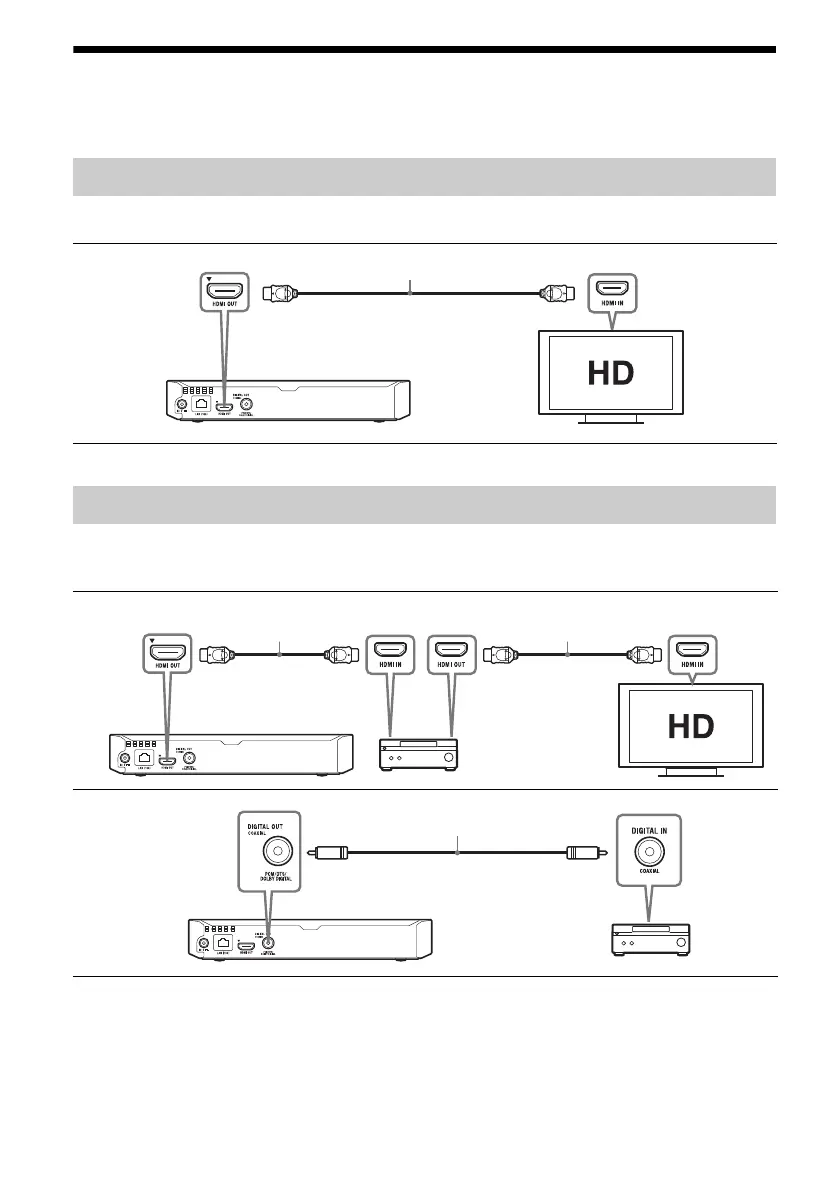
Connect the player to your TV with a High Speed HDMI Cable.
Select one of the following connection methods according to the input jacks on your AV amplifier
(receiver). When you select A or B, make the appropriate settings in [Audio Settings].
Connecting to your TV
High Speed HDMI Cable (not supplied)
Connecting to your AV amplifier (receiver)
A
B
High Speed HDMI Cable
(not supplied)
High Speed HDMI Cable
(not supplied)
Coaxial digital cable
(not supplied)



 To Next Page