9
BDP-S3700/BDP-S1700
4-579-662-11(1)
master page=right
E:\SONY
DVD\SD150015\4579662111_GB\030STU.fm
Getting Started
Step 2: Preparing for
Network Connection
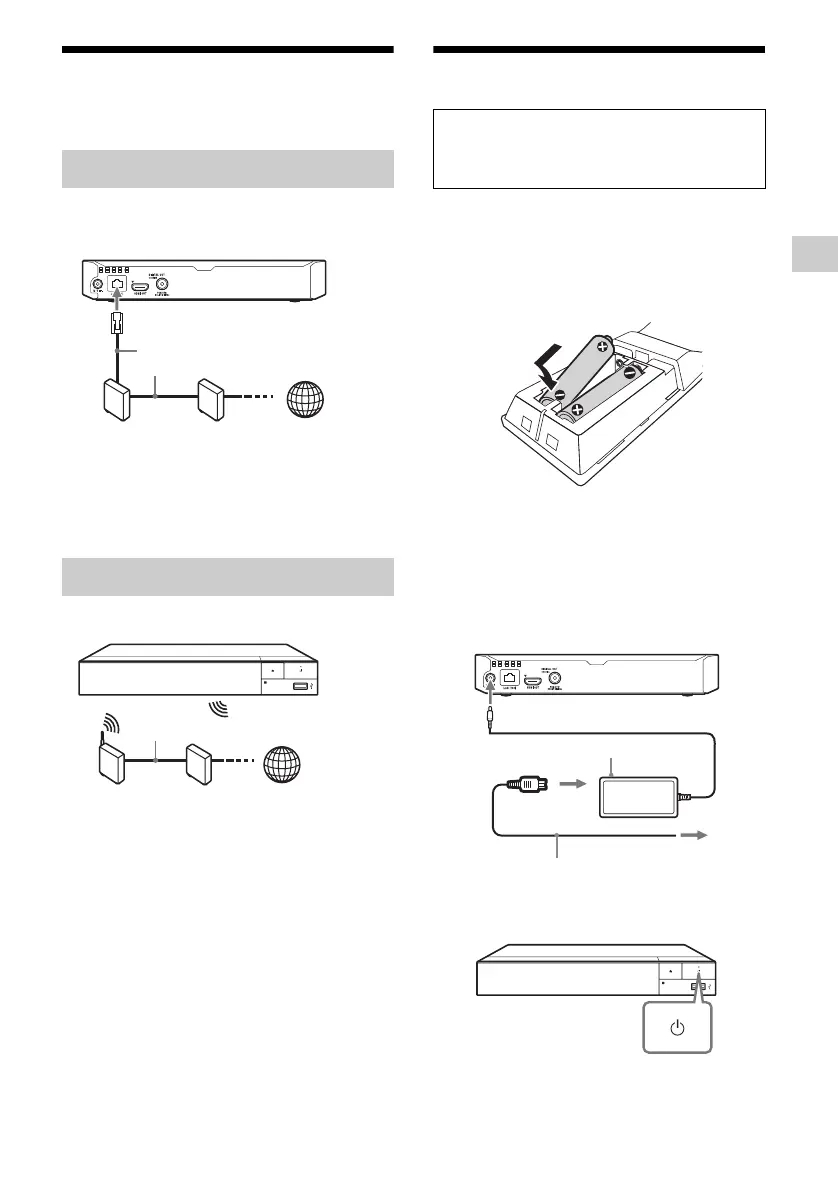
Use a LAN cable to connect to the LAN (100)
terminal on the player.
z
The use of a shielded and straight interface cable (LAN
cable) is recommended.
Use the wireless LAN that is built into the player.
Step 3: Easy Setup
1 Insert two R03 (size AAA) batteries by
matching the 3 and # ends on the
batteries to the markings inside the
battery compartment of the remote.
2 Connect the supplied AC adaptor and
AC power cord (mains lead) in the
numeric order shown below. When
removing them, do so in reverse
order.
3 Press 1 to turn on the player..
* Turns on the player, or sets to standby
mode.
Wired Setup
Wireless Setup (BDP-S3700 only)
ADSL modem/
Cable modem
Broadband
router
LAN cable
(not supplied)
Internet
Wireless LAN
router
ADSL modem/
Cable modem
Internet
LAN cable (not supplied)
When turned on for the first time
Wait for a short while before the player turns
on and starts [Easy Initial Settings].
to mains
AC adaptor (supplied)
AC power cord (mains lead)
(supplied)
2
3
1
to DC IN 12 V
*



 To Next Page