10
US
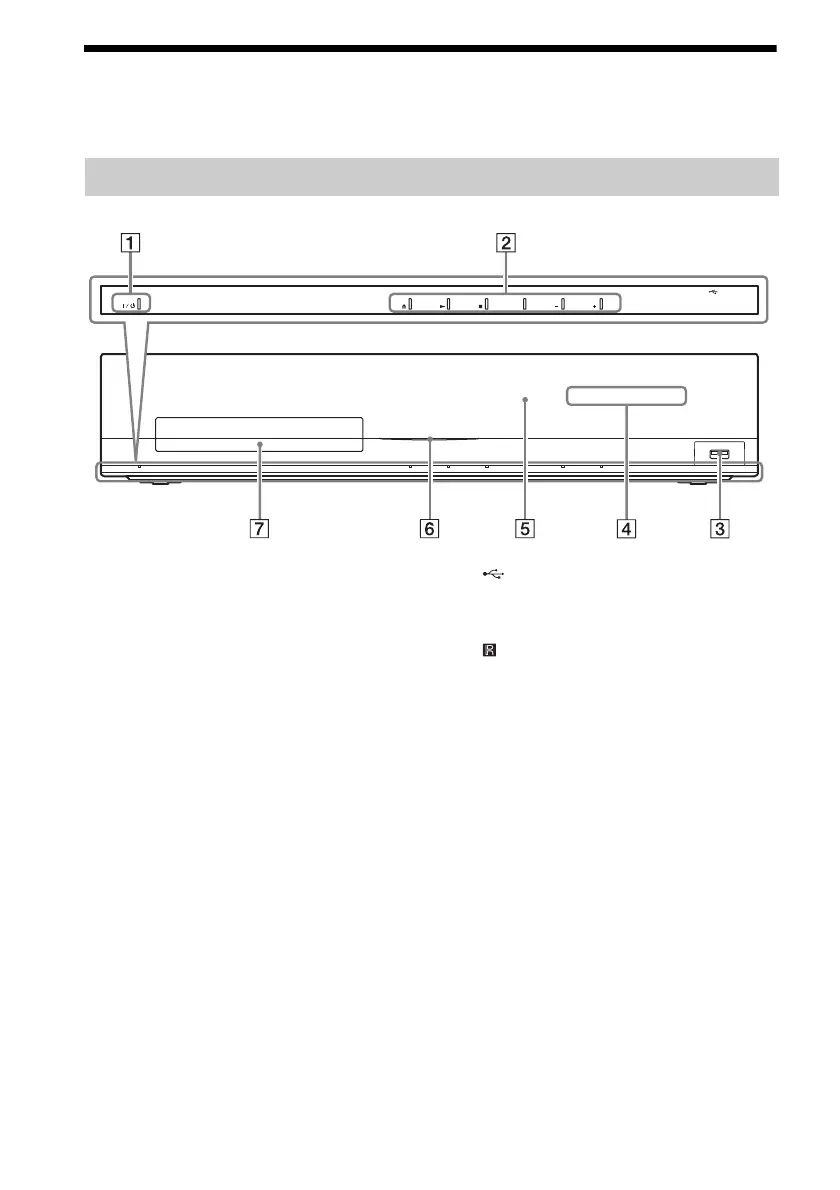
Index to Parts and Control
For more information, refer to the pages indicated in parentheses.
A "/1 (on/standby)
Turns on the unit, or sets it to standby mode.
B Play operation buttons
Z (open/close) (page 32)
Opens or closes the disc tray.
N (play)
Starts or re-starts playback (resume play).
Plays a slideshow when a disc containing
JPEG image files is inserted.
x (stop)
Stops playback and remembers the stop
point (resume point).
The resume point for a title/track is the last
point you played or the last photo for a
photo folder.
FUNCTION
Selects the playback source.
VOLUME +/–
Adjusts the system’s volume.
C (USB) port (page 33)
Used for connecting a USB device.
D Front panel display
E (remote sensor)
F Power indicator
Lights up while the system is turned on.
G Disc tray (page 32)
Front panel
FUNCTION VOLUME VOLUME



 To Next Page