11
US
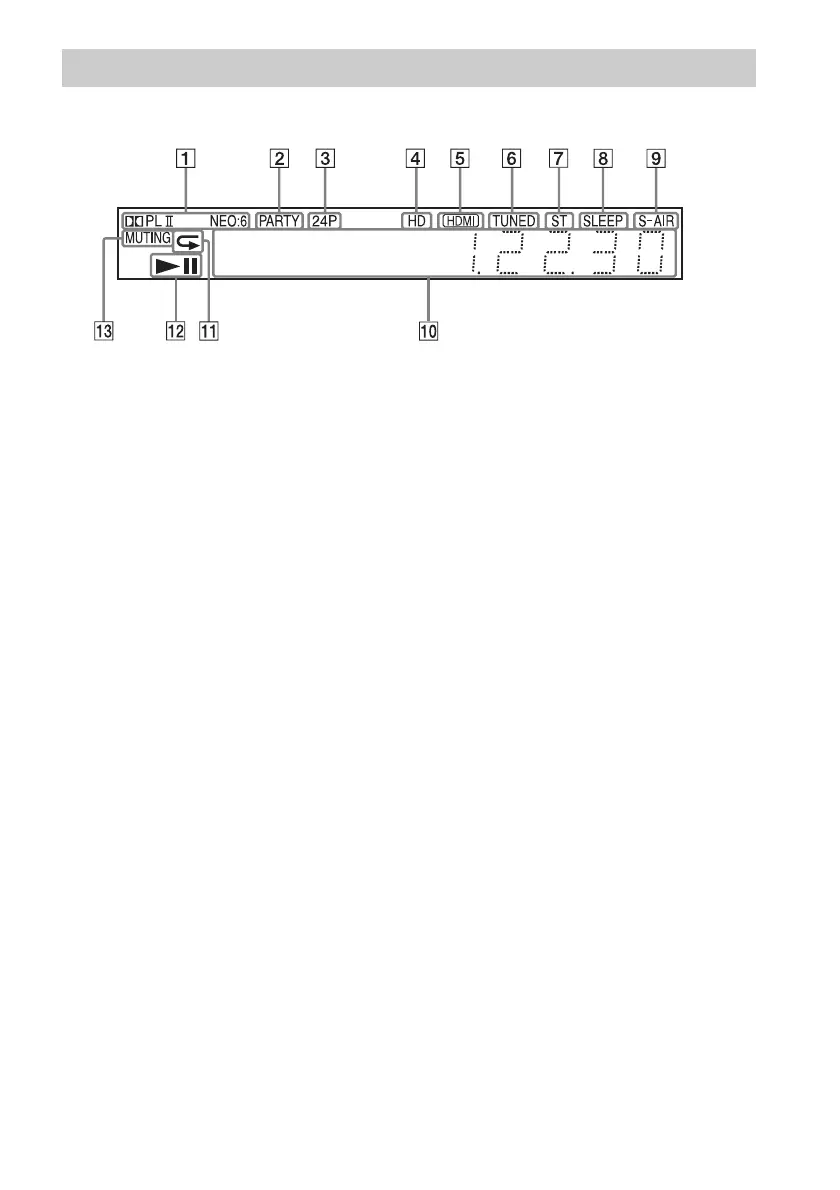
About the indications in the front panel display
A Displays the current sound format.
B Lights up when the system is playing
via the PARTY STREAMING function.
C Lights up when outputting 1920 ×
1080p/24 Hz video signals.
D Lights up when outputting 720p/1080i/
1080p video signals from the HDMI
OUT jack or 720p/1080i video signals
from the COMPONENT VIDEO OUT
jacks.
E Lights up when the HDMI OUT jack is
correctly connected to an HDCP (High-
bandwidth Digital Content Protection)-
compliant device with HDMI or DVI
(Digital Visual Interface) input.
F Lights up when a station is received.
(Radio only) (page 42)
G Lights up when stereo sound is
received. (Radio only) (page 42)
H Flashes when the sleep timer is set.
(page 54)
I S-AIR indicator (only when the wireless
transmitter (not supplied) is inserted
into the unit)
Lights up during wireless
transmission. Flashes when [Standby]
is set to [On] and the system is in
standby mode while wireless
transmission between the unit and
S-AIR receiver is not activated. (page
44)
J Displays system’s status such as
chapter, title, or track number, time
information, radio frequency, playing
status, surround setting, etc.
K Lights up when repeat play is
activated.
L Displays system’s playing status.
M Lights up when muting is on.
Front panel display



 To Next Page