13
GB
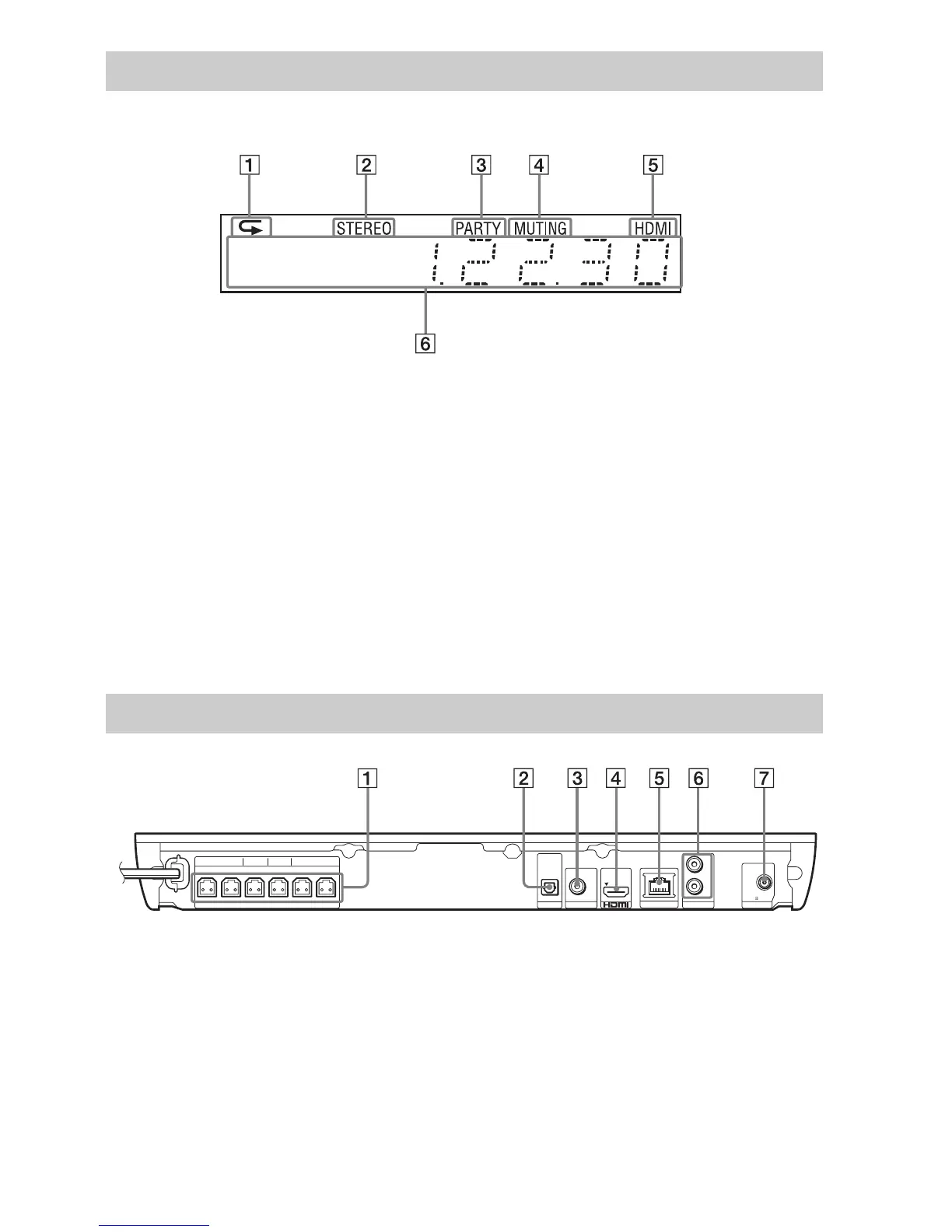
About the indications in the front panel display
A Lights up when repeat play is
activated.
B Lights up when stereo sound is
received. (Radio only)
C Lights up when the system is playing
via the PARTY STREAMING function.
D Lights up when muting is on.
E Lights up when the HDMI (OUT) jack is
correctly connected to an HDCP (High-
bandwidth Digital Content Protection)
compliant device with HDMI or DVI
(Digital Visual Interface) input.
F Displays the system’s status, such as
radio frequency, etc.
When you press DISPLAY, the stream
information/decoding status is displayed
when the function is set to “TV.”
The stream information/decoding status
may not appear depending on the stream or
item being decoded.
A SPEAKERS jacks (page 16)
B TV (DIGITAL IN OPTICAL) jack (page
17)
C VIDEO OUT jack (page 17)
D HDMI (OUT) jack (page 17)
E LAN (100) terminal (page 19)
F AUDIO (AUDIO IN L/R) jacks (page 18)
G ANTENNA (FM COAXIAL 75Ω) jack
(page 19)
Front panel display
Rear panel
FRONT R FRONT L SUBWOOFER CENTER SUR R SUR L
SPEAKERS
TV
OPTICAL
DIGITAL IN
FM COAXIAL
75
L
R
OUT ARC
VIDEO OUT
LAN (100)
AUDIO IN ANTENNA



 To Next Page