17
GB
Getting Started
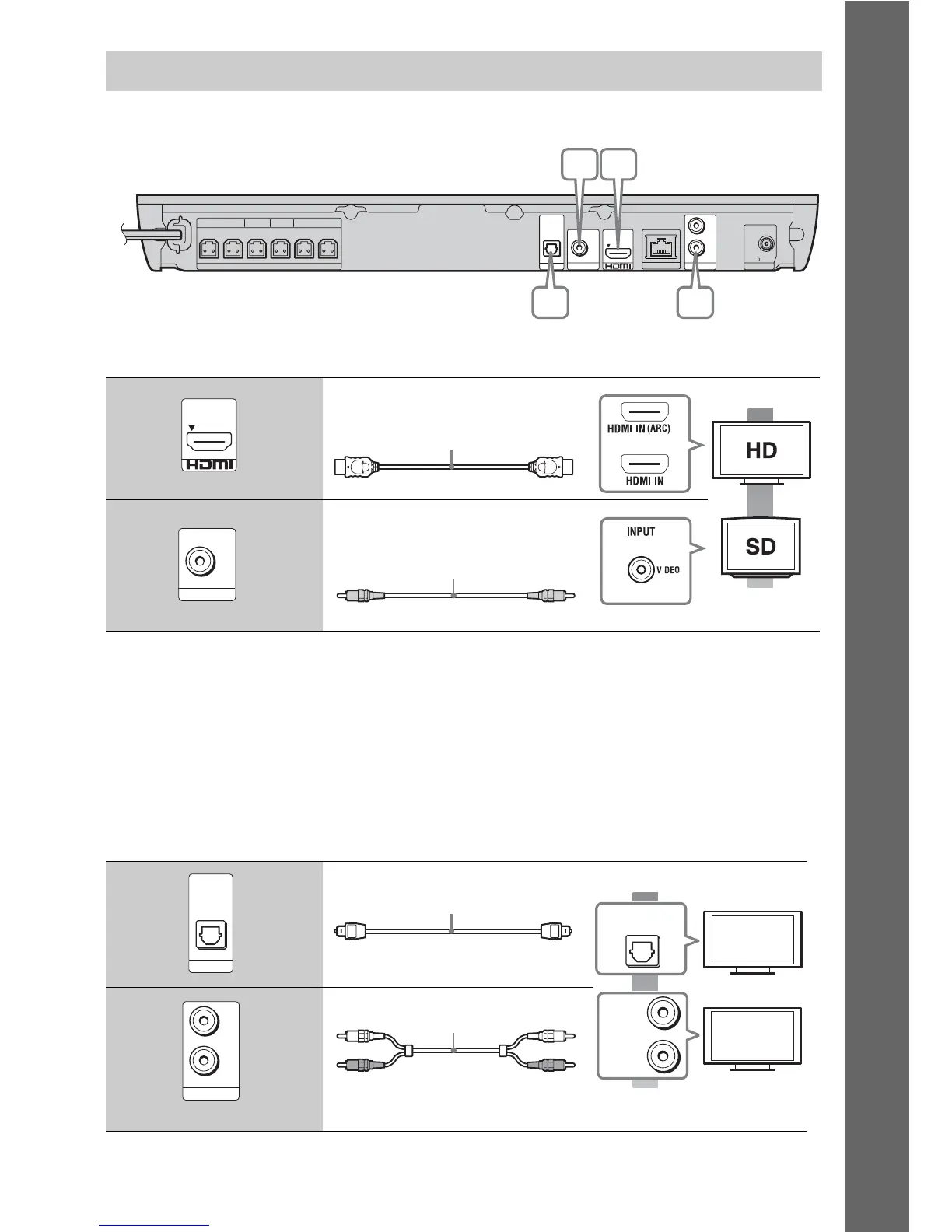
Select one of the following connection methods according to the input jacks on your TV.
Video connections
1)
High Speed HDMI cable
2)
If the HDMI IN jack of your TV is compatible with the ARC (Audio Return Channel) function, an HDMI cable
connection can also send a digital audio signal from the TV. For setting the Audio Return Channel function, see
[Audio Return Channel] (page 44).
3)
The supplied video cord is for connection of the Dock for iPod/iPhone. (Europe, Australia, and South Africa
models of BDV-E690/BDV-E490/BDV-E290 only)
Audio connections
If you do not connect the system to the TV’s HDMI jack that is compatible with the ARC function,
make an appropriate audio connection for listening to TV sound via the system’s speakers.
Connecting the TV
A High quality
Standard
quality
B
C High quality
Standard
quality
D
FRONT R FRONT L SUBWOOFER CENTER SUR R SUR L
SPEAKERS
TV
OPTICAL
DIGITAL IN
FM COAXIAL
75
L
R
OUT ARC
VIDEO OUT
LAN (100)
AUDIO IN ANTENNA
AB
C D
OUT ARC
HDMI cable
1)
(supplied with India,
Middle East, Singapore, China,
Thailand, and Taiwan models only)
or
2)
VIDEO OUT
Video cord (supplied with Europe,
Australia, and South Africa models
of BDV-E190 only
3)
)
TV
OPTICAL
DIGITAL IN
Digital optical cord
(not supplied)
OPTICAL
DIGITAL OUT
L
R
AUDIO
OUTPUT
L
R
AUDIO IN
Audio cable (not supplied)



 To Next Page