26
GB
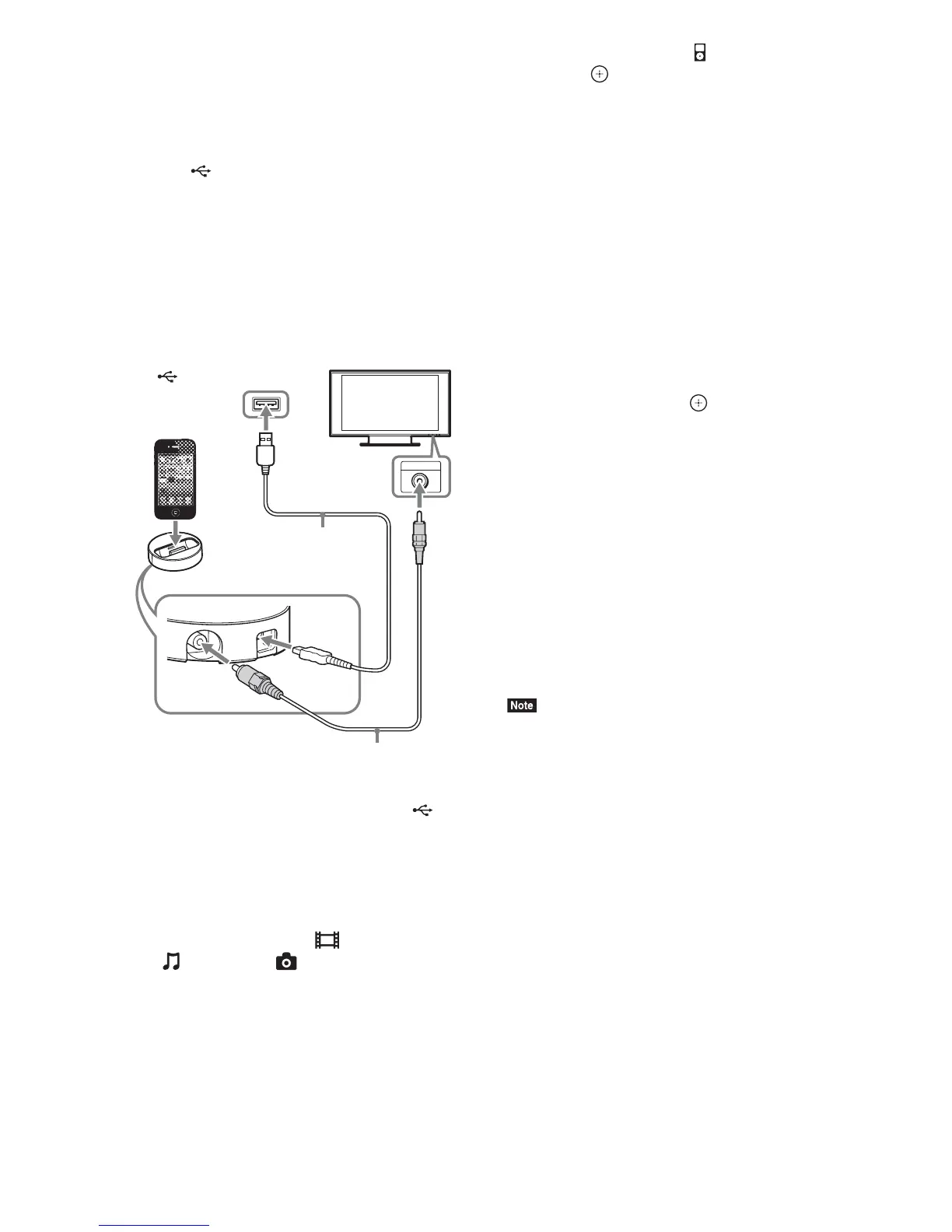
To enjoy an iPod/iPhone via the
system
1 (For Europe, Australia, and South
Africa models)
Connect the Dock for iPod/iPhone to
the (USB) port (page 12), then place
the iPod/iPhone onto the Dock for iPod/
iPhone.
When you play a video/photo file, connect
the video out jack of the Dock for iPod/
iPhone to the video input jack of your TV
with a video cord before placing the iPod/
iPhone onto the Dock for iPod/iPhone.
(For other models)
Connect the iPod/iPhone to the
(USB) port (page 12) with the iPod/
iPhone’s USB cable.
2 Press HOME.
The home menu appears on the TV screen.
3 Press C/c to select [Video]*,
[Music], or [Photo]*.
* Europe, Australia, and South Africa models
only.
4 Press X/x to select [iPod], then
press .
x If you selected [Video]* or [Music] in
Step 3
The video/music files are listed on the TV
screen. Go to the next Step.
x If you selected [Photo] in Step 3*
[Please change the TV input to the video
input...] appears on the TV screen. Switch
the input selector on your TV so that the
signal from the iPod/iPhone appears on
your TV screen. Then, start the slideshow
by operating the iPod/iPhone directly.
* Europe, Australia, and South Africa models
only.
5 Press C/X/x/c and to select the file
that you want to play.
The sound from the iPod/iPhone is played
on the system.
When you play a video file, switch the input
selector on your TV so that the signal from
the iPod/iPhone appears on your TV screen.
(Europe, Australia, and South Africa
models only.)
You can operate the iPod/iPhone using the
buttons on the supplied remote.
For operation details, refer to the operating
instructions of the iPod/iPhone.
• To change a system setting, such as the sound mode
setting, while viewing images from your iPod/iPhone
on your TV, select the input on your TV for this
system before operating the system. (Europe,
Australia, and South Africa models only.)
• The iPod/iPhone is charged when connected to the
system while the system is turned on.
• Sony cannot accept responsibility in the event that
data recorded to iPod/iPhone is lost or damaged when
using an iPod/iPhone connected to this unit.
• Do not remove the iPod/iPhone during operation. To
avoid data corruption or damage to the iPod/iPhone,
turn the system off when connecting or removing the
iPod/iPhone.
• The System Audio Control function does not work
while playing video/photo files via the iPod/iPhone
(Europe, Australia, and South Africa models only).
• The system can recognize up to 5,000 files (including
folders).
V
I
D
E
O
O
U
T
USB
VIDEO IN
Dock for iPod/iPhone (supplied)
TV
Video cord (supplied)
(USB) port of the unit
USB cable (supplied)



 To Next Page