36
GB
• Sony cannot accept responsibility in the event that
data recorded to iPod/iPhone is lost or damaged when
using an iPod/iPhone connected to this unit.
• This product has been designed specifically to work
with iPod/iPhone and has been certified to meet
Apple performance standards.
• Do not remove the iPod/iPhone during operation. To
avoid data corruption or damage to the iPod/iPhone,
turn the system off when connecting or removing the
iPod/iPhone.
• The system only recognizes iPods/iPhones that have
previously been connected to the system.
• The System Audio Control function does not work
while playing video/photo files via the iPod/iPhone
(European, Australian, Singapore, and Thai models
only).
• When you connect an iPod that is not compatible with
the video output function and select [iPod (front)]
or [iPod (rear)] in [Video] or [Photo], an alert
message appears on the TV screen (European,
Australian, Singapore, and Thai models only).
• The system can recognize up to 3,000 files (including
folders).
Playing via a Network
BRAVIA Internet Video serves as a gateway
delivering selected Internet content and a variety
of on-demand entertainment straight to your
unit.
• Some Internet content requires registration via a PC
before it can be played.
1 Prepare for BRAVIA Internet Video.
Connect the system to a network (page 24).
2 Press C/c to select [Video],
[Music], or [Photo].
3 Press X/x to select an Internet content
provider icon, then press .
If the Internet content list has not been
retrieved, it will be represented by an
unacquired icon or a new icon.
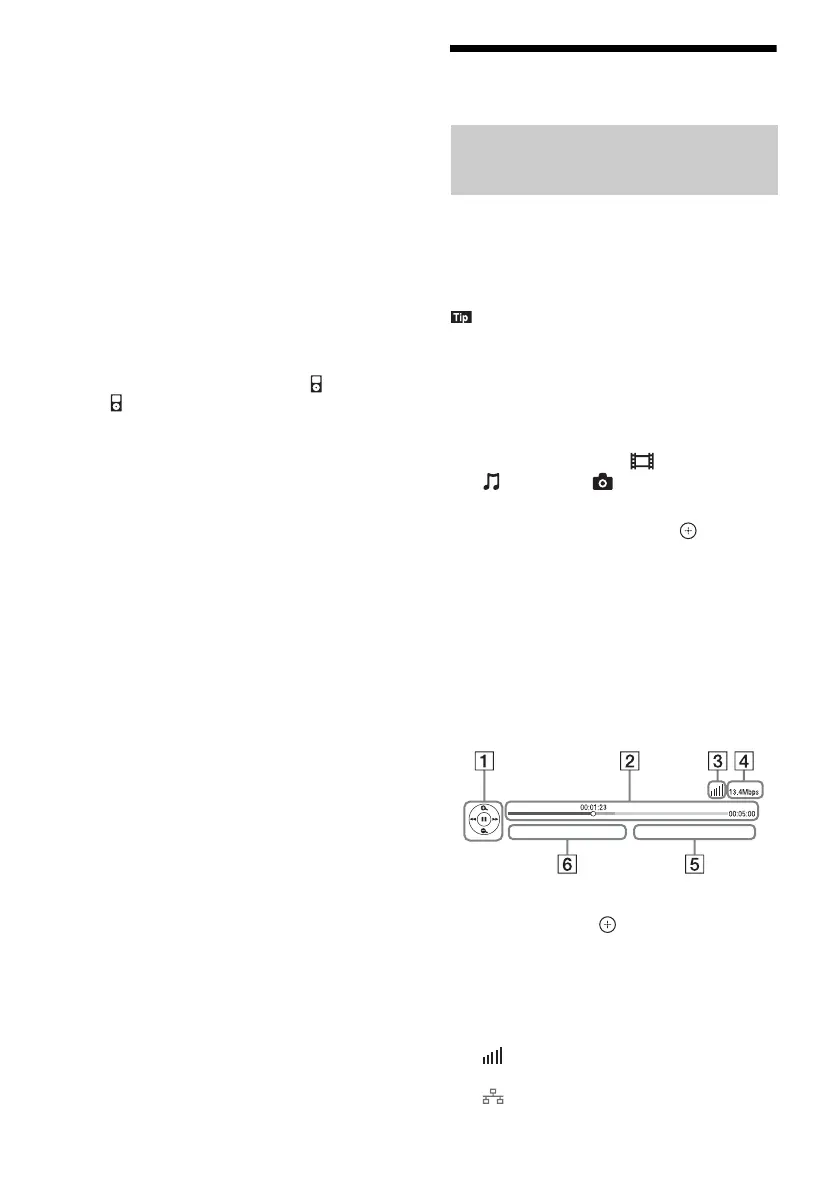
To use the control panel
The control panel appears when the video file
starts playing. The displayed items may differ
depending on Internet content providers.
To display again, press DISPLAY.
A Control display
Press C/X/x/c or for playback operations.
B Playing status bar
Status bar, cursor indicating the current
position, playing time, duration of the video
file
C
Network condition indicator
Indicates signal strength for a wireless
connection.
Indicates a wired connection.
Streaming BRAVIA Internet
Video


 To Next Page