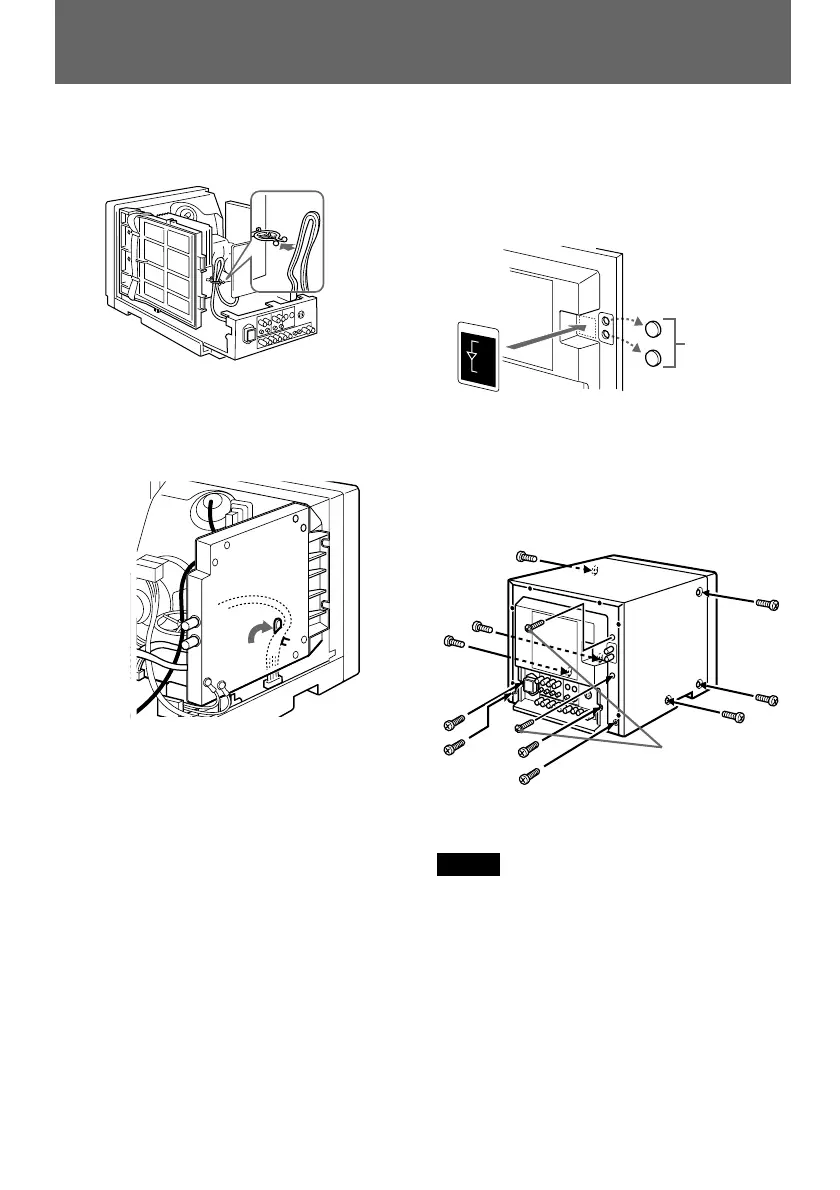
12
14
(for only 14-inch monitors)
Hold the cables (removed in 1 from step
8) of the monitor using the cable clamp of
the SDI module.
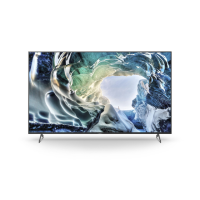
15
Make two holes for connectors of the SDI
module on the rear cover of the SDI
module on the rear cover of the monitor,
and stick the connector label beside the
holes.
Make holes
with nippers
16
Replace the rear cover of the monitor
using the 10 screws removed in step 1 so
that the SDI connectors expose from the
rear cover, and fix them with the supplied
screws.
Screw
(silver)
× 6
Supplied screws
(+BVTT 4 × 8)
Screw (black) × 4
Note
Leave all other parts and wiring as they are.
13
Fasten the cables to the G board.
IN
O
U
T
COMPONENT SDI
ACTIVE THROUGH
Installation


 To Next Page