8
Installation
For 20-inch monitors except PVM-
20S1WE/20S1WU/20S1WA
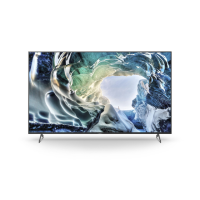
1 Fasten the 2 cables from the SDI
module to the monitor with the
installed cable clamps.
2 Fasten the monitor cable (connected to
the CN401 terminal) and the cable from
the SDI module (connected to the CN8
terminal on the BB board) with the
supplied cable clamp (black).
Push the SDI module forwards (to
the display side), and fasten it
with screws.
2
1
8 Install the SDI module in the monitor.
For 14-inch monitors
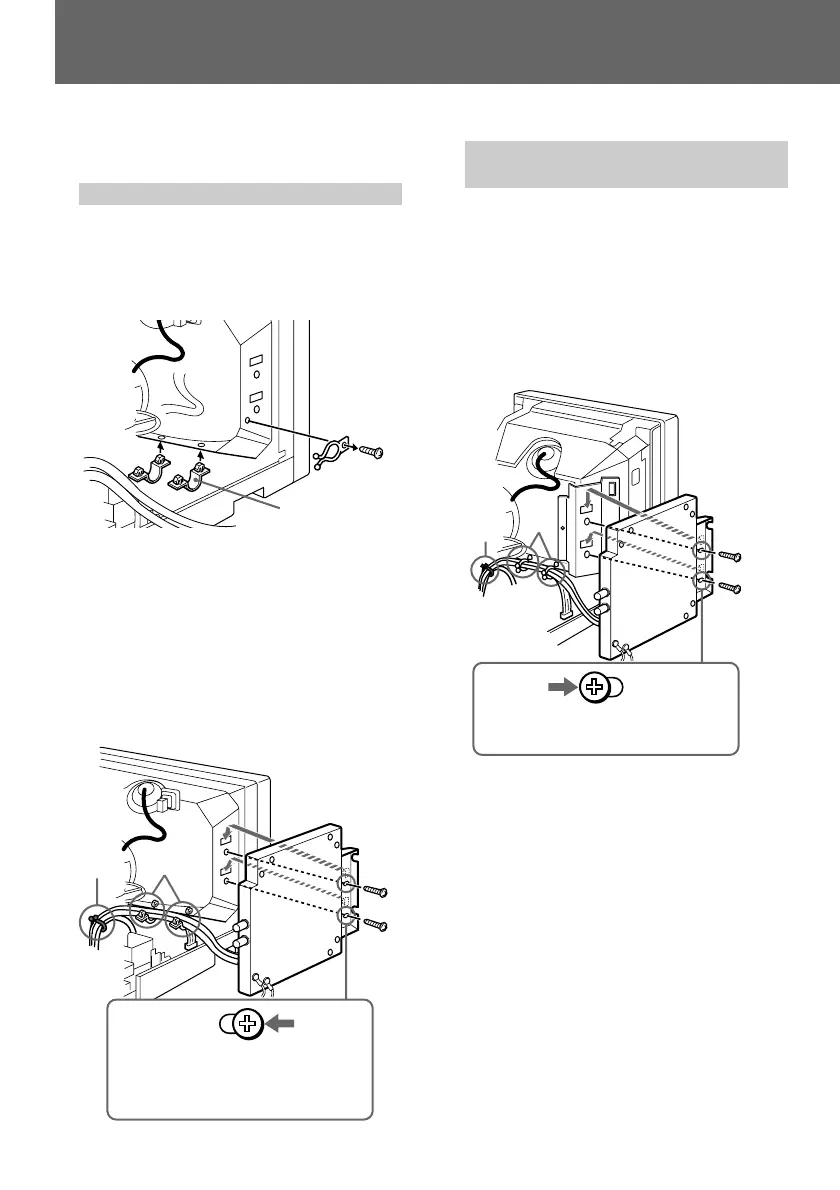
1 Remove the cable clamp from the
monitor and then the monitor cable.
2 Attach the supplied holders (white).
Holder
3 Fasten the 2 cables from the SDI
module with the attached holders from
2.
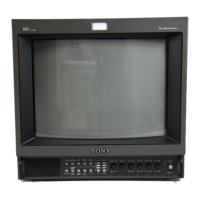
4 Fasten the monitor cable (connected to
the CN401 terminal) and the cable from
the SDI module (connected to the CN8
terminal on the BB board) with the
supplied cable clamp (black).
Pull the SDI module
back (to the connector
side), and fasten it with
screws.
2
1
3
4


 To Next Page