12
GB
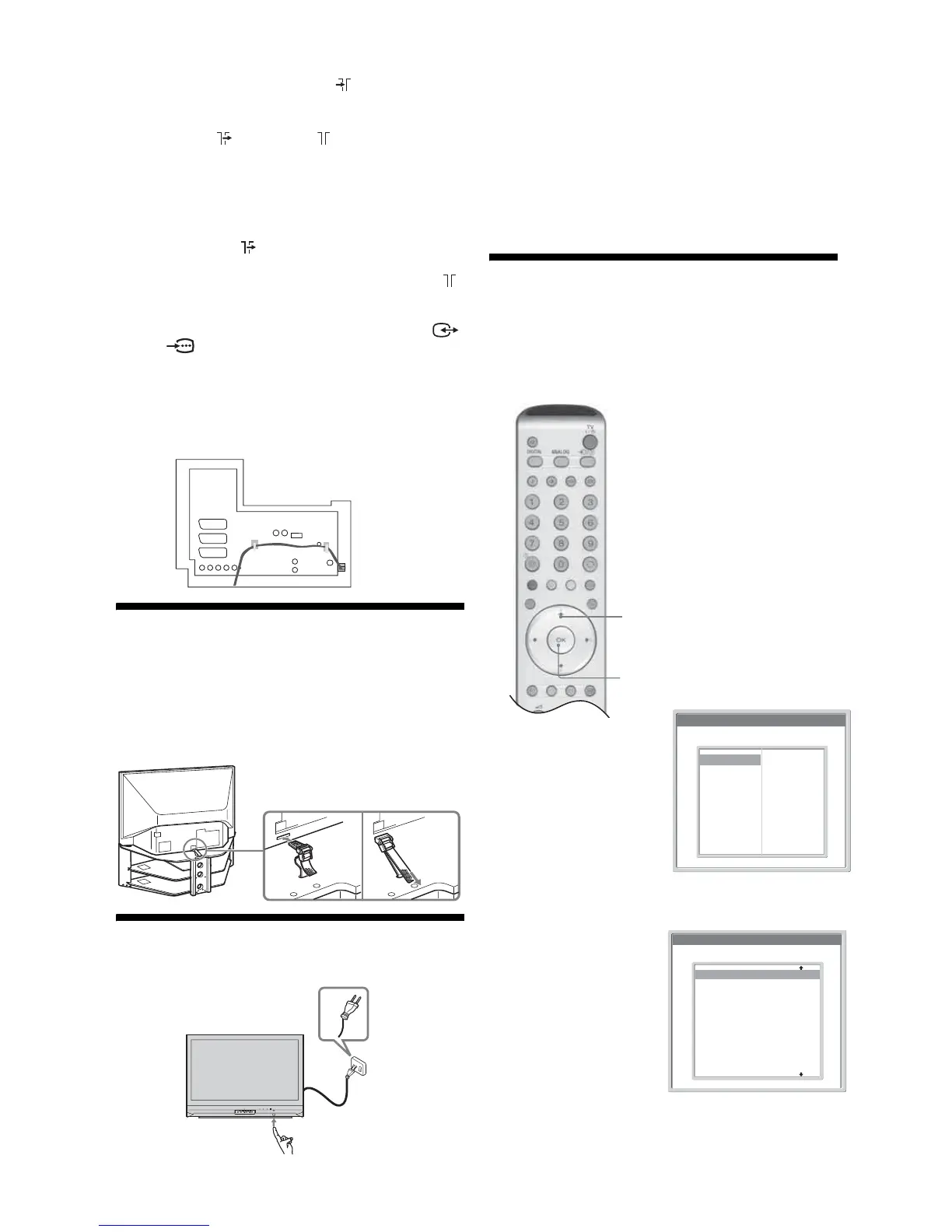
1 Connect your aerial to the socket on the
rear of the TV.
If connecting to an aerial only (A)
Connect the socket to the socket on the rear of
the TV with the supplied coaxial cable.
Go to step 3.
If connecting to a VCR with an aerial (B)
Go to step 2.
2 Connect your VCR.
1 Connect the socket on the rear of the TV to the
input socket on your VCR with the RF lead.
2 Connect the output socket on your VCR to the
socket on the rear of the TV with the supplied
coaxial cable.
3 Connect the scart socket on your VCR to the /
2 scart socket on the rear of the TV with a
scart lead.
Note
Do not connect the mains lead to your mains socket until
all connections are complete.
3 Bundle the cable.
4: Preventing the TV
from toppling over
Sony strongly recommends using the TV stand SU-
RG11S (for KDF-E42A11E)/SU-RG11M (for KDF-
E50A11E) with a support belt designed for your TV.
5: Switching on the TV
1 Connect the TV to your mains socket (220-
240V AC, 50Hz).
2 Press 1 on the TV (front side).
When you switch on the TV for the first time, the
Language menu appears on the screen, then go to “6:
Selecting the language and country/region” on
page 12.
When the TV is in standby mode (the
1
(standby)
indicator on the front of the TV is red), press TV
+
/
1
on the remote to switch on the TV, then go to page 13.
6:
Selecting the language
and country/region
When you switch on the TV for the first time, the
Language menu appears on the screen.
1
Press
m
/
M
/
</,
to
select the language
displayed on the
menu screens, then
press OK.
2
Press
m
/
M
to
select the country/
region in which you
will operate the TV,
then press OK. If
the country/region
in which you want
to use the TV does
not appear in the
list, select “-”
instead of a
country/region.
The message
confirming the TV
start auto-tuning
appears on the
screen.
1,2
1,2
PUSH OPEN
WEGA GATE
TV/VIDEO
CANNELVOL U M E
POWER
TIMER LAMP
POWER/STANDBY
2
1
Country
Select Country
–
United Kingdom
Ireland
Nederland
België/Belgique
Luxembourg
France
Italia
Schweiz/Suisse/Svizzera
Deutschland
Österreich
Language
Select Language
English
Nederlands
Français
Italiano
Deutsch
Türkçe
Ελληνικά
Español
Português
Polski
Česky
Magyar
Русский
Бьлгарски
Suomi
Dansk
Svenska
Norsk






 To Next Page