37
GB
Using Optional Equipment
R/D/
D/D
MONO
L/G/
S/I
Connecting optional equipment
Using Optional Equipment
You can connect a wide range of optional equipment to your TV. Connecting cables are not supplied.
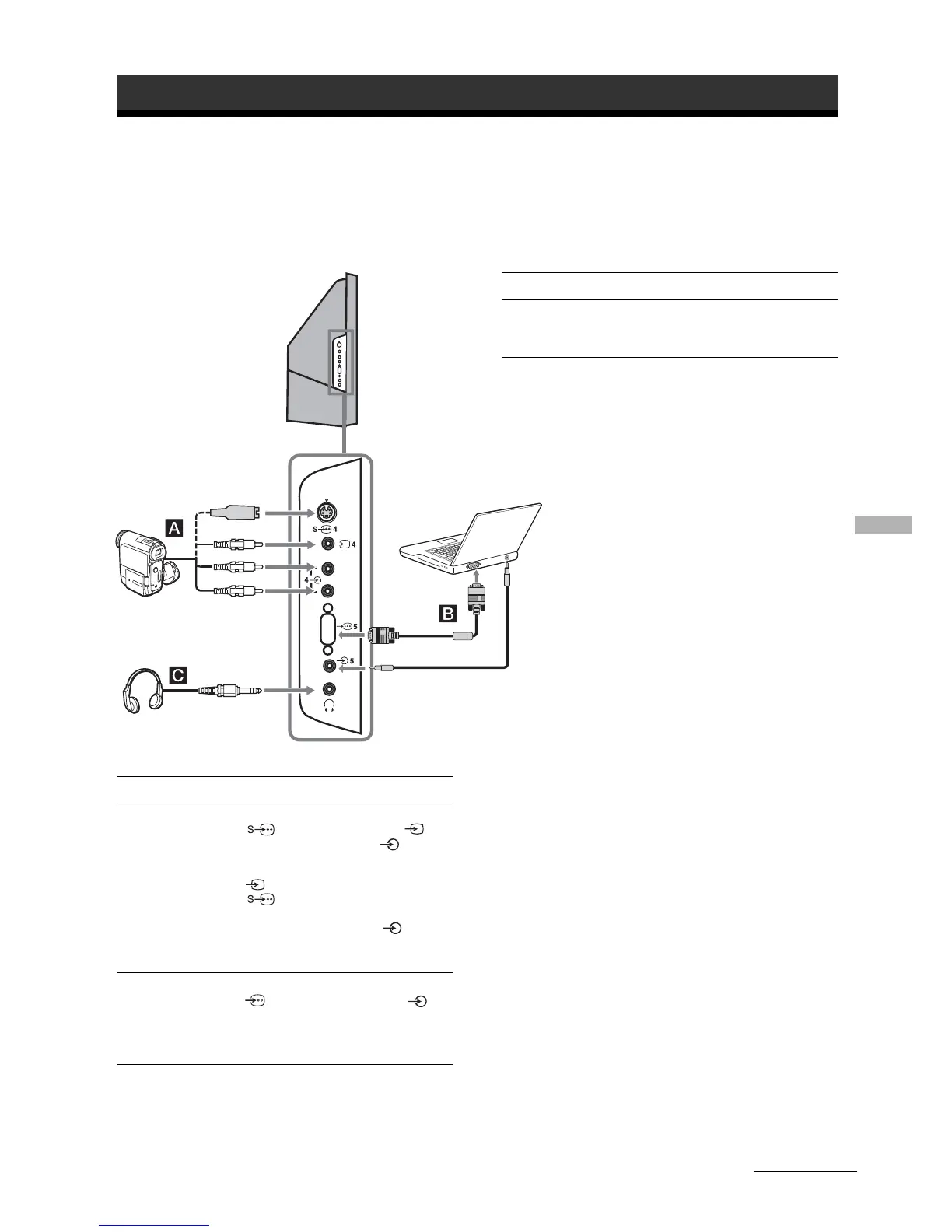
Connecting to the side of the TV
To connect Do this
S VHS/Hi 8/DVC
camcorder
A
Connect to the S video socket
4 or the video socket 4,
and the audio sockets 4. To
avoid picture noise, do not connect
the camcorder to the video socket
4 and the S video socket
4 at the same time. If you
connect mono equipment, connect
to the L/G/S/I sockets 4, and
set “Dual Sound” to “A”
(page 24).
Personal Computer
B
Connect to the PC Input socket
5 and the audio socket 5.
Headphones
S VHS/Hi8/DVC
camcorder
Continued
To connect Do this
Headphones C Connect to the i socket to listen to
sound from the TV on headphones.
Note:
It is recommended to use a PC cable with ferrites.
Personal
Computer





 To Next Page