EasyManua.ls Logo

Sony BRAVIA - Combined Picture and Sound Issues; Troubleshooting No Picture and No Sound

Sony BRAVIA
9 pages
Print Icon
To Next Page IconTo Next Page
To Previous Page IconTo Previous Page
Loading...
Display/Picture & Sound
6 | P a g e
No picture (screen is dark) and no sound
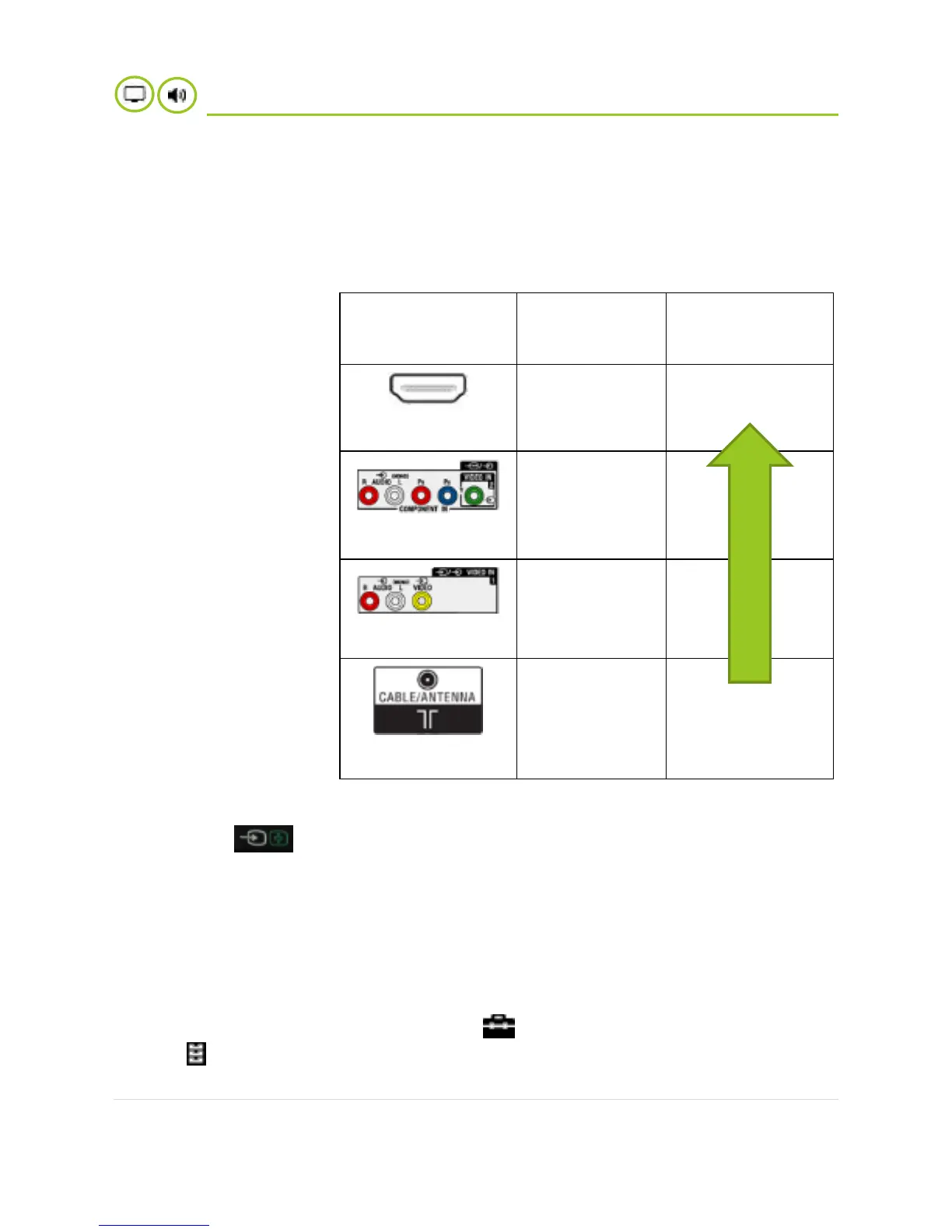
1. Make sure the TV is on and connected to device source properly.
SOCKETS/PORTS
SIGNAL
TRANSMITTED
PICTURE QUALITY
PERFORMANCE
HDMI
Picture + Sound
Best quality
Component Video
Picture + Sound
Composite
Picture + Sound
RF/COAXIAL
Picture + Sound
Normal quality
2. Make sure the TV is set to the correct video input to receive the signal.
1. Press on your remote.
2. Select proper input based on the port you are using to connect with other
device.
3. Tune the channel with Auto Tuning or Manual Tuning. Refer to instructions manual
of your TV.
4. Perform factory reset.
1. Press the HOME button, then select Settings.
2. System Settings General Set-up Factory Settings Yes.
After completing this process, the initial set-up screen is displayed.

Check which ports
are common on both
the device and TV,
then choose a cable
that is compatible
into both devices.
For Set Top Box
connection,
remember to
connect RF cable
(aerial) to Set Top
Box.

Other manuals for Sony BRAVIA

Related product manuals