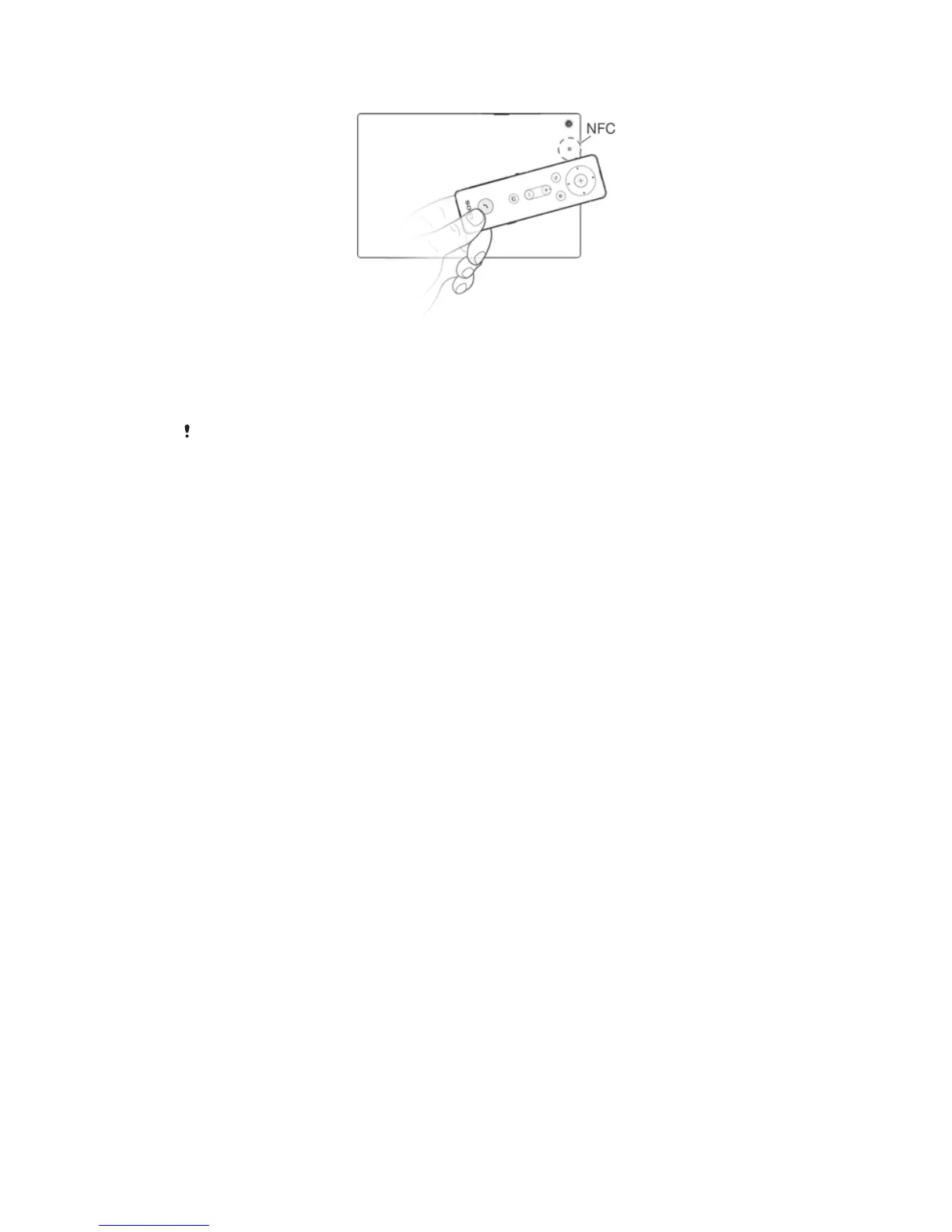
To automatically pair your Bluetooth® Remote with an Android™ device
1
Android™ device: Make sure that the NFC function is turned on and that the
screen is active and unlocked.
2
Place the Bluetooth® Remote over your Android™ device so that the NFC
detection area of each device touches the other.
3
Android™ device: Follow the pairing instructions that appear.
The device used in this illustration is for illustration purposes only and may not accurately
depict the actual device used.
Preparing a non-Android™ device
Before you can start using your Bluetooth® Remote with a non-Android™ device that
supports Bluetooth®, you need to do one of the following:
•
Pair the Bluetooth® Remote with the other device manually (using Bluetooth
technology). Follow the same procedure used to manually pair the remote with a
regular Android™ device.
•
Pair the Bluetooth® Remote with the other device automatically (using NFC
technology). Follow the same procedure used to automatically pair the remote with a
regular Android™ device.
8
This is an Internet version of this publication. © Print only for private use.



 To Next Page