Basics
Charging the Bluetooth® Remote
Before using the Bluetooth® Remote for the first time, you need to charge it for
approximately 2.5 hours. Sony chargers are recommended.
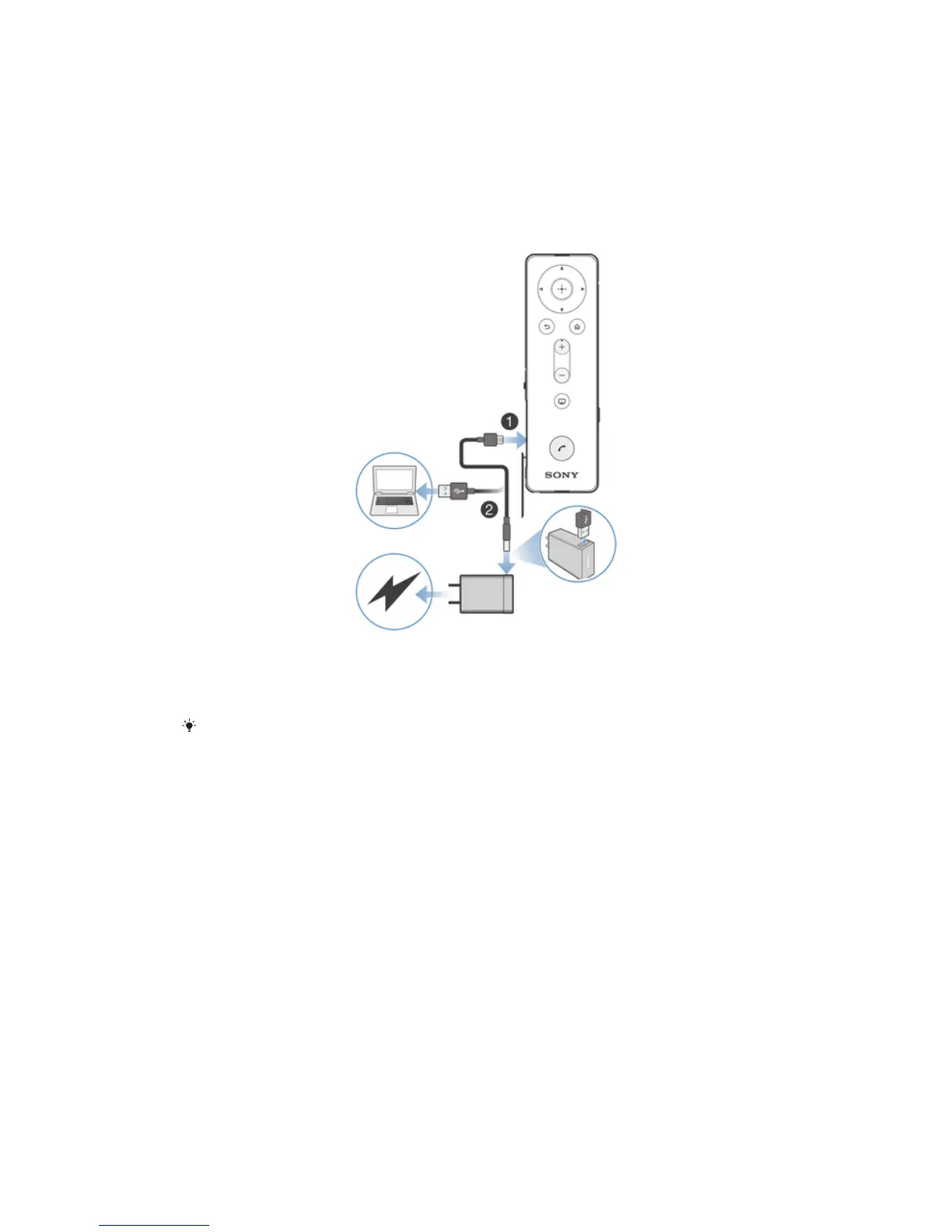
To charge the Bluetooth® Remote
1
Plug one end of the USB cable into the Micro USB port of your Bluetooth®
Remote.
2
Plug the other end of the cable into the charger or into the USB port of a
computer.
A charger may not be included at purchase in all markets.
Turning the Bluetooth® Remote on and off
To turn on the Bluetooth® Remote
•
Press and hold down the power key until the Bluetooth® Remote vibrates and
the notification light flashes white.
To turn off the Bluetooth® Remote
•
Press and hold down the power key until you hear a notification sound.
Adjusting the volume
To adjust the volume
•
During a call, or when playing a media file, press the volume key up or down.
Resetting the Bluetooth® Remote
Reset the Bluetooth® Remote if it behaves unexpectedly. If you reset it, all
information about paired devices gets deleted.
5
This is an Internet version of this publication. © Print only for private use.



 To Next Page