~
I
~
0
811:ie Uanu Or,arationc
~
1
1iii~-/M;1~,1
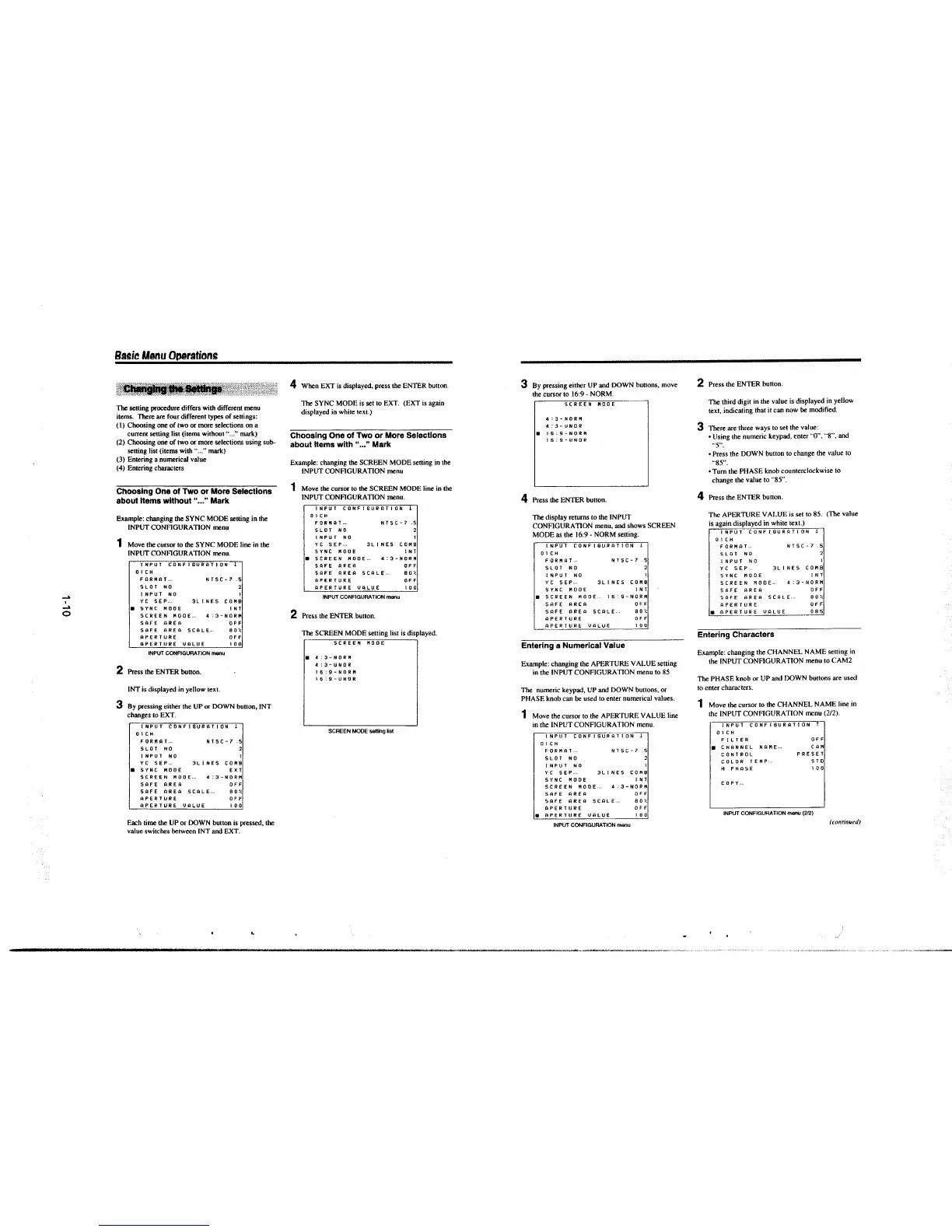
The setting procedure differs with different menu
items. There are four different types of settings:
( l) Choosing one of two or more selections on a
current setting list (items without·· ... "
mark)
(2) Choosing one of two or more selections using sub-
setting list (items with" ... " mark)
(3) Entering a numerical value
(4) Entering characters
Choosing One of Two or More Selections
about Items without" ... " Mark
Example: changing the SYNC MODE setting in the
INPUT CONFIGURATION menu
1 Move the cursor to the SYNC MODE line in the
INPUT CONFIGURATION menu.
INPUT tci~FiSURATJON 1
OICH
FORMAT ...
SLOT NO
INPUT NO
NTSC-7 .S
YC SEP.. 3LINES COMB
• SYNC MOOE INT
SCREEN MOOE .. 4:3-NORM
SAFE AREA OFF
SAFE AREA SCALE.. 80%
APERTURE OFF
APERTURE VALUE 100
INPUT CONFIGURATION menu
2 Press the ENTER button.
INT is displayed in yellow
text.
3 By pressing either the UP or DOWN button, INT
changes to EXT.
INPUT CONFIGURATION !
OICH
FORMAT ..
SLOT NO
INPUT NO
NTSC-7
.S
YC SEP... 3LJNES COMB
a SYNC MODE EXT
SCREEN MODE ... 4:3-NORM
SAFE AREA OFF
SAFE AREA SCALE-- BO%
APERTURE OFF
APERTURE VALUE 100
Each time the UP or DOWN button is pressed, the
value switches between INT
and EXT.
~
4 When EXT is displayed, press the ENTER button.
The SYNC MODE is set to EXT. (EXT is again
displayed in white
text.)
Choosing One of Two or More Selections
about Items with" .. ," Mark
Example: changing the SCREEN MODE setting in the
INPUT CONFIGURATION menu
1 Move the cursor to the SCREEN MODE line in the
INPUT CONFIGURATION menu.
INPUT CONFIGURATION T
OICH
FORMAT ..
SLOT NO
INPUT NO
NT SC - 7 .5
2
YC SEP.. 3LINES COMB
SYNC MOOE INT
a SCREEN HOOE .. 4:3-NORM
SAFE AREA OFF
SAFE AREA
SCALE-- BO%
APERTURE OFF
APERTURE VALUE 100
INPUT CONFIGURATION menu
2 Press the ENTER button.
The SCREEN MODE setting list is displayed.
SCREEN KOOE
• 4:3-NORM
4:3-UNOR
16:9-NOIUI
16:9-UNOR
SCREEN MOOE setting list
3 By pressing either UP and DOWN buttons, move
the cursor to 16:9 - NORM .
SCREEN MOOE
4:3-NOfOl
4:3-UNOR
• 16:9-NORM
16:9-UNOR
4 Press the ENTER button.
The display returns to the INPUT
CONFIGURATION menu,
and shows SCREEN
MODE as the 16:9- NORM setting.
INPUT CONFIGURATION !
OICH
FORMAT- ..
SLOT NO
NTSC-7 _5
INPUT NO I
YC SEP.. 3LINES COMB
SYNC MODE
INT
• SCREEN MODE 16:9-NORM
SAFE AREA OFF
SAFE AREA SCALE, 80%
APERTURE OFF
APERTURE VALUE 100
Entering a Numerical Value
Example: changing the APERTURE VALUE setting
in the INPUT CONFIGURATION menu to 85
The numeric keypad, UP
and DOWN buttons, or
PHASE knob can
be used to enter numerical values.
1 Move the cursor to the APERTURE VALUE line
in
the INPUT CONFIGURATION menu.
INPUT CONFIGURATION !
0 1 CH
FORMAT.
SLOT NO
INPUT NO
Y C 5 E P ..
NTSC-7 .5
2
I
3LINES COMB
SYNC MODE INT
SCREEN MODE ... 4:3-NORM
SAFE AREA OFF
SAFE AREA SCALE,
80%
APERTURE OFF
a APERTURE UALUE
1 0 0
INPUT CONFIGURATION menu
2 Press the ENTER button.
The third digit
in the value is displayed in yellow
text, indicating that it can now be modified.
3 There are three ways to set the value:
• Using the numeric keypad, enter
"O'', ··s", and
··5"_
• Press the DOWN button to change the value to
'"85".
•Tum the PHASE knob counterclockwise to
change the value to
··85".
4 Press the ENTER button.
The APERTURE VALUE is set to 85. (The value
is again displayed in white
text.)
INPUT CONFIGURATION 1
01CH
FORMAT
..
SLOT NO
INPUT NO
YC
SEP ..
NTSC-7 .s
I
3LINES COMB
SYNC MOOE INT
SCREEN MOOE .. 4:3-NORM
SAFE AREA OFF
SAFE AREA SCALE
..
APERTURE
• APERTURE VALUE
Entering Characters
80%
OFF
085
Example: changing the CHANNEL NAME setting in
the INPUT CONFIGURATION menu to CAM2
The PHASE knob or UP and DOWN buttons are used
to enter characters.
1 Move the cursor to the CHANNEL NAME line in
the INPUT CONFIGURATION menu (2/2).
INPUT CONFISURATION
~
OICH
FILTER
a CHANNEL NAME ...
CONTROL
COLOR
TEMP ..
H PHASE
COPY ..
OFF
CAM
PRESET
STO
IO 0
INPUT CONFIGURATION menu (2/2)
(rnntinued)


 To Next Page
 Loading...



