....
I
....
....
Basic Menu Operations
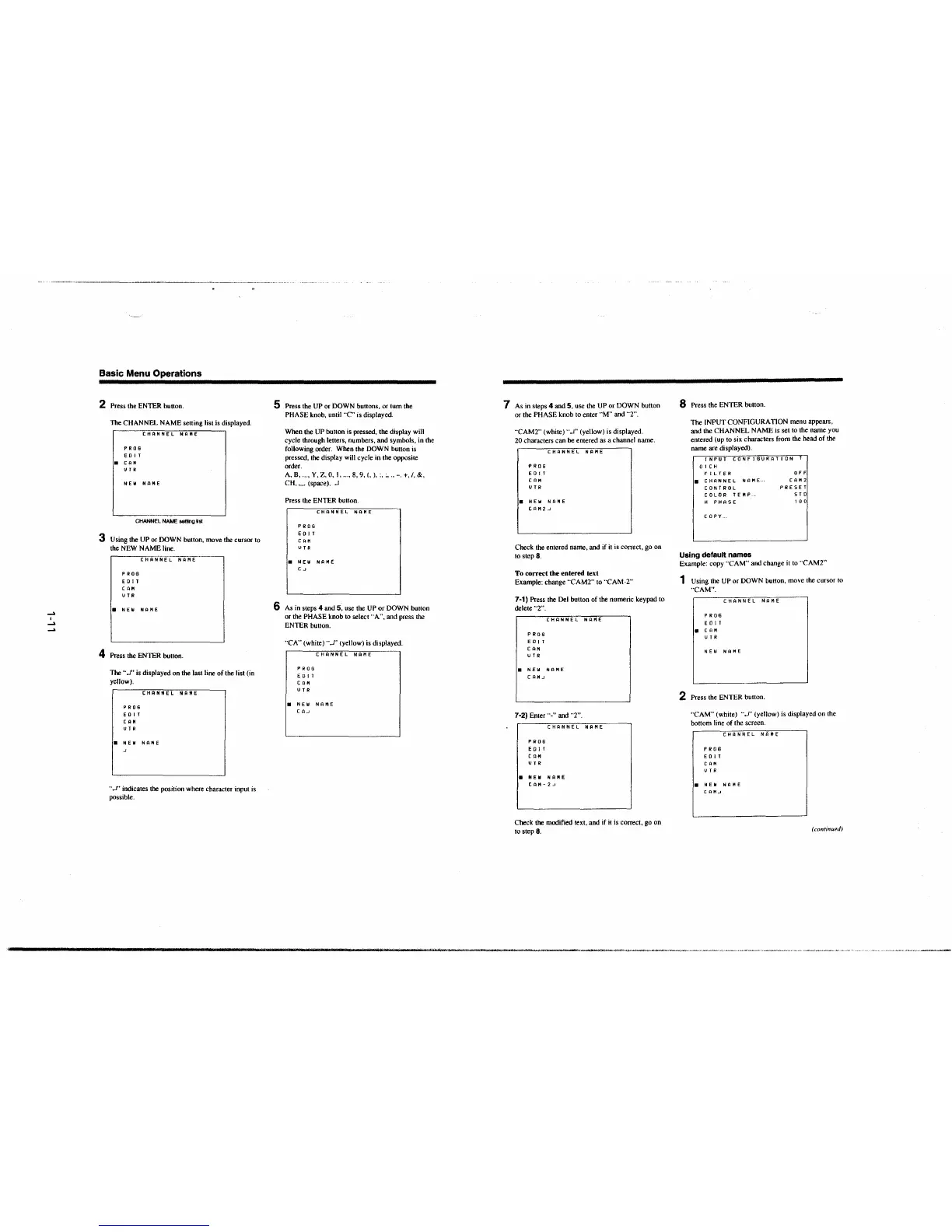
2 Press the ENTER button.
The CHANNEL NAME setting list is displayed.
PROB
E O IT
• CAM
UT R
CHANNEL NAME
NEW NAME
CHANNEL NAME setting list
3 Using the UP or DOWN button, move the cursor to
the NEW NAME line.
PROG
ED IT
CAH
UTR
CHANNEL NA"1E
• NEW NAME
4 Press the ENTER button.
The •·
...I" is displayed on the last line of the list (in
yellow),
PROS
E O IT
CAM
UTR
CHANNEL NAME
a NEW NAME
··.J" indicates the position where character input is
possible.
5 Press the UP or DOWN buttons, or tum the
PHASE knob, until
··C" is displayed.
When the UP button is pressed,
the display will
cycle through letters, numbers, and symbols, in the
following order. When the DOWN button is
pressed, the display will cycle in the opposite
order.
A, B, ... , Y, Z, 0, I, ... , 8, 9, (, ), :. :, ., -. +. /, &,
CH,~ (space), .J
Press the ENTER button.
PROS
E O IT
CAH
UTR
CHANNEL NAME
• NEIii NAME
Ca
6 As in steps 4 and 5, use the UP or DOWN button
or the PHASE knob to select
"A", and press the
ENTER button .
"CA" (white) ··.J" (yellow) is displayed.
PROB
E O IT
CAH
UTR
a NEIii
CAo
CHANNEL NAME
NAME
7 As in steps 4 and 5, use the UP or DOWN button
or the PHASE knob lo enter
"M" and "2".
"CAM2"
(white) "...I" (yellow) is displayed.
20 characters can be entered
as a channel name.
PROS
ED IT
CAH
UTR
CHANNEL NAME
a NEIii NAME
CAM 2
.J
Check the entered name, and if it is correct, go on
10 step 8.
To correct the entered text
Example: change "CAM2" to "CAM-2"
7·1) Press the Del button of the numeric keypad to
delete
"2" .
PROS
ED IT
CAH
u TR
CHANNEL NAME
a NEIii NAME
C t:l M .J
7·2) Enter"." and "2".
PR06
E O IT
CAH
UT R
CHANNEL NAME
a NEIii NAME
CAM
- 2 .J
Check the modified text, and if it is correct, go on
to step
8.
8 Press the ENTER button.
The INPUT CONFIGURATION menu appears,
and the CHANNEL NAME is set to the name you
entered (up to six characters from
the head of the
name are displayed).
INPUT CONFIGURATION--f
OICH
FILTER
a CHANNEL NAME ...
CONTROL
COLOR TEMP ..
H PHASE
COPY ..
Using default names
OFF
CAH2
PRESET
STO
100
Example: copy ··CAM" and change it to "CAM2"
1 Using the UP or DOWN button, move the cursor to
"CAM".
PROG
E O IT
a CAM
UTR
CHANNEL NAME
NEW NAME
2 Press the ENTER button.
"CAM" (white) ".J" (yellow) is displayed on the
bottom line of the screen.
PROS
E O IT
CAM
UTR
CHANNEL NAl'IE
a NEW NAME
CAMJ
(continued)
---MrtMM ___ ..,. _,.. • ""'"°""-"'"""'*"""""-•="-"',- •• ,.,, .. ~,..,~_. .e- "~'"--'·''~"'~'"'""-' ·--·••~•·w~.,, ~'""~"'" "•""-•"""'""~,.-..~,,--~• ••-· -







 To Next Page