...
I
w
N
Assembly
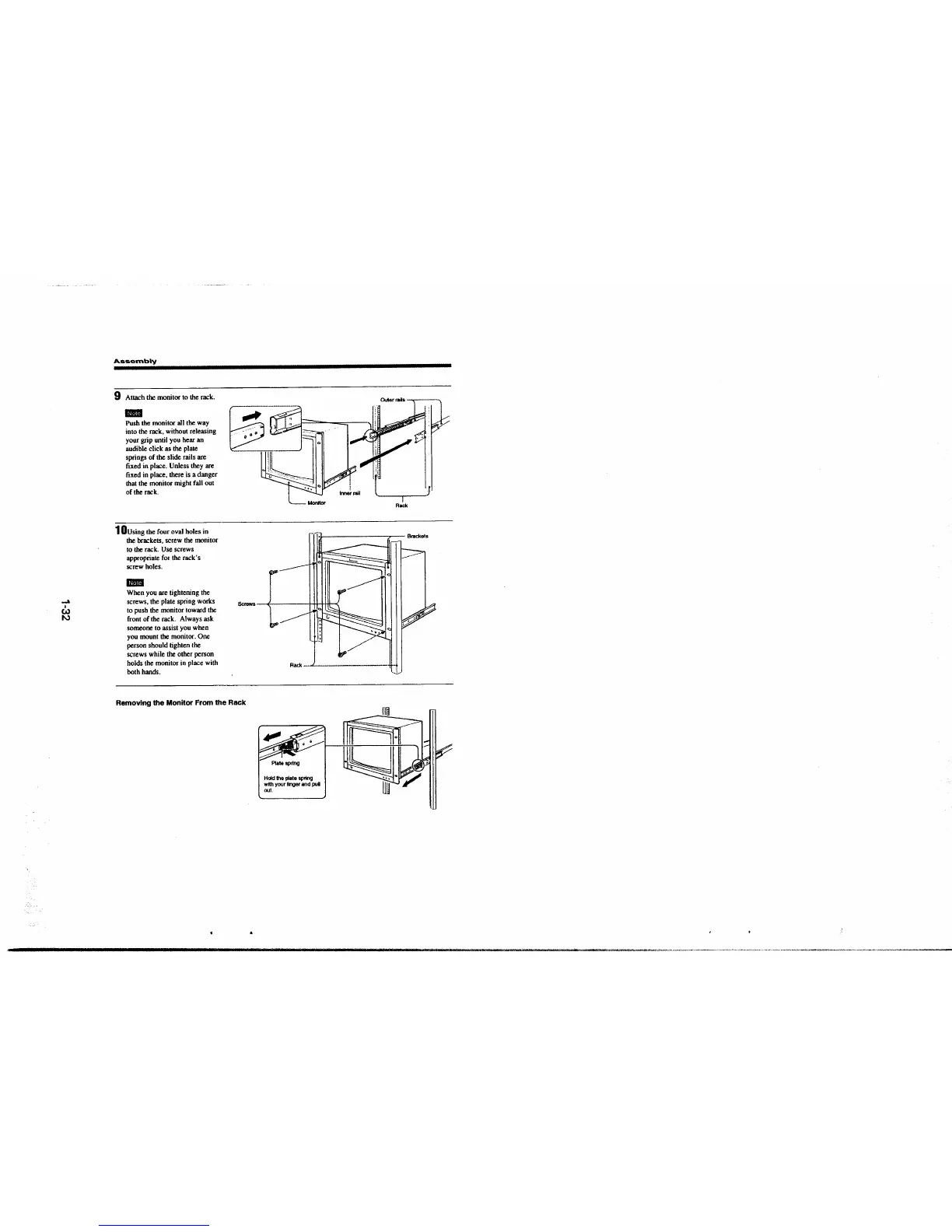
9 Attach the monitor to the rack.
11111111
Push the monitor all the way
into the rack, without releasing
your grip until you hear an
audible click as the plate
springs of the slide rails are
fixed in place. Unless they are
fixed in place, there is a danger
that the monitor might fall out
of the rack.
1 Dusing the four oval holes in
the brackets, screw the monitor
to the rack. Use screws
appropriate for the rack· s
screw holes.
11111111
Outer ralts
~
I
,.
LJ
Rack
l••Jr-----------c,-- Brackets
~
When you are tightening the
screws, the plate spring works
to push the monitor toward the
front of the rack. Always ask
someone to assist you when
you mount the monitor. One
person should tighten the
screws while the other person
holds the monitor in place with
both hands.
Scoews ( 111 llll (
Removing the Monitor From the Rack
Rack -···""'---·-·-··-·--·-··-·----·--,
!1ll
·1'~1
' . . . ::::: ::: J
Platespnng
Hold the plate spring
with
your Hnger and pul
oot.







 To Next Page