....
I
w
CD
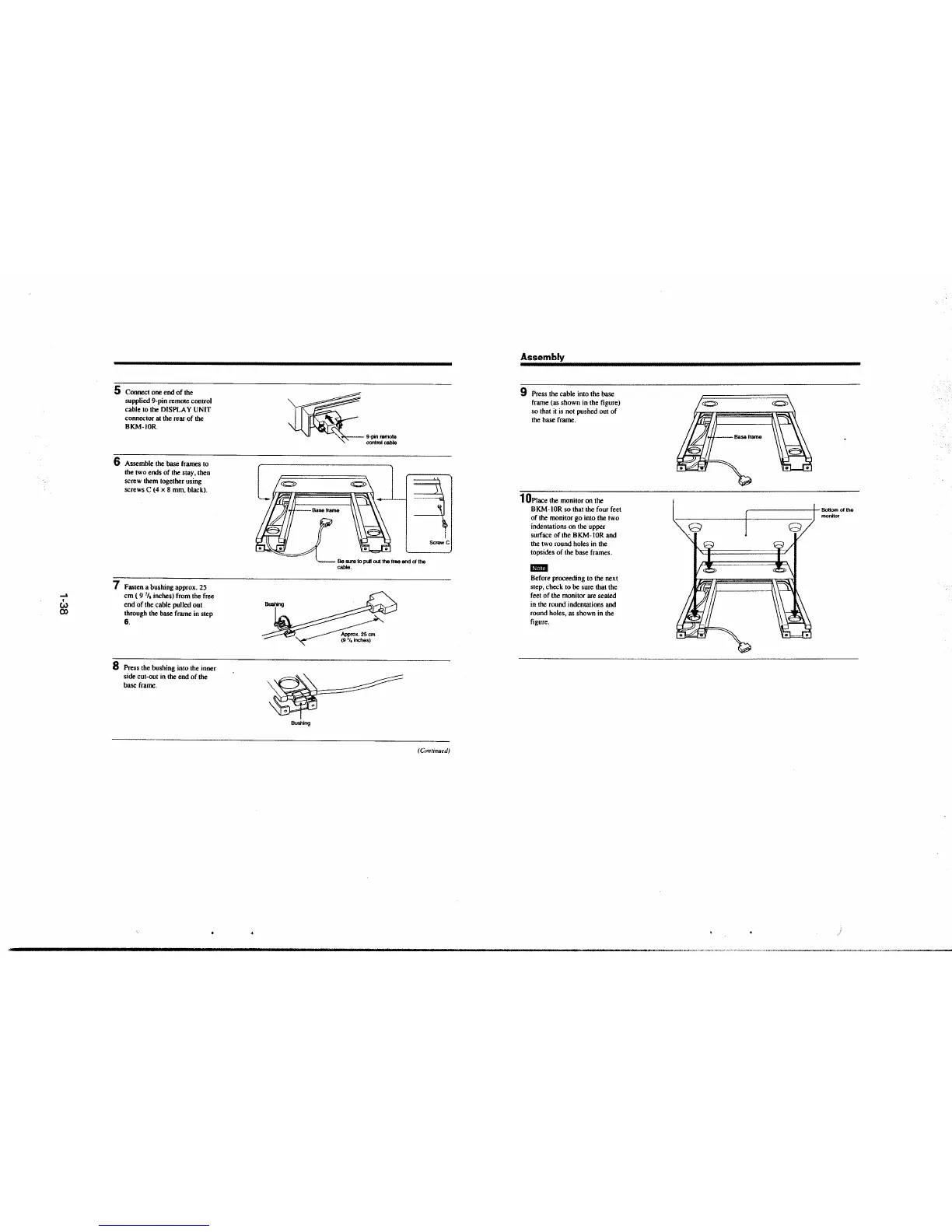
5 Connect one end of the
supplied 9-pin remote control
cable to the DISPLAY UNIT
connector at the rear of the
BKM-IOR.
6 Assemble the base frames to
the
two ends of the stay, then
screw them together using
screws C (4 x 8 mm, black).
7 Fasten a bushing approx. 25
cm ( 9
7
/,
inches) from the free
end of the cable pulled out
through the base frame in step
6.
8 Press the bushing into the inner
side cut-out in
the end of the
base frame.
~·~-
~=u~-·
1J3
·._ Be sure to P"* out the free encl of the
cable.
~~
Bo$hlng
~
!
5c,_ C
(Conrmut'd)
Assembly
9 Press the cable into the base
frame (as shown in the figure)
so that
it is not pushed out of
the base frame.
1 0Place the monitor on the
BKM-IOR so that the four feet
of the monitor go into !he two
indentations on the upper
surface of the BKM-IOR and
the two round holes in the
topsides of the base frames.
..
Before proceeding to the next
step, check to be sure that the
feet of the monitor are seated
in the round indentations and
round holes, as shown in the
figure.
~-------,,- Bottom of the
monitor







 To Next Page