EasyManua.ls Logo

Sony CDP-0231 - Location of Controls

Sony CDP-0231
18 pages
Print Icon
To Next Page IconTo Next Page
To Previous Page IconTo Previous Page
Loading...
CDP-C221
SECTION
1
GENERAL
1-1.
LOCATION
OF
CONTROLS
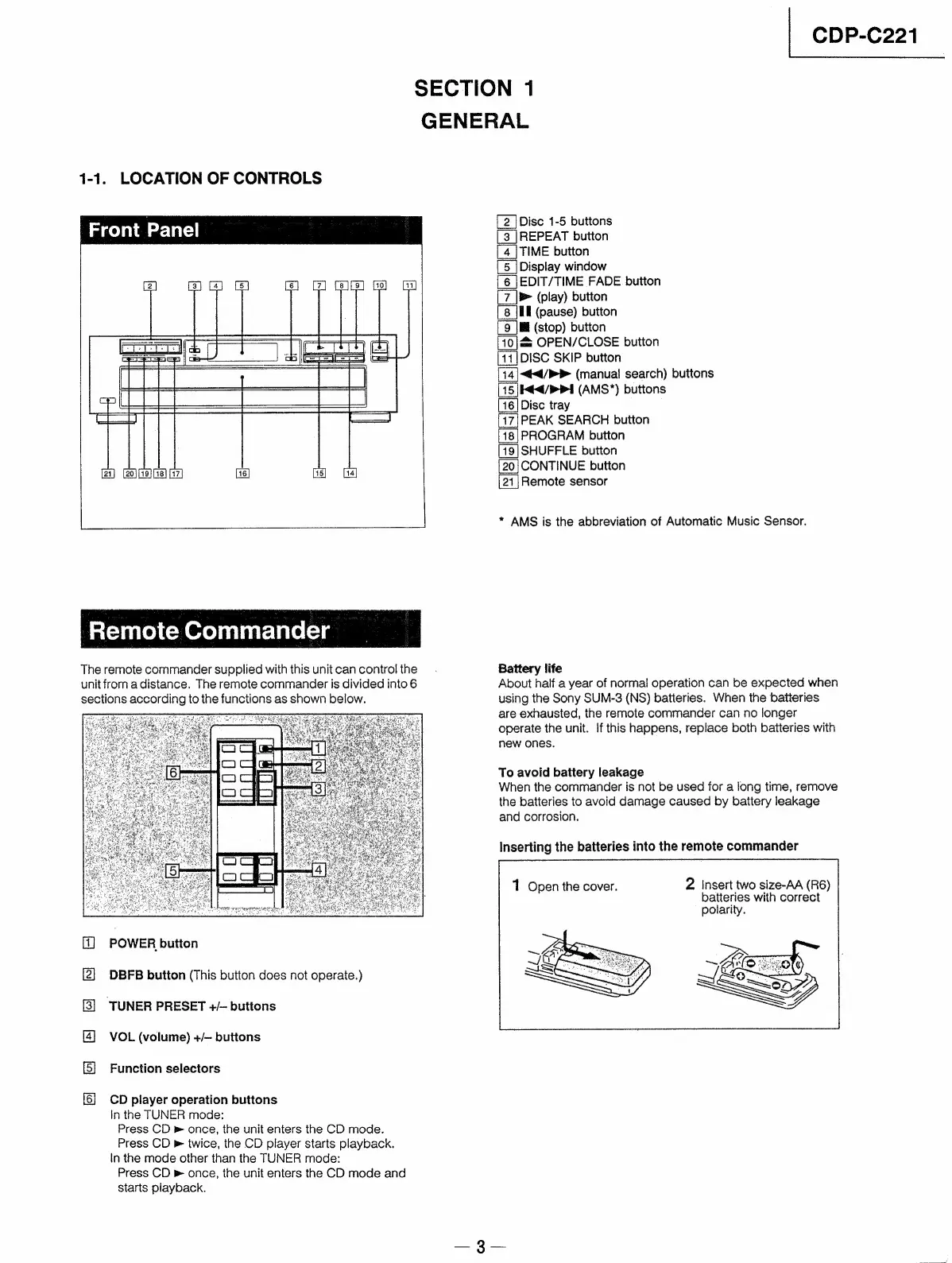
Front
Panel
Remote
Commander
The
remote
commander
supplied
with
this
unit
can
control
the
unit
from
a
distance.
The
remote
commander
is
divided
into
6
sections
according
to
the
functions
as
shown
below.
POWER
button
Se
DBFB
button
(This
button
does
not
operate.)
‘TUNER
PRESET
+/-
buttons
e
&
VOL
(volume)
+/—
buttons
[]
Function
selectors
a)
CD
player
operation
buttons
In
the
TUNER
mode:
Press
CD
»
once,
the
unit
enters
the
CD
mode.
Press
CD
»
twice,
the
CD
player
starts
playback.
In
the
mode
other
than
the
TUNER
mode:
Press
CD
&
once,
the
unit
enters
the
CD
mode
and
starts
playback.
[2
]Disc
1-5
buttons
REPEAT
button
[4
|
TIME
button
[5
|Display
window
[6
|EDIT/TIME
FADE
button
[7 |b
(play)
button
{8
|Il
(pause)
button
9
|
(stop)
button
[10|4
OPEN/CLOSE
button
DISC
SKIP
button
[14|<¢</B
(manual
search)
buttons
[15]
I<<4/P4
(AMS*)
buttons
Disc
tray
[17]PEAK
SEARCH
button
[18]
PROGRAM
button
SHUFFLE
button
[20]
CONTINUE
button
(21|Remote
sensor
*
AMS
is
the
abbreviation
of
Automatic
Music
Sensor.
Battery
life
About
half
a
year
of
normal
operation
can
be
expected
when
using
the
Sony
SUM-3
(NS)
batteries.
When
the
batteries
are
exhausted,
the
remote
commander
can
no
longer
operate
the
unit.
If
this
happens,
replace
both
batteries
with
new
ones.
To
avoid
battery
leakage
When
the
commander
is
not
be
used
for
a
long
time,
remove
the
batteries
to
avoid
damage
caused
by
battery
leakage
and
corrosion.
Inserting
the
batteries
into
the
remote
commander
2
Insert
two
size-AA
(R6)
batteries
with
correct
polarity.
1
Open
the
cover.

Related product manuals