EasyManua.ls Logo

Sony CDP-101 - Connections, Controls, and Operations; Connecting the CDP-101; AC Outlet and Power Cord Usage

Sony CDP-101
88 pages
Print Icon
To Next Page IconTo Next Page
To Previous Page IconTo Previous Page
Loading...
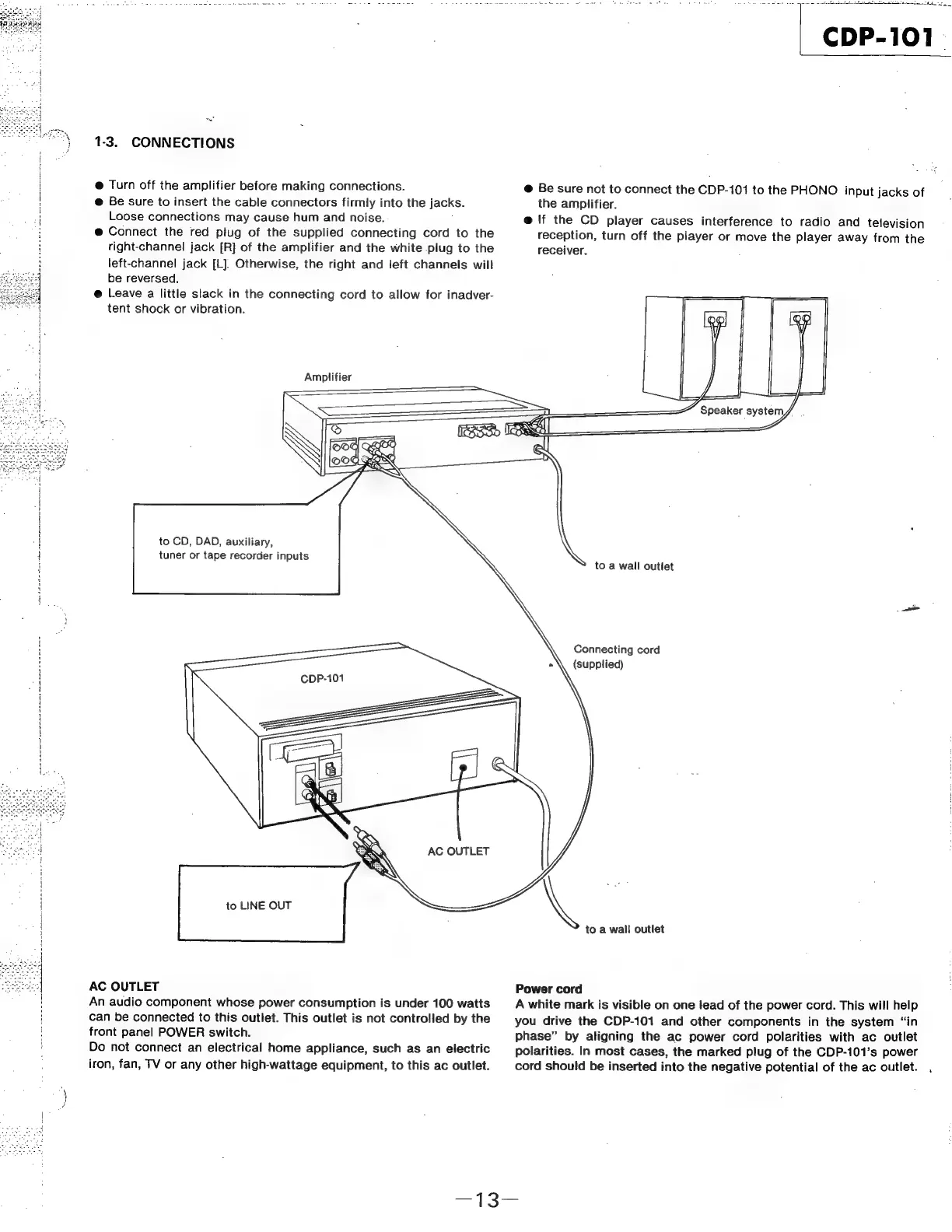
1-3.
CONNECTIONS
@
Turn
off
the
amplifier
before
making
connections.
@
Be
sure
to
insert
the
cable
connectors
firmly
into
the
jacks.
Pr
Loose
connections
may
cause
hum
and
noise.
@
Connect
the
red
plug
of
the
supplied
connecting
cord
to
the
right-channel
jack
[R]
of
the
amplifier
and
the
white
plug
to
the
left-channel
jack
[L]:
Otherwise,
the
right
and
left
channels
will
be
reversed.
@
Leave
a
little
slack
in
the
connecting
cord
to
allow
for
inadver-
tent
shock
or
vibration.
Amplifier
a
atta
tn
a
tg
CDP-101
@
Be
sure
not
to
connect
the
CDP-101
to
the
PHONO
input
jacks
of
the
amplifier.
@
\f
the
CD
player
causes
interference
to
radio
and
television
reception,
turn
off
the
player
or
move
the
player
away
from
the
receiver.
.
Speaker
system/
.
OOF
QELY
|
Sa
DOOD
FQ
PSS
to
CD,
DAD,
auxiliary,
tuner
or
tape
recorder
inputs
AC
OUTLET
|
to
LINE
OUT
AC
OUTLET
'
An
audio
component
whose
power
consumption
is
under
100
watts
can
be
connected
to
this
outlet.
This
outlet
is
not
controlled
by
the
i
front
panel
POWER
switch.
Do
not
connect
an
electrical
home
appliance,
such
as an
electric
iron,
fan,
TV
or
any
other
high-wattage
equipment,
to
this
ac
outlet.
to
a
wall
outlet
Connecting
cord
(supplied)
to
a
wall
outlet
Power
cord
A
white
mark
is
visible
on
one
lead
of
the
power
cord.
This
will
help
you
drive
the
CDP-101
and
other
components
in
the
system
“in
phase”
by
aligning
the
ac
power
cord
polarities
with
ac
outlet
polarities.
In
most
cases,
the
marked
plug
of
the
CDP-101’s
power
cord
should
be
inserted
into
the
negative
potential
of
the
ac
outlet.
,

Related product manuals