EasyManua.ls Logo

Sony CDP-101 - Guide Plate Adjustment

Sony CDP-101
88 pages
Print Icon
To Next Page IconTo Next Page
To Previous Page IconTo Previous Page
Loading...
CDP-101
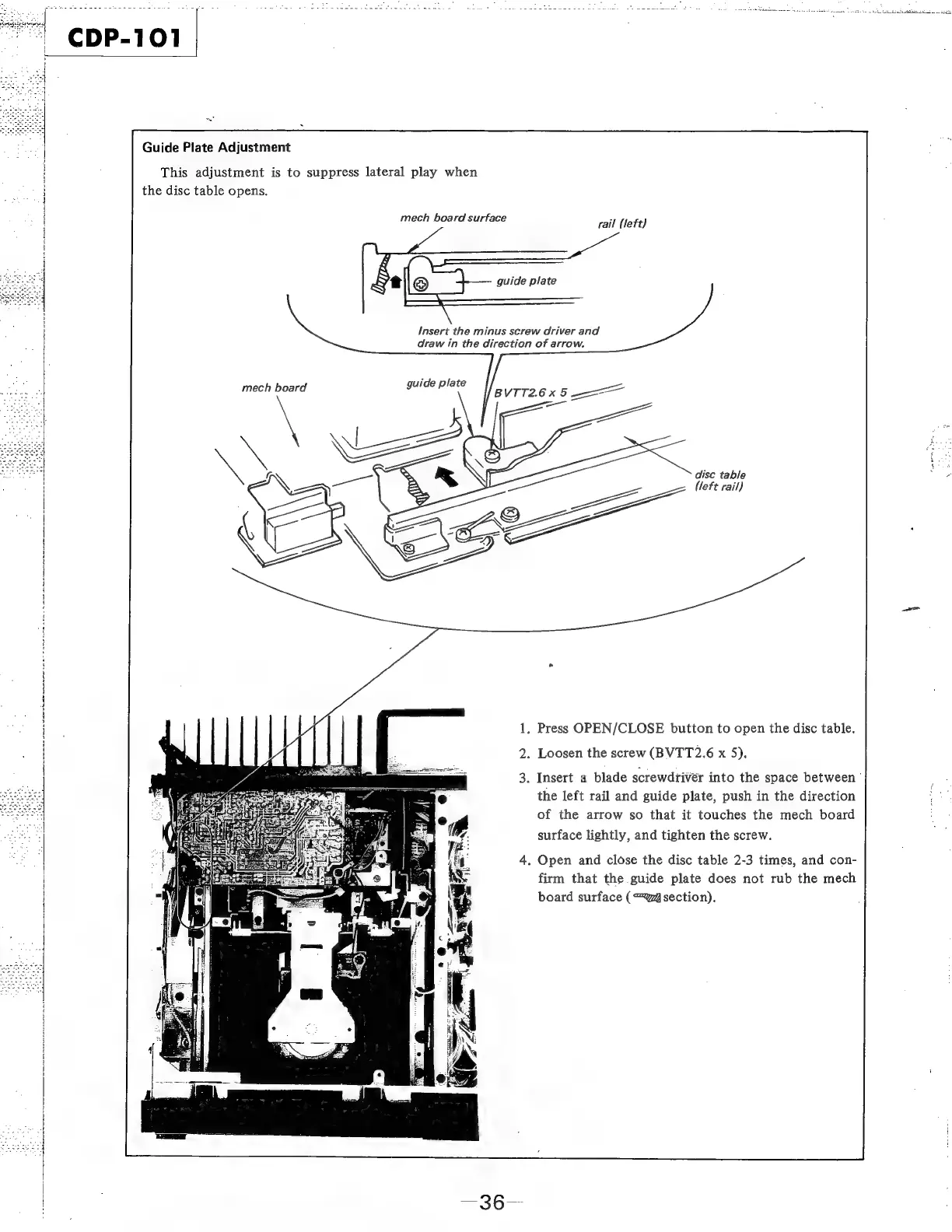
Guide
Plate
Adjustment
This
adjustment
is
to
suppress
lateral
play
when
the
disc
table
opens.
mech
board
surface
rail
(left)
guide
plate
Insert
the
minus
screw
driver
and
i
draw
in
the
direction
of
arrow.
mech
board
disc
table
(left
rail)
.
Press
OPEN/CLOSE
button
to
open
the
disc
table.
.
Loosen
the
screw
(BVTT2.6
x
5).
.
Insert
a
blade
screwdriver
into
the
space
between’
the
left
rail
and
guide
plate,
push
in
the
direction
of
the
arrow
so
that
it
touches
the
mech
board
surface
lightly,
and
tighten
the
screw.
.
Open
and
close
the
disc
table
2-3
times,
and
con-
firm
that
the
guide
plate
does
not
rub
the
mech
board
surface
(“@section).
po
—36--

Related product manuals