33
CDX-5V661/5V661A/5V661D/5V661S
(1) LED PWM Adjusting Method
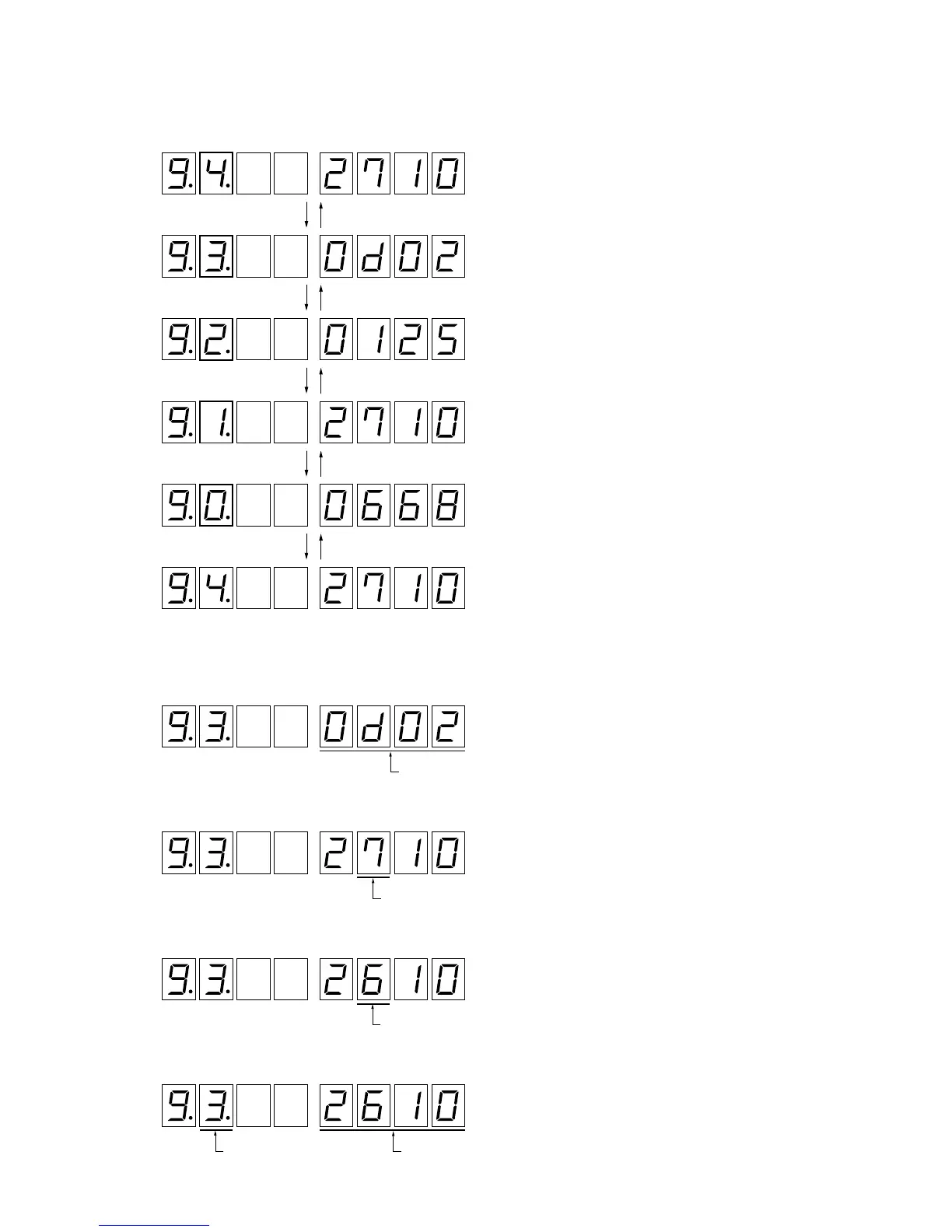
1. Press 7 or 8 (PWM SEL –/+) key to select the data.
2. Connect the Duty Generator (see “Setting” on page 21).
Night Max.: Duty 100%, Night Min.: Duty 20%
3. Press qd (SETUP) key to activate the data setup mode.
4. Press 9 or 0 (CURSOR –/+) key to select the position where the data is entered.
5. Press 5 or 6 (PWM DATA –/+) key to adjust the data at the cursor position.
6. Press qf (PWM ENTRY) key to enter the selected data.
“4”: Indicator PWM (Day Max.: Duty unnecessary)
Press
7
key Press
8
key
“3”: Indicator PWM (Night Max.: Duty 100%)
“2”: Indicator PWM (Night Min.: Duty 20%)
“1”: Dimmer PWM (Night Max.: Duty 100%)
“0”: Dimmer PWM (Night Min.: Duty 20%)
“4”: Indicator PWM (Day Max.: Duty unnecessary)
Press
7
key Press
8
key
Press
7
key Press
8
key
Press
7
key Press
8
key
Press
7
key Press
8
key
PWM data entry position displa


 To Next Page