19
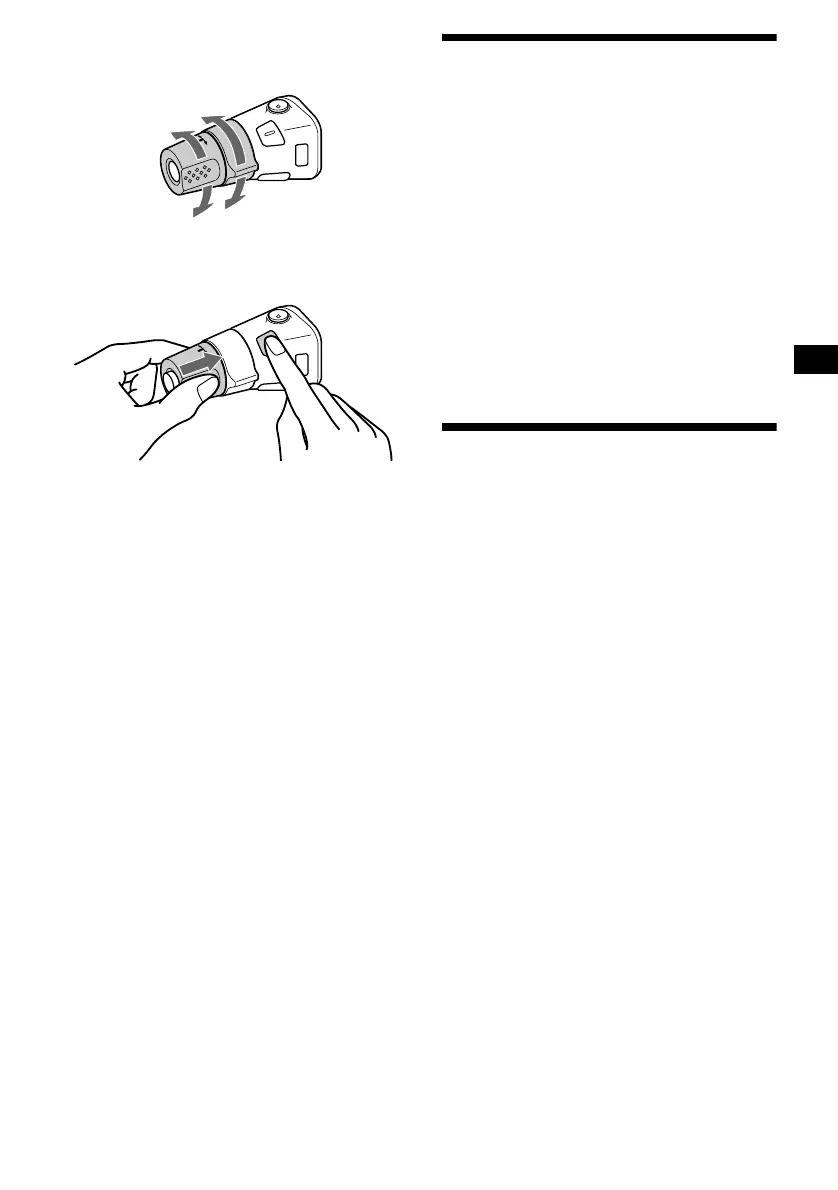
Changing the operative direction
The operative direction of controls is factory-set
as shown below.
If you need to mount the rotary commander on
the right hand side of the steering column, you
can reverse the operative direction.
Press (SEL) for 2 seconds while
pushing the VOL control.
Adjusting the balance and
fader
You can adjust the balance and fader.
1 Press ( SEL ) repeatedly until “BAL” or
“FAD” appears.
Each time you press (SEL), the item changes
as follows:
LOW* t MID* t HI* t
BAL (left-right)
t FAD (front-rear)
* When EQ3 is activated (page 20).
2 Press the volume +/– button to adjust
the selected item.
Note
Adjust within 3 seconds after selecting the item.
Quickly attenuating the
sound
Press (ATT).
After “ATT-ON” momentarily appears,
“ATT” appears in the display.
To restore the previous volume level, press
(ATT) again.
Tip
When the interface cable of a car telephone is
connected to the ATT lead, the unit decreases the
volume automatically when a telephone call comes in
(Telephone ATT function).
To increase
To decrease








 To Next Page