28
Adjusting network settings
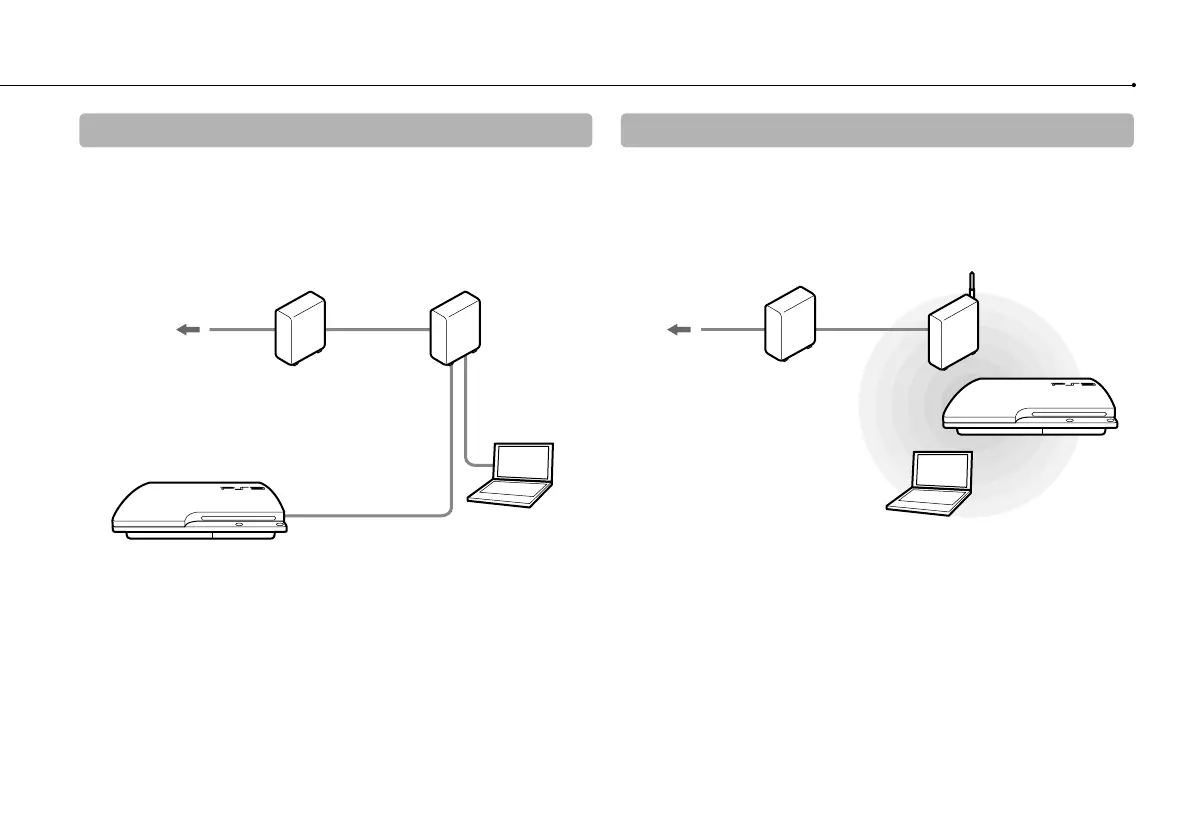
Example of a network configuration (wired)
A wired network configuration requires items , and .
Example of a network configuration (wireless)
A wireless network configuration requires items and .
*
1
The connection method may vary depending on the environment in use. For example, you may be able to connect Ethernet cables directly into the wall outlet in
housing complex units that have preinstalled LAN ports. If you are using such a network environment, you do not need a network gateway device.
*
2
A router is a device that enables multiple devices to be connected to one Internet line. A router is necessary if a PC and a PS3™ system will be connected to the
Internet at the same time using one Internet connection.
*
3
A wireless router is a device that adds access point functionality to a router.
To the Internet line
Network gateway device
such as an ADSL modem*
1
Wireless router
(access point) *
2
*
3
PC
To the Internet line
Network gateway device
such as an ADSL modem*
1
Router*
2
PC
Ethernet cable



 To Next Page