EasyManua.ls Logo

Sony CFD-765 - Page 13

Sony CFD-765
40 pages
Print Icon
To Next Page IconTo Next Page
To Previous Page IconTo Previous Page
Loading...
[3]
2
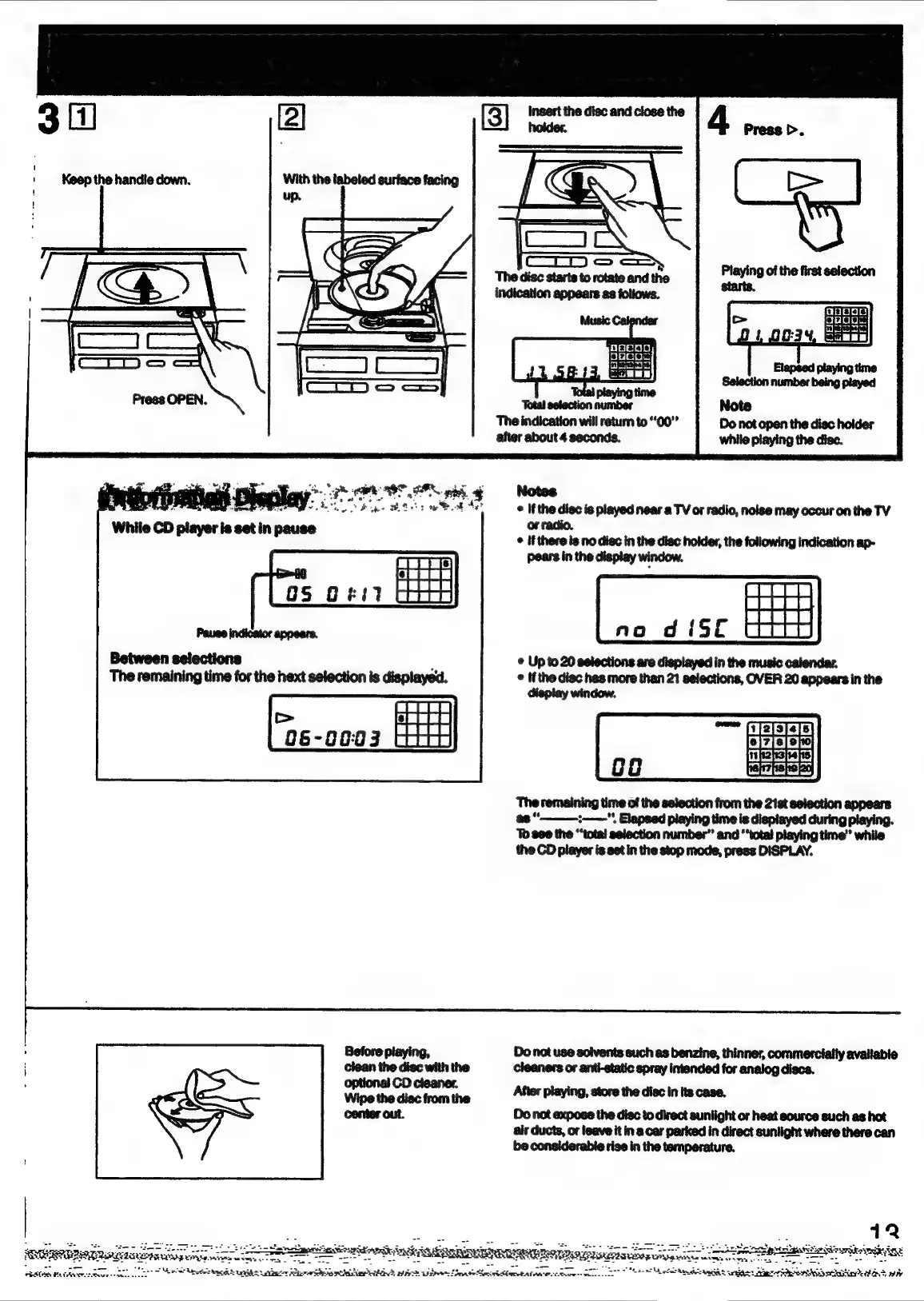
Keep
the
handie
down.
‘The disc
starts
to
rotate
and
the
indication
appears
as
foliows.
Press
OPEN.
Total
selection
number
The
indication
will
return
to
“00°
after
about
4
seconds.
while
playing
the
disc.
ue
——
ae
AON
ph
*
Notes
i
ae
ts
ett
Ae
©
Ifthe
disc
is
played
near
a
TV
or
radio,
noise
may
occur
on
the
TV
or
radio.
©
if
there
is no
disc
in
the
disc
holder,
the
following
indication
ap-
pears
in
the
display
window.
no
d
{ST
Between
selections
:
¢
Up
to
20
selections
are
displayed
in
the
music
calendar.
The
remaining
time
for
the
hext
selection
is
displayed.
©
Ifthe
disc
has
more
than
21
selections,
OVER
20
appears
in
the
HH
The
remaining
time
of
the
selection
from
the
21st
selection
appears
ss
t=",
Elapsed playing
time
is
diepiayed
during
playing.
To
8e¢
the
“‘total
selection
number”
and
“total
playing
time’
while
the
CD
player
is
set
in
the
stop
mode,
press
DISPLAY.
Before
playing,
Do
not
use
solvents
such
as
benzine,
thinner,
commercially
available
clean
the
disc
with
the
cleaners
or
anti-static
spray
intended
for
analog
discs.
optional
CD
cleaner.
Wipe
the
disc
from
the
After
playing,
store
the
disc
in
its
case.
center
out.
Do
not
expose
the
disc
to
direct
sunlight
or
heat
source
such
as
hot
ait
ducts,
or
leave
it
in
a
car
parked
in
direct
suntight
where
there
can
be
considerable
rise
in
the
temperature.
12
:
sa
ES
—*
=
TF
eheinedkrngay
z
ROURRERNR
REUSE:
Kine
Teston
ees
Eee
Mee.
Ha
Mendes
aa
SUS
‘pigs
Hie

Related product manuals