EasyManua.ls Logo

Sony CFD-765 - To Locate the Beginning of a Selection (AMS); For Selecting Directly; To search for a Particular Point in a Selection (Search)

Sony CFD-765
40 pages
Print Icon
To Next Page IconTo Next Page
To Previous Page IconTo Previous Page
Loading...
Playing
Discs
'o
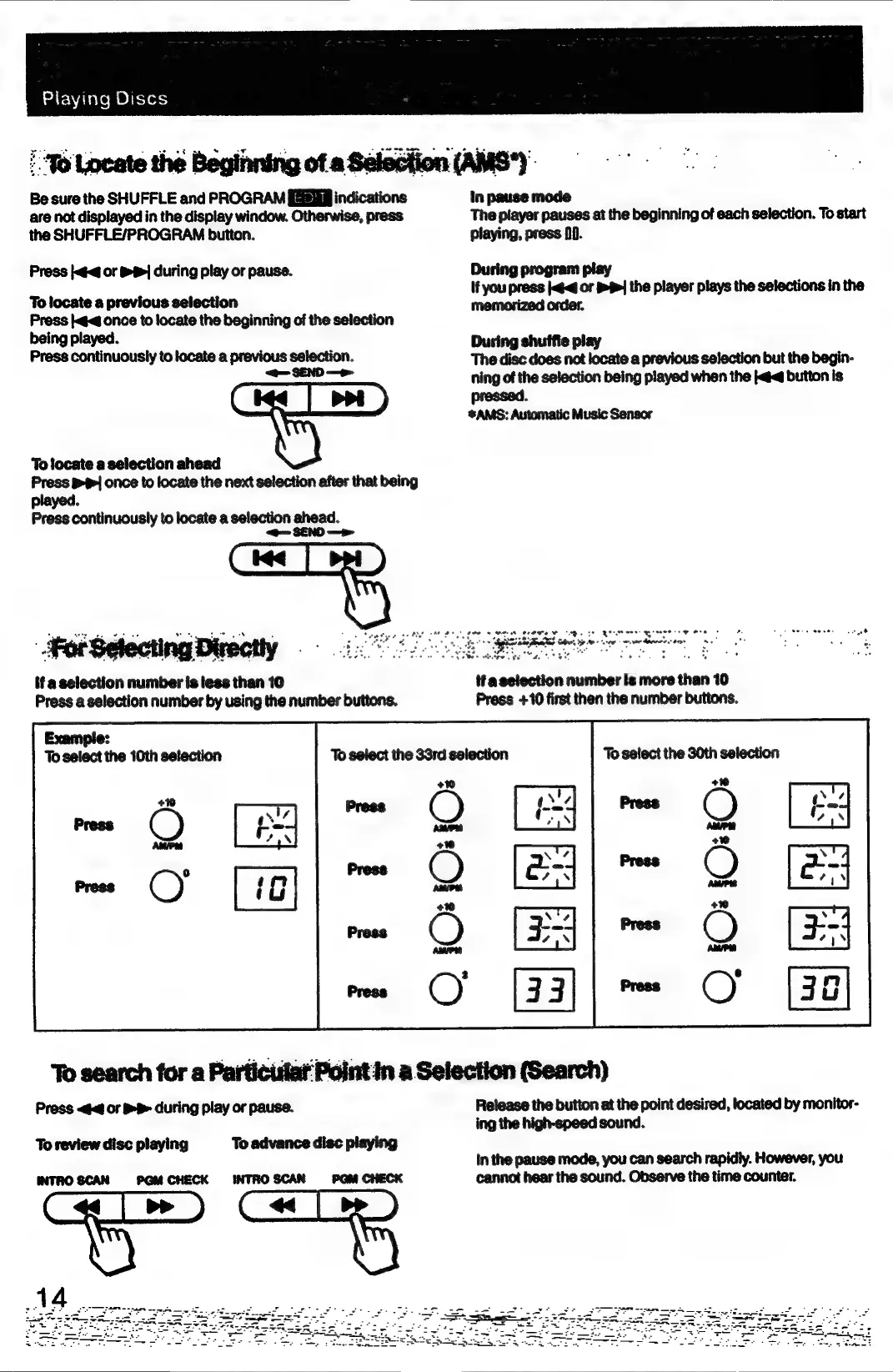
Locate
the
Beginning
of
a
Selection
(AMS*).
Be
sure
the
SHUFFLE
and
PROGRAM
[sig
indications
in
pause
mode
are
not
displayed
in
the
display
window.
Otherwise,
press
The
player
pauses
at
the
beginning
of
each
selection.
To
start
the
SHUFFLE/PROGRAM
button.
playing,
press
0.
Press
or
&
S|
during
play
or
pause.
During
program
play
If
you
press
or
the
player
the
selections
in
the
To
locate
a
previous
selection
———
—*
Press
<q
once
to
locate
the
beginning
of
the
selection
being
played.
:
During
shuffle
play
Press
continuously
to
locate
a
previous
selection.
The
disc does
not
locate
a
previous
selection
but
the
begin-
——
ning
of
the
selection
being
played
when
the
jt
button
is
pressed.
*AMS:
Automatic
Music
Sensor
To
locate
a
selection
ahead
Press
P|
once
to
locate
the
next
selection
after
that
being
played.
Press
continuously
to
locate
a
selection
ahead.
<@
SEND
—>
On
——————
wos
———
Sees,
Pe
Se
Ce
St
ees
—*
Fee
MSE
Be
ores
Cr
cn
oer
|
for
Selecting
Directly
Be
gi
Be
eee
AL
RE
gee,
——
oy
ata
if
a
selection
number
is
less
than
106
ifa
selection
number
is
more
than
10
Press
a
selection
number
by
using
the
number
buttons.
Press
+10
first
then
the
number
buttons.
Example:
To
select
the
10th
selection
To
select
the
30th
selection
+0
+10
press
(_)
aire
Press
To
search
for
a
Particislat
Point
In
a
Selection
(Search)
Press
or
BB
during
play
or
pause.
Release
the
button
at
the
point
desired,
located
by
monitor-
ing
the
high-speed
sound.
In
the
pause
mode,
you can
search
rapidly.
However,
you
INTROSCAN
PGM
CHECK
INTROSCAN
PGM
CHECK
cannot
hear
the
sound.
Observe
the
time
counter.
To
review
disc
playing
To
advance
disc
playing

Related product manuals