EasyManua.ls Logo

Sony CFD-765 - To Play the Selections in the Order Desired - Program Play

Sony CFD-765
40 pages
Print Icon
To Next Page IconTo Next Page
To Previous Page IconTo Previous Page
Loading...
ET
eTolurcm
Ol
(tom
sate
y
aisle
mii
celelsrs
bik?
Seanad
ha
Res
ys
Cee
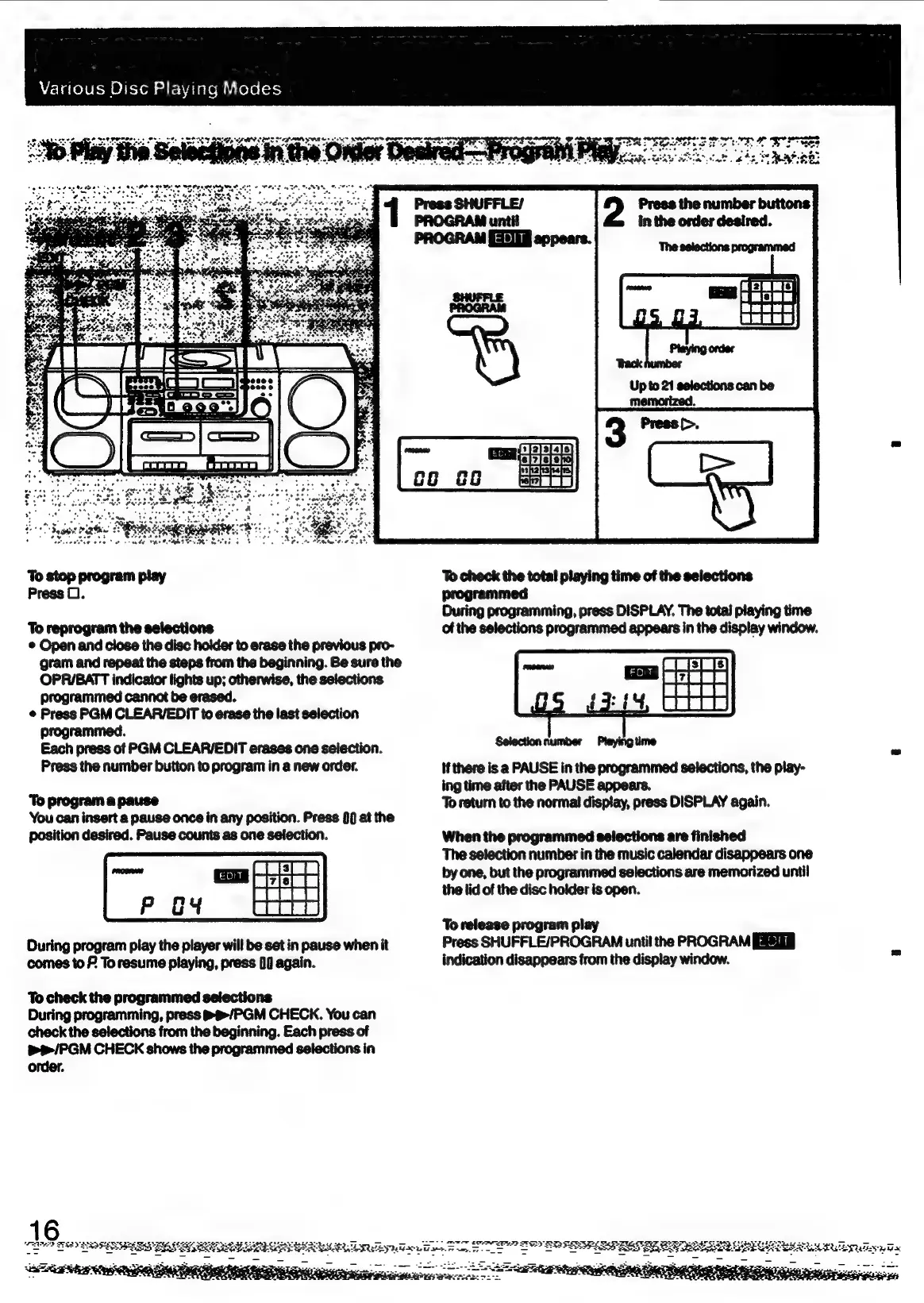
To
stop
program
play
Press
0.
To
reprogram
the
selections
©
Open
and
close
the
disc
holder
to
erase
the
previous
pro-
gram
and
repeat
the
steps
from
the
beginning.
Be
sure
the
OPRIBATT
indicator
lights
up;
otherwise,
the
selections
programmed
cannot
be
erased.
*
Press
PGM
CLEAR/EDIT
to
erase
the
last
selection
programmed.
Each
press
of
PGM
CLEAR/EDIT
erases
one
selection.
Press
the
number
button
to
program
in
a
new
order.
‘To
program
a
pause
You
can
insert
a
pause
once
in
any
position.
Press
}0
at
the
position
desired.
Pause
counts
as
one
selection.
During
program
play
the
player
will
be
set
in
pause
when
it
comes
to
F
To
resume
playing,
press
00
again.
To
check
the
programmed
selections
During
programming,
press
®t/PGM
CHECK.
You
can
check
the
selections
from
the
beginning.
Each
press
of
&e/PGM
CHECK
shows
the
programmed
selections
in
order.
To
check
the
total
playing
time
of
the
selections
programmed
During
programming,
press
DISPLAY.
The
total
playing
time
of
the
selections
programmed
appears
in
the
display
window.
if
there
is
a
PAUSE
in
the
programmed
selections,
the
play-
ing
time
after
the
PAUSE
appears.
To
return
to
the
norma!
dispiay,
press
DISPLAY
again.
When
the
programmed
selections
are
finished
The
selection
number
in
the
music
calendar
disappears
one
by
one,
but
the
programmed
selections
are
memorized
until
the
lid
of
the
disc
holder
is
open.
To
release
program
play
Press
SHUFFLE/PROGRAM
until
the
PROGRAM
indication
disappears
from
the
display
window.
2%
agEe
Sad
STi
x

Related product manuals