1
2
Owner’s Record
The model number is located at the rear and the serial number is located in the battery
compartment. Record the serial number in the space provided below. Refer to them
whenever you call upon your Sony dealer regarding this product.
Model No. CFS-E2 Serial No.
• Frequency range FM: 87.6-108 MHz/AM: 530-
1,710 kHz
• Antennas FM: Telescope/AM: Built-in ferrite bar
• Recording system 4-track, 2-channel stereo
• Frequency response 100-10,000 Hz
• Speakers Full-range: 5.7 cm (2
1
/
4
inches) dia,
cone type
• Output Headphones jack(stereo minijack), for
8-32 ohm impedance headphones
• Power output 1 W+1 W (at 10% harmonic
distortion in DC operation)
• Battery life
• Power requirements 120V AC, 60 Hz/6 V DC,
four size AA (R6) batteries
• Power consumption DC 4 W
• Dimensions Approx. 285 x 101 x 58 mm (w/h/d)
( 11
1
/
4
x 4 x 2
3
/
8
inches) incl. projecting parts and
controls
• Mass Approx. 720 g (1 lb 94 oz) ( incl. batteries)
• Supplied accessory AC power adaptor (1)
Design and specifications are subject to change
without notice.
FM recording
Sony SUM-3 (NS) : Approx. 2 hours
Sony AM3 (N) alkaline : Approx. 5 hours
playback
Sony SUM-3 (NS) : Approx. 1.5 hours
Sony AM3 (N) alkaline : Approx. 4 hours
3-859-869-11(1)
Operating Instructions
Sony Corporation ©1997 Printed in China
CFS-E2
WARNING
To prevent fire or shock hazard, do not
expose the player to rain or moisture.
This symbol is intended to alert the
user to the presence of uninsulated
“dangerous voltage” within the
product’s enclosure that may be of
sufficient magnitude to constitute a
risk of electric shock to persons.
This symbol is intended to alert the
user to the presence of important
operating and maintenance
(servicing) instructions in the
literature accompanying the
appliance.
You are cautioned that any changes or
modifications not expressly approved in this
manual could void your authority to operate
this equipment.
Choosing Power Sources
Specifications
If the battery compartment lid comes off
Insert the right corner of the lid and then insert the left corner
aligning it to the groove of the battery compartment.
Notes
•To use the player on batteries, disconnect the AC power adaptor from the player. The
player does not operate on batteries as long as the AC power adaptor is connected.
•Replace the batteries when the OPR/BATT indicator dims or when the player stops
operating. Replace all the batteries with new ones.
Rear Panel
Troubleshooting Precautions
On safety/power sources
• Should any solid object or liquid fall into the
player, unplug the player, and have it checked
by qualified personnel before operating it any
further.
• For AC operation,
use the supplied
AC power adaptor;
do not use any
other type.
• Unplug the player from the wall outlet when it
is not to be used for an extended period of
time.
• For battery operation, use four size AA (R6)
batteries.
• When the batteries are not to be used, remove
them to avoid damage that can be caused by
battery leakage or corrosion.
• The nameplate indicating operating voltage,
power consumption, etc. is located at the rear.
On placement/operation
• Do not leave the player in a location near heat
sources, or in a place subject to direct sunlight,
excessive dust or mechanical shock.
• Do not place anything within 10 mm of the
side of the cabinet. The ventilation holes must
be unobstructed for the player to operate
properly and to prolong the life of its
components.
• Since a strong magnet is used for the speakers,
keep personal credit cards using magnetic
coding or spring-wound watches away from
the player to prevent possible damage from
the magnet.
• If the player has not been used for a long time,
set it in the playback mode to warm it up for a
few minutes before inserting a cassette.
Side A
There is no audio.
• Connect the AC power adaptor securely.
• Insert the batteries properly.
• Replace all the batteries if they are weak.
• Unplug the headphones.
• Adjust the volume.
• Set FUNCTION to the position you want to
operate.
Cassette cannot be inserted.
• Insert the cassette properly.
• Press pSTOP to release 9PLAY.
The rREC button does not
function.
• No cassette is in the tape compartment.
• Make sure the safety tab on the cassette is in
place.
Poor playback,recording or
erasing quality.
• Dirty heads. Clean the unit (as shown) with a
cotton swab slightly moistened with cleaning
fluid or alcohol.
• Demagnetize the heads and all metal parts in
the tape path with a commercially available
tape head demagnetizer.
Connecting the AC power adaptor.
Notes on cassettes
• Break off the cassette tab
from side A or B to
prevent accidental
recording. If you want
to reuse the tape for
recording, cover the
broken tab with
adhesive tape.
• The use of a cassette with more than 90
minutes of play time is not recommended
except for long, continuous recording or
playback.
If you have questions or problems concerning
your player, please consult your nearest Sony
dealer.
Radio Cassette-Corder
to a wall outlet
to DC IN 6V socket
Using the player on batteries.
Insert four size AA (R6) batteries (not supplied)
into the battery compartment.
Erase head
Record / Playback
head
Pinch roller
Capstan
Cotton swab
To release battery
Press the ’ side of the battery and then take out
the battery.
AC power adaptor (supplied)
Polarity of the plug
Tab for side A
Tab for side B

 Need help?
 General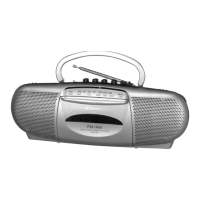

 To Next Page